
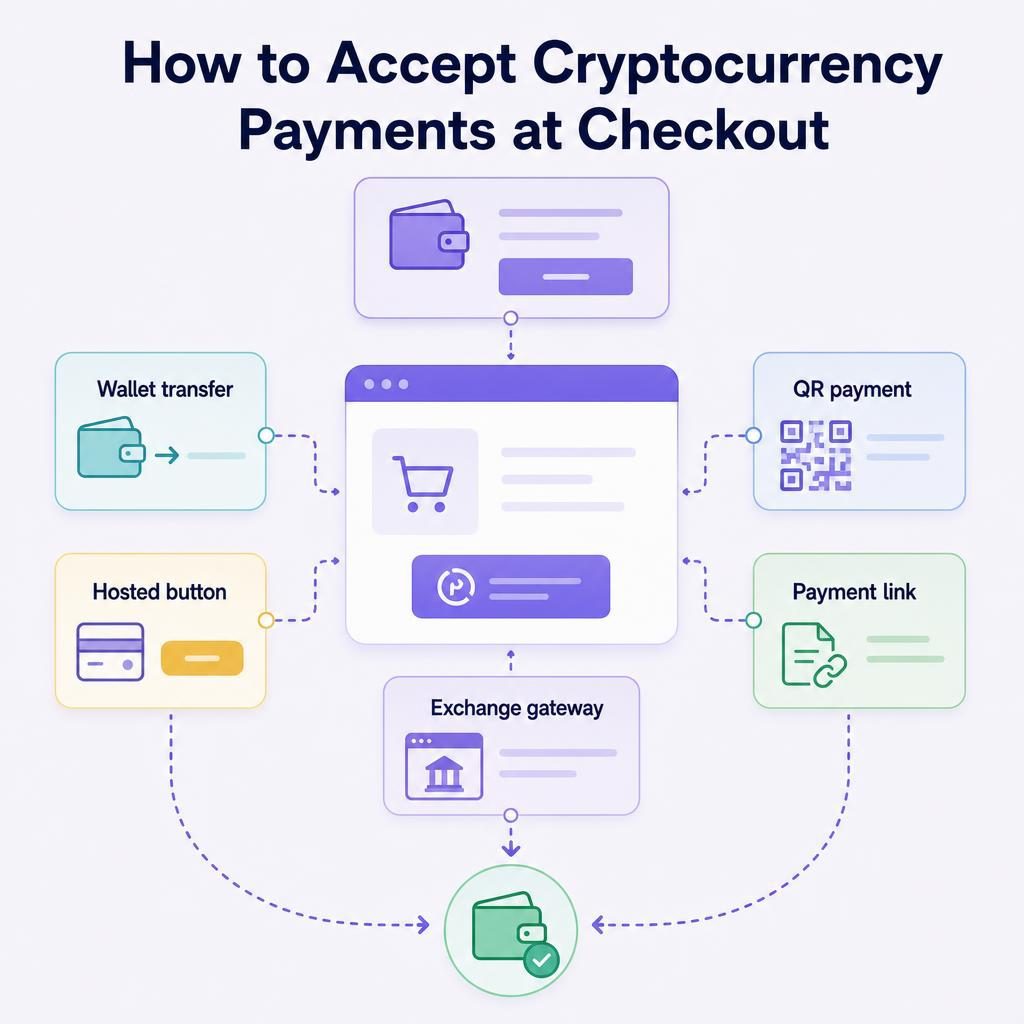
If you need to accept crypto payments on your website, start by deciding how the money should move rather than which button looks best. In all honesty, cryptocurrency checkout is still uneven: the method that feels simple for a wallet user can create support work for a card buyer. This guide compares the main routes, explains the tradeoffs, and gives you a practical way to choose one.
Which cryptocurrency checkout method should you use?
Choose the checkout method that fits how your customers pay, what you are prepared to receive, and how you will handle refunds when an order goes wrong. Wallet-to-wallet and QR payments suit customers who already hold crypto. A hosted card-to-crypto button can suit a buyer who wants to pay by card, Apple Pay, or Google Pay. Exchange-hosted gateways can fit where their business terms, regions, assets, and settlement choices fit your operation.
The main tradeoff is control versus convenience. Direct wallet payments give you direct control over the receiving wallet, but you must handle network instructions, payment matching, and refunds. Hosted flows remove some checkout work from your site, but an independent provider’s verification process, availability, and terms become part of the customer journey.
Written by Brad Ungar | Founder, VERIFIED Crypto Checkout
Brad Ungar builds payment infrastructure for WooCommerce merchants who need card-to-crypto checkout, hosted provider routing, payment links, and subscription flows that settle directly to a merchant wallet.
Product review: VERIFIED Crypto Checkout engineering
Key Highlights
- Choose the money route before choosing the button.
- Wallet payments suit customers who already use crypto wallets.
- QR codes reduce address-copying errors on mobile and in person.
- Hosted card flows can require identity verification on first use.
- Crypto refunds are usually new payments, not reversals.
- Record the asset, network, amount, transaction reference, and order number.
- Check who controls funds, who handles refunds, and what fees apply.
Compare the ways to accept crypto payments
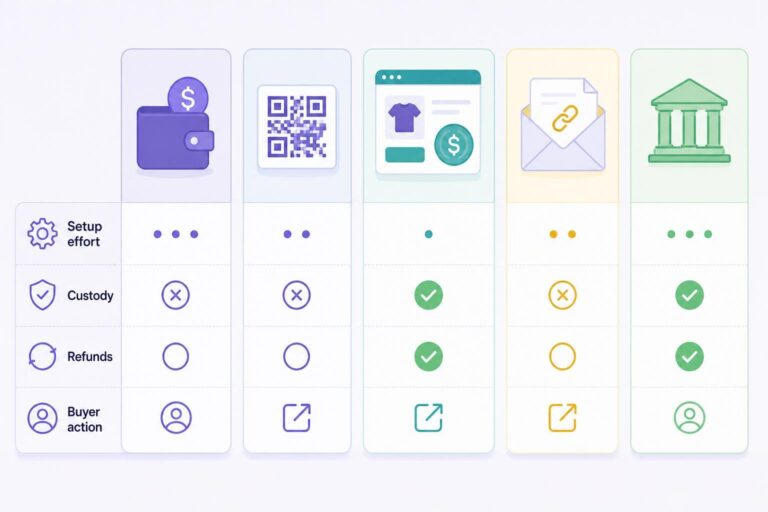
There is no universal best method. A useful comparison asks four questions: what does the buyer do, how much work does setup create, who controls the funds, and what happens if you need to refund an order?
A payment rail is simply the route money follows from the buyer to you. A card-to-crypto hosted flow, a blockchain wallet transfer, and an exchange-hosted checkout are different rails even if each one appears as a button beside the same product.
| Method | What your customer does | Setup effort | Volatility and custody exposure | Refund practicality | Choose it when |
|---|---|---|---|---|---|
| Wallet-to-wallet transfer | Sends crypto from a wallet they control to your wallet. | Low for an address; higher if you need automatic order matching. | You receive the selected asset directly. Its value can move unless you accept a stable asset. | Usually manual: you send a new transaction back. | Your buyers already use wallets and understand networks. |
| QR or address payment | Scans a QR code or copies an address, then sends crypto. | Low for one static address; moderate for order-specific QR codes. | Your wallet arrangement determines who controls access to received funds. | Usually manual and dependent on confirming a return address. | You sell in person or buyers pay from a second device. |
| Hosted card-to-crypto button | Moves to a hosted provider page and pays by card, Apple Pay, or Google Pay where offered. | Moderate; the provider runs its hosted payment and conversion steps. | The provider converts the buyer’s payment and sends the stated settlement asset to your wallet. | Depends on the provider’s refund process and the conversion state. | Your buyer may want crypto settlement without already holding crypto. |
| Payment link or invoice | Opens a payment page from an email, message, invoice, or order request. | Low to moderate. | Depends on the payment rail behind the link. | Depends on the underlying payment method and payment status. | You need to collect payment away from the normal cart checkout. |
| Exchange-hosted gateway | Uses a checkout run by an exchange or its payments product. | Moderate; account setup and integration requirements apply. | Depends on whether it settles to an exchange balance, bank account, or wallet. | Follow that gateway’s stated refund process and account terms. | You have checked business eligibility, regions, assets, and settlement choices. |
These are decision ratings, not promises about a particular vendor. A static QR code can be easy to publish and still be a poor choice for a busy store if you cannot reliably connect each incoming transfer to the right order.
The checkout button is visible; payment matching and refunds are the work behind it.
If you are not on WooCommerce
The decision still applies on Shopify, Wix, or a custom-built site. Before selecting a method, check whether your platform has an app, plugin, or workable custom integration for it; whether a hosted payment page can return the buyer cleanly to your order-confirmation page; how an approved payment updates the order status; and who performs refunds. Those four checks prevent a nice-looking button from becoming a manual support queue.
Wallet-to-wallet transfers and QR payments
A wallet-to-wallet transfer means the customer signs a blockchain transaction from a wallet they control and sends it to an address you provide. The network is the blockchain used for that transfer. The asset and network both need to match what you are prepared to receive.
This is often the clearest route for a crypto-native audience. It is also unforgiving of vague instructions. “Send USDC” is incomplete if your buyer can choose among several networks. State the asset, exact network, amount, receiving address or order-specific QR code, and any order reference your system uses.
For face-to-face sales, an order-specific QR code is generally easier than asking the buyer to type an address. The separate guide to in-person QR code payments for WooCommerce explains that practical use case.
Hosted card-to-crypto buttons
A hosted card-to-crypto button takes the customer from your checkout to an independent provider’s payment page. The provider can collect card details, perform card processing, convert the payment, and send the resulting settlement to the wallet you supplied.
Your site does not need to collect card data for that hosted step. PCI DSS, the card-industry security standard for protecting account data, is relevant to how card data is handled; review the scope of your own integration with the provider or a qualified assessor rather than assuming a hosted redirect settles every compliance question.
This route can make sense when a buyer wants to use familiar card or mobile-wallet methods rather than arrive with crypto already available. It does not mean every buyer can skip identity checks. KYC, short for “Know Your Customer,” is identity verification. On a first use with a provider, it may include government ID and a liveness check to show that the person is present. Returning use with the same provider is usually faster, but it is not a promised checkout time.
For a closer explanation of this route, read how card-to-crypto payments work. The decision point here is straightforward: it is a different rail from a buyer sending crypto they already hold.
Payment links and exchange-hosted gateways
A payment link is a checkout URL you send after the original cart session has ended. It can help with invoice collection, an order awaiting payment, or a customer who asked to pay later. It is a delivery format rather than a payment rail: the link may lead to a wallet payment, a hosted provider flow, or another method. See the operational guide to sending WooCommerce payment links if that is part of your process.
An exchange-hosted gateway is another hosted option. Do not let a familiar exchange name answer the business questions for you. Check merchant eligibility, supported locations, settlement destination, assets, refund procedures, and account restrictions before you build around it. Those details can differ by product and country.
Start with the customer and your operating model
I generally recommend starting with two questions: who is likely to pay, and who on your team will handle exceptions? The answers usually narrow the field quickly.
- Map the buyer’s starting point. If customers already hold the asset you accept, a wallet payment or QR code may be enough. If they are ordinary card buyers who want conversion handled during checkout, assess a hosted card-to-crypto route.
- Choose what you will receive. A volatile asset can change in value between order creation and receipt. A stablecoin is designed to track a reference value, but it still has issuer, network, and wallet considerations.
- Decide who controls the wallet. Custody means holding or controlling funds on someone else’s behalf. A wallet you control is a different arrangement from an account balance held by a platform.
- Write the exception process. Decide how you will treat underpayments, overpayments, wrong-network payments, cancelled orders, and refund requests before launch.
- Run a small real-world test. Test the mobile path, confirmation message, order-status update, and reconciliation process—the matching of each incoming payment to its order and bookkeeping record.
What your support team should have before launch
Give staff a short written checklist: order number, asset, network, amount, receiving address, wallet transaction reference where available, and the payment status shown in your store. They should never ask a customer for a seed phrase or private key.
Also write one rule for each common exception. For example: who approves a refund, how the return address is confirmed, and when fulfillment can begin after payment. This is less glamorous than adding a button, but it is what stops small payment problems becoming expensive arguments.
If a conventional card processor has closed your account, do not treat crypto checkout as a magic bypass. A hosted provider can still assess business category, buyer verification, country, and its own terms. The guide to payment options after a merchant account denial is useful background before you change your checkout path.
Choose a payment method for the buyers you have, not the buyers you hope will learn a new habit.
What does a crypto payment look like from order to settlement?
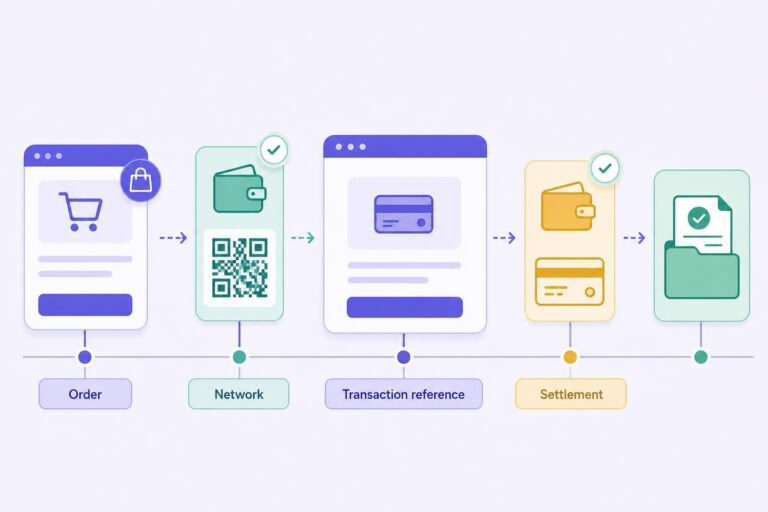
Settlement is when the agreed payment proceeds reach the destination account or wallet. It is not simply the moment a buyer sees a confirmation screen. The following worked scenario is hypothetical, but it shows the records and decisions you will need.
Hypothetical example: a $100 order
Imagine a WooCommerce store selling a $100 item. The buyer sees two choices: “Pay from crypto wallet” and “Pay by card to crypto.”
- With the wallet option, the store shows the USDC amount, a specified network, and an order-specific QR code. The buyer scans it, approves the transfer in their wallet, and the store checks the incoming transaction against the order.
- With the hosted card-to-crypto option, the buyer goes to an independent provider’s hosted page. The provider may ask for KYC on first use. If the hosted flow is completed, the provider converts the payment and sends its documented settlement asset to the merchant wallet.
- For either route, the store records the order number, asset, network, amount, transaction reference where available, payment status, and the wallet address used. That is the record the team uses to confirm receipt without relying on a screenshot alone.
If the hosted VERIFIED route is used, the fee structure for this hypothetical order is: $100 order − 4% VERIFIED infrastructure fee ($4) − the independent provider’s separate conversion fee = amount settled to your wallet. VERIFIED does not set that provider conversion fee, so do not treat $4 as the total cost. Check the provider’s current disclosure and the VERIFIED fee transparency guide before setting customer-facing prices or deciding what your business will absorb.
If the order is refunded, verify the destination address through your documented process and make a new outbound payment where appropriate. Do not send a refund to an address pasted into an unverified support message.
The Federal Trade Commission warns consumers about cryptocurrency payment scams and the difficulty of recovering crypto sent to a scammer. The operational lesson for your store is the same: treat wallet addresses and payment instructions as high-consequence data, and make changes to them deliberate. Read the FTC’s guidance on cryptocurrency and scams.
Where a hosted VERIFIED flow fits
VERIFIED Crypto Checkout is payment infrastructure software for WooCommerce. It is not a payment processor, bank, money transmitter, exchange, acquirer, or custodian. It routes customers to independent hosted providers; those providers perform KYC, card processing, conversion, and settlement. VERIFIED does not handle card data or hold funds.
Version 1.56.1 of the WooCommerce plugin supports both Classic and Blocks checkout. It can route customers to more than 20 independent hosted crypto on-ramp providers in single-provider or auto-routing modes. In the hosted flow, customers can pay by card, Apple Pay, or Google Pay, and providers convert the payment and send settlement directly to the merchant wallet.
The current plugin documentation specifies USDC settlement on Polygon. Some live pages describe additional payout assets in hosted flows. Treat that as a documentation conflict to check before you advertise an asset or network; do not assume the broader description applies to your installation.
If you have decided that a hosted WooCommerce route fits, review the documentation hub and install the VERIFIED Crypto Checkout WooCommerce plugin to assess the current setup and settlement details.
A hosted checkout can simplify your site without removing the need to understand the provider behind it.
What happens when a crypto payment goes wrong?
The weak point in many crypto checkout plans is not receiving a successful payment. It is handling the small number that do not fit the happy path.
The customer sends the wrong amount
Set a rule before launch. For a small underpayment, will you request the balance, cancel the order, or accept it within a stated tolerance? For an overpayment, who confirms the return address and approves the refund? Do not leave staff to decide this from scratch in a live support ticket.
The customer uses the wrong network
Receiving an asset on a different network from the one you published can create a recovery problem. Whether funds can be accessed depends on the receiving-wallet setup and the relevant provider or wallet tools. Do not promise recovery until you have checked the actual transaction details. Record the transaction reference, network, receiving address, asset, and amount, then use the appropriate wallet or provider support route.
The customer wants a refund
A wallet payment is different from a card refund. The original blockchain transfer is generally not edited into a refund. You normally make a new outgoing transfer after you approve the refund and confirm its destination.
State whether you refund in the original asset, how you treat a fiat-denominated order if asset value has moved, and what identity or address confirmation you require. Obtain legal and accounting advice for your business; this is operational guidance, not legal or tax advice.
A customer abandons a hosted flow
For eligible first-time VERIFIED customers with a confirmed provider attempt, automated recovery can send a tokenized no-login Pay Now link that lasts seven days. The link can include a fixed incentive, percentage incentive, or shipping credit. Subscription renewals are excluded.
That limitation matters. This is not a universal abandoned-cart tool, and it should not be promised to every buyer. Read the recovery flow details before configuring it.
Use a short launch checklist before you publish
You do not need a long implementation plan to avoid the common mistakes. You do need clear instructions that your buyer and support team can follow.
- Publish exactly what you accept. Name the asset and network rather than saying only “crypto accepted.”
- Secure the receiving-wallet process. Limit who can change wallet addresses, and use a second check for address changes where your team size permits.
- Set payment-status rules. Decide when an order moves from pending to paid and when fulfillment can begin.
- Give support the transaction checklist. Ask for the order number and transaction reference, not a seed phrase, private key, or unverified screenshot alone.
- Document refunds. Define approval, address confirmation, pricing treatment, and the person responsible for the outbound payment.
- Test one normal order and one exception. Test a correct payment, then test an incomplete or cancelled path without sending funds to an unsupported network.
If you sell subscriptions, be especially precise. VERIFIED subscription renewals are customer-initiated from reminder-email links; there is no stored-card automatic rebilling. The buyer starts each renewal payment from the reminder link. See the crypto subscription payment guide if recurring orders are part of your model.
Check whether hosted WooCommerce checkout fits your payment plan
Install the plugin if independent hosted provider routing and direct-to-wallet settlement fit the payment rail you chose. Read the current documentation before launch, particularly the settlement details and the support process you will use for exceptions.
About VERIFIED Crypto Checkout
VERIFIED Crypto Checkout is WooCommerce payment infrastructure software. It routes customers to independent hosted providers for card-to-crypto checkout, while those providers handle KYC, card processing, conversion, and settlement directly to the merchant wallet. VERIFIED does not process cards, custody funds, or act as a bank, money transmitter, exchange, acquirer, or payment processor.
Learn more about VERIFIED Crypto Checkout, read what crypto checkout means for WooCommerce, or contact the team through the contact page with questions about documented product functionality.
Further Reading
Frequently Asked Questions
Can I use one wallet address for every crypto order?
You can publish one address, but it makes order matching harder because multiple payments arrive at the same destination. For a busy store, use a process that reliably connects each transaction to an order, whether through an order-specific address, QR code, reference, or payment-matching system.
What should I give my accountant after a crypto sale?
Keep the order number, order value, asset, network, amount received, transaction reference where available, settlement date or time, wallet address, fees shown by the relevant service, and any refund record. Ask your accountant which additional records are needed for your jurisdiction and business structure.
Who should handle a refund from a hosted card-to-crypto payment?
Confirm this before launch with the hosted provider and in your own support process. A provider’s role in the original hosted payment does not automatically tell you how a completed crypto settlement will be refunded. Document the decision maker, destination-address verification step, and customer communication for your chosen setup.
About the Author: Brad Ungar
