
Keep Your Brand Visible From Payment to Receipt

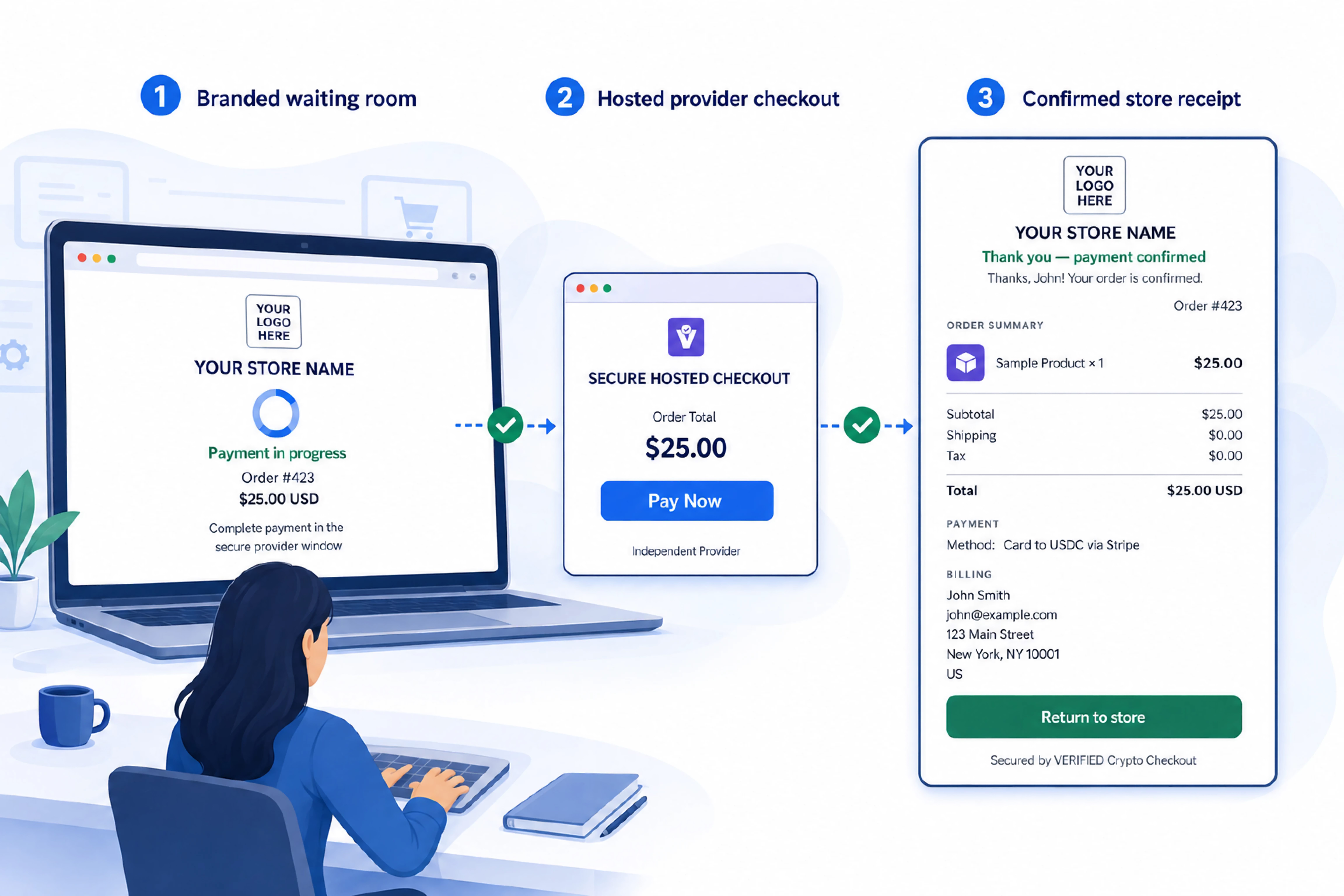
VERIFIED adds a merchant-branded WooCommerce payment confirmation page to your card-to-crypto checkout. While customers pay through the independent hosted provider, your waiting room stays open with your logo, colours, order details, and current WooCommerce status.
When WooCommerce records the payment, the waiting room automatically becomes a detailed receipt. Customers can see what happened and what they purchased without depending on the provider to redirect them back.
- Your branding stays visible during hosted checkout.
- WooCommerce order status refreshes automatically in the waiting room.
- The waiting room becomes a detailed receipt after WooCommerce records payment.
- Card entry and identity verification remain off your website on the provider platform.
- Customers can return to checkout or try another eligible provider while the order is unpaid.
- Direct-provider fallback keeps checkout available if the waiting room cannot be used.
Compatible with WooCommerce — Works With Major Providers
Flexible Card Payments. Branded Payment Confirmation. Direct Wallet Settlement.
Includes a merchant-branded Thank-You Page with a live payment waiting room and detailed receipt, Subscription Products, Automated Checkout Recovery, Payment Links, and In-Person QR Payments.
VERIFIED connects your WooCommerce store to secure third-party hosted checkout providers. Customers complete payment on the provider’s hosted page, while the optional branded waiting room monitors the WooCommerce order and becomes a receipt when payment is confirmed.
Settlement is delivered directly to your configured wallet. WooCommerce records the order status, transaction details, and available on-chain tracking data for fulfillment and reconciliation.




Add Branded Payment Confirmation to WooCommerce
Give customers a store-branded path from hosted payment to detailed receipt—without moving card processing onto your website.
The hosted payment waiting room gives the customer a visible connection to the WooCommerce order while payment happens on the independent provider platform.
The page can display the merchant’s store name, logo, configured colours, order number, order total, and instructions explaining that payment must be completed in the separate provider window. The customer does not enter card details or identity information into the waiting room.
Pending: While WooCommerce continues to report an unpaid status, the waiting room displays a pending message and continues checking the existing order. A pending display does not necessarily mean the provider rejected the payment. The provider callback or settlement-verification process may still be completing.
Payment received and being finalized: If the available information requires additional review, the page can tell the customer that payment was received and is being finalized. This avoids presenting the order as fully confirmed before WooCommerce and the applicable safeguards have completed their work.
Payment confirmed: The waiting room displays the confirmed state only after WooCommerce reports the order as paid. It then changes into the selected receipt view and provides a Return to Store action.
If a final status takes longer than expected, the page can explain that processing is continuing and that the customer may safely close it. WooCommerce can still update later and send its normal order email.
See the official definitions of WooCommerce order statuses.
WooCommerce remains the order system of record. The waiting room reads the status WooCommerce reports but does not create the paid decision itself.
- WooCommerce creates the order, stores its status, and records the resulting updates.
- VERIFIED Crypto Checkout routes the checkout and supplies the merchant-branded, read-only waiting room.
- The independent hosted provider handles card entry, provider-required identity verification, and payment processing.
- Provider callbacks and settlement safeguards supply the information used to determine whether WooCommerce can update the order.
- The merchant-controlled wallet receives settlement according to the provider and transaction route.
- The relevant blockchain network can supply on-chain settlement evidence when the transaction settles on-chain.
The waiting room accesses the existing order through an authenticated, read-only status connection. It cannot mark the order paid, modify the amount, approve a settlement, or release an order from review.
The page therefore displays payment confirmation; it does not perform payment confirmation. For more detail, read What Is VERIFIED Crypto Checkout?, How Hosted Checkout Works, and the guide to server-side payment confirmation.
The waiting room becomes a receipt only after WooCommerce reports the order as paid. The merchant controls the level of detail displayed, and individual fields depend on the information available for the order and settlement.
Minimal receipt: Provides a compact confirmation focused on the order number, total, paid-state information, and available payment or transaction identifiers.
Standard receipt: Standard is the default level. It adds a broader order summary, such as subtotal, shipping, tax, total, and item count, while limiting the customer and product information exposed through the hosted link.
Full receipt: Full mode can display product images and names, quantities, line totals, subtotal, shipping, tax, total, billing name and address, payment method, available verified on-chain amount, and a settlement transaction linked to the block explorer appropriate to the actual network.
The transaction link displays available on-chain settlement evidence. It should not be interpreted as proof that the waiting room processed the payment or as proof of the customer’s card authorization.
The hosted link remains available for up to 48 hours. Anyone holding the link during that period may be able to view the selected receipt details. Stores should use Minimal or Standard when Full information is unnecessary and should review the site’s receipt-link privacy.
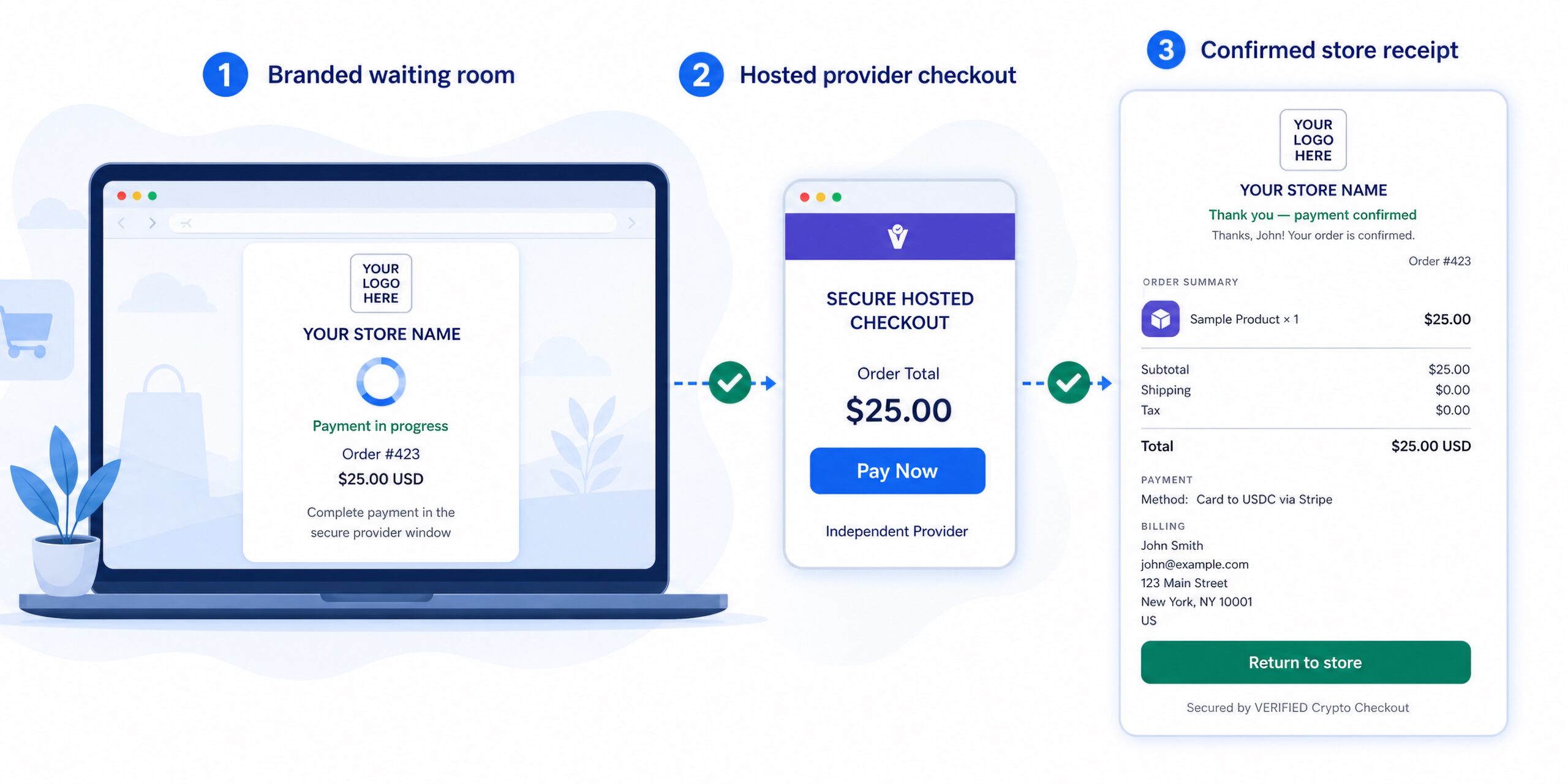
New tab — recommended: Opening the independent provider checkout in a new tab keeps the waiting room available in the original tab. The page can continue refreshing the WooCommerce order and become the receipt without depending on a provider return redirect.
Same tab: Merchants can open the provider checkout in the same tab, but the customer then leaves the waiting room and may not see the automatic receipt unless they return. Test this experience on the devices your customers commonly use.
Try a different provider: Eligible provider-specific flows can offer another provider against the same pending WooCommerce order. Customers must complete payment through one provider only. Another provider session that is already open can still be completed, so two completed sessions may send two settlements to the merchant-controlled wallet and require manual reconciliation.
Back to checkout: By default, this opens WooCommerce’s payment page for the same pending order. The customer can select an available method without immediately creating another order.
Optional Cart restore: If enabled and the cart is empty, eligible items can be repopulated and returned to normal checkout. Current price, stock, shipping, and tax rules are recalculated. Completing the restored checkout creates a new WooCommerce order, while the original unpaid order remains for the store’s normal order-management process.
The hosted Thank-You Page link expires after 48 hours. During that period, anyone holding the link may be able to view the receipt details selected by the merchant. The link should be treated as temporary customer access rather than a permanently private account page.
If the waiting room is disabled, unavailable, or cannot register the order, VERIFIED uses the existing direct-provider checkout path. The customer can still continue to the independent provider; only the waiting-room and automatic-receipt experience is skipped for that attempt.
A fallback does not, by itself, mean the payment failed. Payment and order updates continue through the underlying provider, WooCommerce, and settlement flow.
VERIFIED does not process payments or hold funds. It supplies checkout-routing and customer-status infrastructure around independent hosted providers and the WooCommerce order.
Hosted Thank-You Page FAQs
| Question | Answer |
|---|---|
| What is the VERIFIED hosted payment waiting room? | It is a merchant-branded status page for an existing WooCommerce order. The waiting room remains available while the customer completes payment on an independent provider platform and becomes a receipt after WooCommerce reports the order as paid. |
| Does the VERIFIED Thank-You Page process or confirm payment? | No. The page displays the status WooCommerce reports. It does not collect card data, process payment, perform identity verification, custody funds, independently verify settlement, or mark the order paid. |
| How does WooCommerce know when the order is paid? | Provider callbacks, settlement verification, applicable on-chain safeguards, and WooCommerce order controls supply the information used to update the order. The waiting room reads and displays the resulting status. |
| What does the customer see while payment is pending? | The customer can see the merchant’s store branding, order number, order total, payment instructions, and the status WooCommerce currently reports. Applicable alternate-provider and return-to-checkout options may also appear while the order remains unpaid. |
| Does the provider have to redirect the customer back to the store? | No. In the recommended new-tab configuration, the waiting room remains open separately and continues checking WooCommerce. It can display the final order status without relying on a provider browser redirect. |
| Why is opening the provider checkout in a new tab recommended? | New-tab mode keeps the waiting room available while the customer completes provider checkout. The page can continue refreshing the WooCommerce order and become the receipt after WooCommerce reports the order as paid. |
| What information can appear on the detailed receipt? | Receipt contents depend on the selected detail level and available order data. Full mode can include product images, quantities, line totals, subtotal, shipping, tax, total, billing name and address, payment method, verified on-chain amount, and a linked settlement transaction. |
| Is the hosted receipt private? | The temporary receipt link expires after 48 hours, but anyone holding the link during that period may be able to view the selected receipt details. Merchants should use Minimal or Standard when Full receipt information is unnecessary. |
| Can a customer try a different payment provider? | Eligible single-provider flows can offer Try a different provider against the same pending WooCommerce order. The option is not required for Auto-Routing because the customer is already using the provider chooser. |
| Can VERIFIED prevent a customer from paying two providers? | No. Another provider session that is already open can still be completed. Customers must complete payment through one provider only. If two settlements arrive, the merchant may need to reconcile and refund the duplicate manually. |
| What does “Back to checkout” do? | By default, it opens the WooCommerce payment page for the same pending order. The customer can select an available payment method without immediately creating another WooCommerce order. |
| What does Cart restore do? | If Cart restore is enabled and the cart is empty, it can repopulate eligible products from the unpaid order and return the customer to normal checkout. Completing that checkout creates a new order, and current prices, stock, tax, and shipping rules are recalculated. |
| How long does the Hosted Thank-You Page link remain available? | The temporary hosted link remains available for up to 48 hours. After it expires, the customer should use the normal WooCommerce order email or contact the merchant for order information. |
| What happens if the waiting room is unavailable? | VERIFIED falls back to the existing direct-provider checkout path. The customer can continue to the provider, but the waiting-room and automatic-receipt experience is skipped for that attempt. The fallback itself does not mean the payment failed. |
| How can a merchant enable, disable, or configure the feature? | The Hosted Thank-You Page is enabled by default in the current public release. Merchants manage its branding, receipt detail, provider-window behavior, and return options under WooCommerce → VERIFIED Thank-You Page. See the configuration guide for current instructions. |