
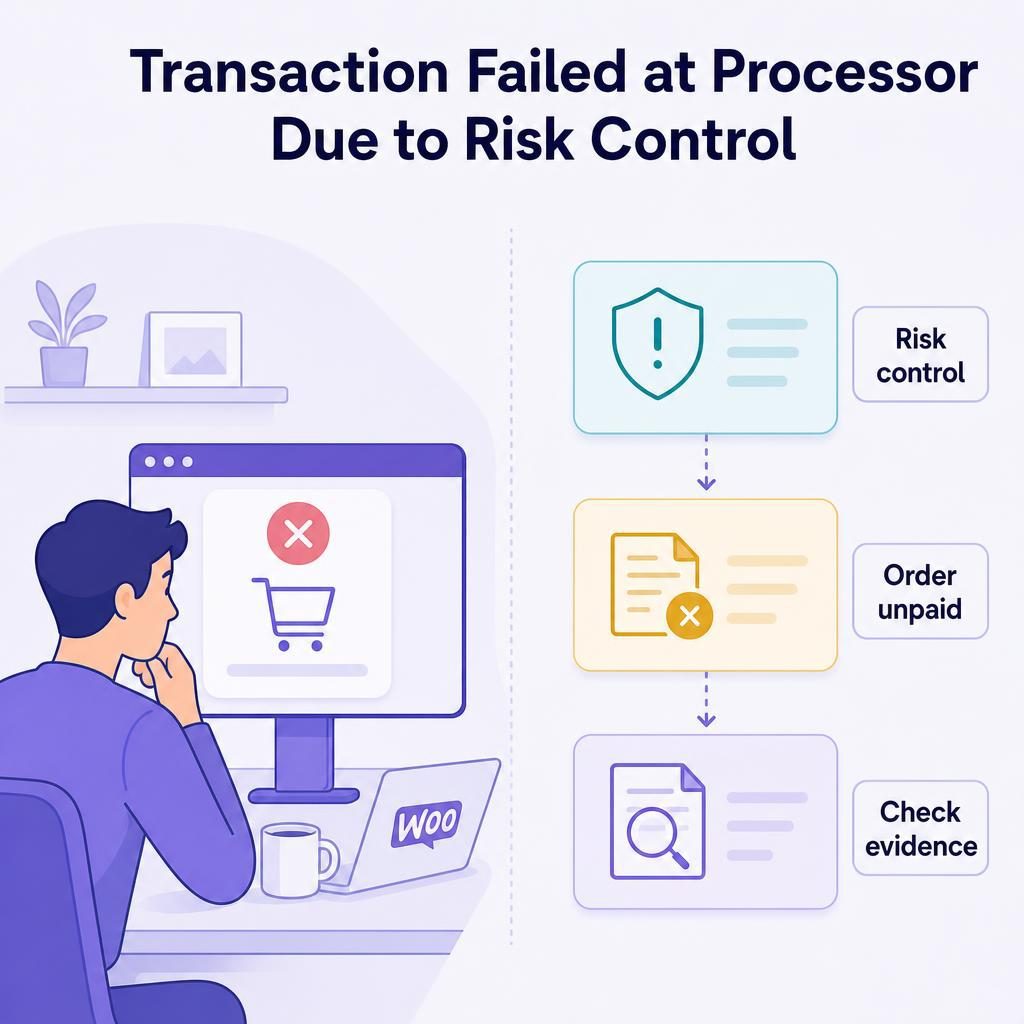
You have an unpaid WooCommerce order, a customer says they tried to pay, and the checkout shows “Transaction failed at processor due to risk control.” That wording is frustrating because it sounds final without telling you what triggered it. The sensible response is to treat it as an incomplete payment attempt, preserve the evidence, and give the customer only the next steps available in the hosted checkout.
What does a processor risk control message mean?
“Transaction failed at processor due to risk control” means an upstream provider or processor stopped that payment attempt under its own risk controls; it does not establish the precise cause or prove that your customer committed fraud. A processor risk control message is not a universal card-industry error code. Providers can use similar words for different controls, and you will usually see the outcome rather than the provider’s complete reasoning.
In plain terms, a processor is a service in the payment chain that executes a payment request. A risk control is a rule or review that stops transactions the provider cannot accept. It may consider payment-method signals, an issuer response, a device or network signal, location, transaction pattern, provider eligibility rules, or information collected in checkout. More than one factor may be involved.
Your immediate job is not to diagnose the customer. Record what happened, keep the order unpaid, and ask the customer to follow the hosted provider’s displayed instructions or choose an offered alternative. Another attempt can sometimes produce a different result, but it is not a remedy you can promise.
Written by Brad Ungar | Founder, VERIFIED Crypto Checkout
Brad Ungar builds payment infrastructure for WooCommerce merchants who need card-to-crypto checkout, hosted provider routing, payment links, and subscription flows that settle directly to a merchant wallet.
Product review: VERIFIED Crypto Checkout engineering
Key Highlights
- This message records a failed attempt, not a fraud finding.
- The provider’s detailed risk rationale is usually not visible to your store.
- Issuer declines, authentication failures, and timeouts need different responses.
- Save the order ID, timestamp, route, exact wording, and customer-reported step.
- Keep the order unpaid until settlement has adequate confirmation.
- Do not ask a customer to bypass identity or liveness verification.
- Use provider instructions or an offered alternative instead of repeated retries.
Where the processor risk control decision happens
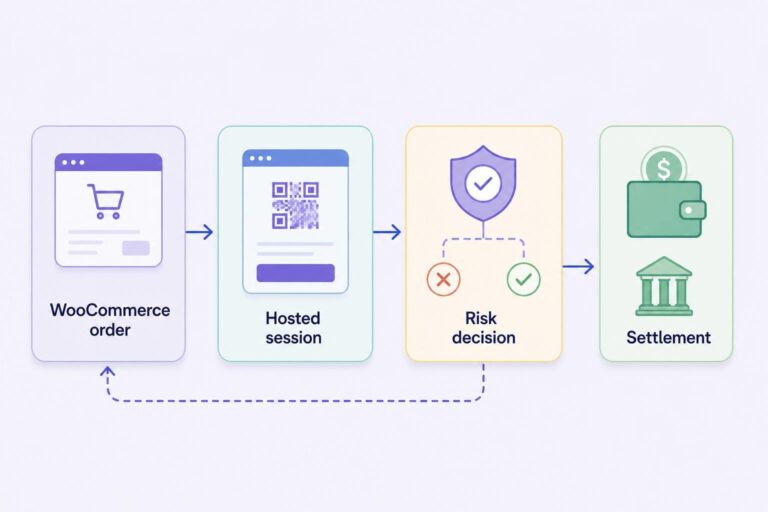
It helps to separate the transaction into parts. WooCommerce creates the order first. VERIFIED then routes the buyer to an independent hosted provider session. That provider, rather than VERIFIED, handles any required identity steps, payment-method authentication, payment execution, eligibility checks, risk decision, conversion, and settlement directly to your wallet.
Hosted checkout means the customer completes sensitive payment steps in the provider’s hosted environment instead of in your WooCommerce payment fields. VERIFIED is checkout-layer infrastructure: it routes the session and records the resulting payment state. It does not handle card data, make an upstream provider’s decision, or take custody, meaning possession or control, of customer or merchant funds.
That boundary answers a common support question: “Can you approve it manually?” You cannot safely make that promise. The hosted provider has information and controls that are not exposed to your store, and its decision can turn on requirements for that specific payment attempt.
| Stage | What happens | What you can usually see | What to do |
|---|---|---|---|
| WooCommerce order | Your store creates an order and total. | Order number, amount, products, customer details, order status, and order notes. | Record the order ID and leave the order unpaid. |
| Hosted provider session | The buyer selects a route and follows the provider checkout steps. | The selected route and a message reported by the buyer or returned to the order. | Capture the exact wording and timestamp. |
| Risk or payment decision | The provider applies its own eligibility, risk, and payment controls. | Usually an outcome, not the full internal rationale. | Do not guess at a fraud reason. |
| Settlement confirmation | A completed payment is evidenced and reconciled to the order. | Recorded payment status and available settlement evidence. | Fulfill only after sufficient confirmation. |
Provider terminology is provider-specific. PayerMax publishes error-code and response-code references for its own services, but I have not verified the current mappings in those documents for this guide. Do not assume that a PayerMax label, or any other provider’s label, maps exactly to the route your customer used. Check the independent provider’s own instructions and code reference where one is available.
The message tells you that the attempt stopped upstream. It does not explain why well enough to support a fraud judgement.
How to separate this from other checkout failures
The useful question is not only whether the customer saw an error. It is where the attempt stopped. That determines the next safe action.
Processor-side risk rejection
This is the category addressed in this guide. An upstream provider or processor rejected the attempt under its controls. You may see only broad wording. Preserve the details, then direct the customer to the provider’s on-screen instructions or an available alternative.
Issuer-side decline
An issuer is the customer’s card-issuing bank or card provider. An issuer-side decline means that bank or issuer did not approve the card transaction. The hosted provider may display a decline message or offer another method. You do not control the issuer’s decision, and your team should not tell the customer to change information simply to force a retry.
Authentication failure
Authentication is the step where the buyer proves they are allowed to use a payment method. Depending on the method and region, it can involve a bank-app approval, one-time code, biometric check, or another issuer-directed challenge. If the customer abandons or fails that challenge, it is different from a processor-side risk decision. They should restart only if the provider offers that path and then complete the challenge exactly as prompted.
Eligibility or KYC friction
KYC, short for “Know Your Customer,” is identity verification a provider may require before it can offer or complete a service. A first use at a provider can require a government-issued ID and a liveness check, where the customer follows a camera prompt to show they are a real person present at that moment. Returning use with the same provider is often faster, but that is not guaranteed.
A KYC request is not the same as a processor risk rejection. The customer can follow the provider’s request if they wish to continue. Do not collect identity documents by email, and do not ask the customer to bypass verification. AML, short for anti-money-laundering controls, refers to checks intended to identify and manage illicit-finance risk; it is commonly discussed alongside KYC, but it does not mean every customer is accused of wrongdoing. For the broader flow, read how KYC and AML work in hosted card-to-crypto checkout.
Timeout or interruption
A timeout means the session, browser, network, or callback did not complete in time. A buyer closing a tab, losing mobile signal, or returning from an authentication app too late can leave an incomplete attempt. Check the actual order status before calling it a decline. A timeout may require a fresh session, but it is neither proof of payment nor proof that no payment can still be confirmed.
Settlement confirmation after a payment attempt
Settlement is the point at which a payment outcome is sufficiently confirmed for you to treat funds as received. It comes after the checkout attempt. A customer may complete an action but the order record may still need confirmation, particularly where a notification arrives late or is missed. That is a reconciliation problem, not a reason to invite repeated payment attempts. See the WooCommerce payment-confirmation guide before changing an order manually.
A decision rule your team can use
If the order has no adequate settlement evidence, keep it unpaid or pending. If it has adequate settlement evidence but the order record has not caught up, investigate confirmation and reconciliation. These are separate problems. Mixing them can lead to duplicate attempts or premature fulfillment.
What to do after the error appears
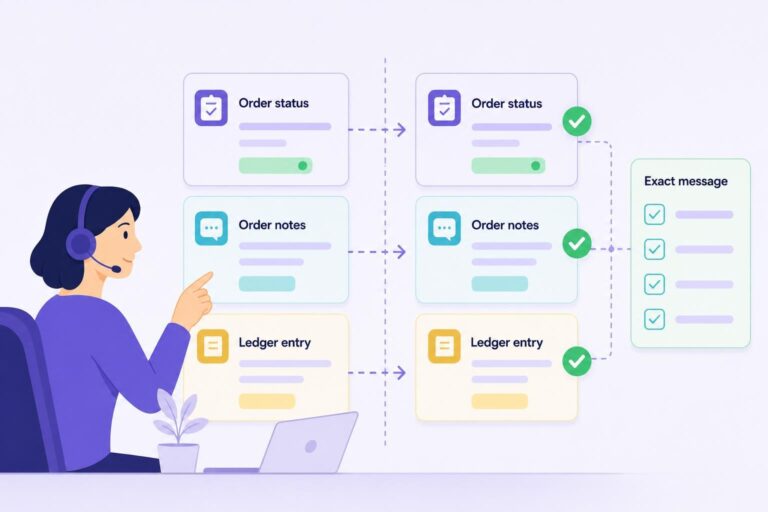
I generally recommend a five-step workflow. It is intentionally plain. Your job is to make the next action understandable and safe, not to reverse-engineer an upstream provider’s risk model.
1. Capture the attempt before the details disappear
Open the WooCommerce order first. Record the order ID, timestamp with time zone, exact displayed message, selected route if known, current order status, and any relevant order notes. Then open the matching VERIFIED Ledger entry for that order. Use its available filters to locate the attempt, and note any retry visibility, transaction hash, or block-explorer link shown there. Those fields are evidence to preserve, not proof that a failed risk-control attempt became a settled payment.
Also note whether the buyer says the message appeared before identity verification, during authentication, immediately after payment submission, or after returning to your site. That sequence is often more useful than asking, “Why was this declined?”
2. Classify the outcome without overclaiming
If the wording specifically identifies processor risk control, record it as a provider-side or processor-side risk outcome. If it identifies the issuer, record it as an issuer decline. If the buyer reports a failed bank challenge, record an authentication issue. If the message is vague, classify it as unknown pending evidence. “Unknown” is a valid support note; a confident but invented explanation is not.
3. Give the customer a safe next step
Ask the customer to follow the hosted provider’s instructions. If the hosted flow offers another payment method, card, or route, they can choose it. If it presents a KYC request, they can decide whether to complete the provider’s verification. Do not tell them that switching providers will work, because availability and approval remain the independent provider’s decision.
The main tradeoff is simple: hosted flows can offer a choice of independent providers, while each provider retains its own payment availability, limits, eligibility criteria, and risk controls. The VERIFIED listing on WordPress.org describes those controls as provider-managed rather than decisions made by VERIFIED.
4. Keep fulfillment behind evidence
Do not mark the order paid because a customer says their banking app showed something, a page refreshed, or an attempted charge appears in a banking app. Return to the WooCommerce order status and order notes, then compare them with the corresponding VERIFIED Ledger entry. Review any available retry record, transaction hash, and block-explorer link before you decide whether confirmation is missing or the payment simply did not complete.
VERIFIED includes a crypto ledger and missed-webhook on-chain checks. A webhook is an automated message sent between systems when an event happens. On-chain means recorded on the relevant blockchain network. These checks can help reconcile a possible confirmed payment when an automated notification was missed; they do not turn a processor risk rejection into a successful payment.
5. Escalate with evidence, not a theory
For an implementation-specific question, provide the order ID, timestamp, route, exact message, current WooCommerce order status, relevant order notes, and non-sensitive screenshots. Avoid writing “fraud suspected” unless you have independent evidence and a reason to make that classification. For checkout-layer questions, review the VERIFIED documentation or open a support ticket with the order evidence.
Capture the facts you have, then escalate the facts. A guessed reason is not useful evidence.
Four things your support team should not do
Set these rules before someone is trying to clear an order queue under pressure:
- Do not repeatedly retry the same method. Repeated attempts can create confusion and do not guarantee a different outcome.
- Do not promise approval. The independent provider controls eligibility, payment execution, and the risk decision.
- Do not mark an order paid without sufficient settlement evidence. A checkout message or customer report is not recorded payment confirmation.
- Do not ask customers to bypass provider verification. If a provider requests identity or liveness verification, that process belongs in the provider’s hosted flow.
If this message appears across several unrelated orders, do not assume every buyer was rejected for the same reason. Look for an implementation pattern instead: one route, one browser environment, a recent checkout configuration change, or a mismatch between the order flow and provider instructions. Then escalate the documented pattern. For a broader explanation of category-level payment risk, see why high-risk payment processors shut down ecommerce stores.
A hypothetical support example
Here is what good handling looks like in practice. Imagine a hypothetical WooCommerce store selling a $75 product. Order #1842 is created at 2:14 p.m. The buyer selects a hosted route, enters the provider session, and reports seeing “Transaction failed at processor due to risk control” after submitting payment details.
At 2:16 p.m., your support operator opens order #1842 in WooCommerce. The order status is still unpaid, and the order notes do not show a confirmed payment. The operator opens the corresponding VERIFIED Ledger entry, checks the available attempt details, and finds no settlement evidence sufficient to support fulfillment.
Example internal order note
Order: #1842
Time: 2:14 p.m., store time zone
Reported message: “Transaction failed at processor due to risk control”
Customer-reported step: After payment submission in hosted provider session
WooCommerce status: Unpaid; no confirmation in order notes
Ledger review: No settlement evidence sufficient for fulfillment
Next action: Customer may follow provider instructions or select an available alternative. Do not fulfill.
The customer-facing reply can stay short: “Your order has not completed payment. The hosted provider stopped this attempt under its own checks, and we cannot see the precise reason. Please follow any instructions shown in that checkout session or choose an available alternative. We will process the order after payment confirmation is recorded.”
Notice the restraint in that reply. It does not accuse the buyer. It does not say the card is bad. It does not promise a later attempt will work. It also does not ask the buyer to email ID documents or share card details with your store.
An unpaid order is not a failed business relationship. It is an order that has not yet earned fulfillment.
When this points to a checkout configuration question
A single risk-control rejection is usually a transaction-level outcome. It is not the same as an account shutdown, a provider relationship ending, or a fault across your whole store. Keep those categories separate. If your concern is account loss rather than one failed payment, read what to do when a payment processor shuts down your account.
Escalate a configuration question when you can show a repeatable pattern, such as the same checkout step failing after a plugin update or a routing option behaving differently from its documented setup. Include the plugin version, WooCommerce version, whether you are using Classic or Blocks checkout, the selected routing mode, WooCommerce order evidence, and the matching Ledger details. Do not change several settings at once while an investigation is open. You lose the clean comparison support needs.
If you are evaluating a hosted card-to-crypto route rather than troubleshooting a live order, start with how card-to-crypto payments work. It explains the division of responsibility before you put the flow in front of customers.
Choose the next path that fits your situation
If you are troubleshooting a live VERIFIED order, gather the WooCommerce status, order notes, and Ledger evidence, then use the documentation or submit a support ticket. If you are assessing the hosted route for a new WooCommerce store, install the plugin to begin reviewing its checkout setup and provider-routing options.
About VERIFIED Crypto Checkout
VERIFIED Crypto Checkout is payment infrastructure software for WooCommerce. It routes customers to independent hosted providers for card-to-crypto checkout. Those providers perform KYC where required, payment execution, conversion, and settlement directly to the merchant wallet.
VERIFIED does not handle card data, take custody of funds, act as a bank, or override an independent provider’s eligibility or risk decision. Learn more about VERIFIED Crypto Checkout, read what the checkout software does, or contact the team with an implementation question.
Further Reading
About the Author: Brad Ungar
