
Written by Brad Ungar | Founder, VERIFIED Crypto Checkout
Brad Ungar builds payment infrastructure for WooCommerce merchants who need card-to-crypto checkout, hosted provider routing, payment links, and subscription flows that settle directly to a merchant wallet.
Product review: VERIFIED Crypto Checkout engineering
KYC and AML crypto checkout can feel like a black box when you are adding card-funded crypto payments to a WooCommerce store. This guide explains who performs the checks, what your customer may see in the hosted payment flow, and how to prepare your store without promising a result you do not control. Last Updated: September 2026
Key Highlights
- KYC means identity verification, while AML describes financial-crime controls used to assess and manage risk.
- VERIFIED is WooCommerce payment infrastructure, not a processor, custodian, bank, exchange, acquirer, or money transmitter.
- Independent hosted providers—not VERIFIED—perform customer onboarding, card processing, conversion, and settlement.
- A first-time customer may be asked for government ID and a liveness check in the provider’s hosted flow.
- Provider eligibility, regional availability, payment methods, and review requirements can vary by provider and customer circumstances.
- VERIFIED targets USDC on Polygon, but provider liquidity may result in settlement in a different asset or network, including ETH, PYUSD, POL, BNB, or USDC on Ethereum.
- Subscription renewals begin when the customer uses a reminder-email link; there is no stored-card automatic rebilling.
- The crypto ledger and missed-webhook on-chain checks support order reconciliation when a payment-status update needs attention.
Direct Answer: How do KYC and AML work in hosted card-to-crypto checkout for WooCommerce?
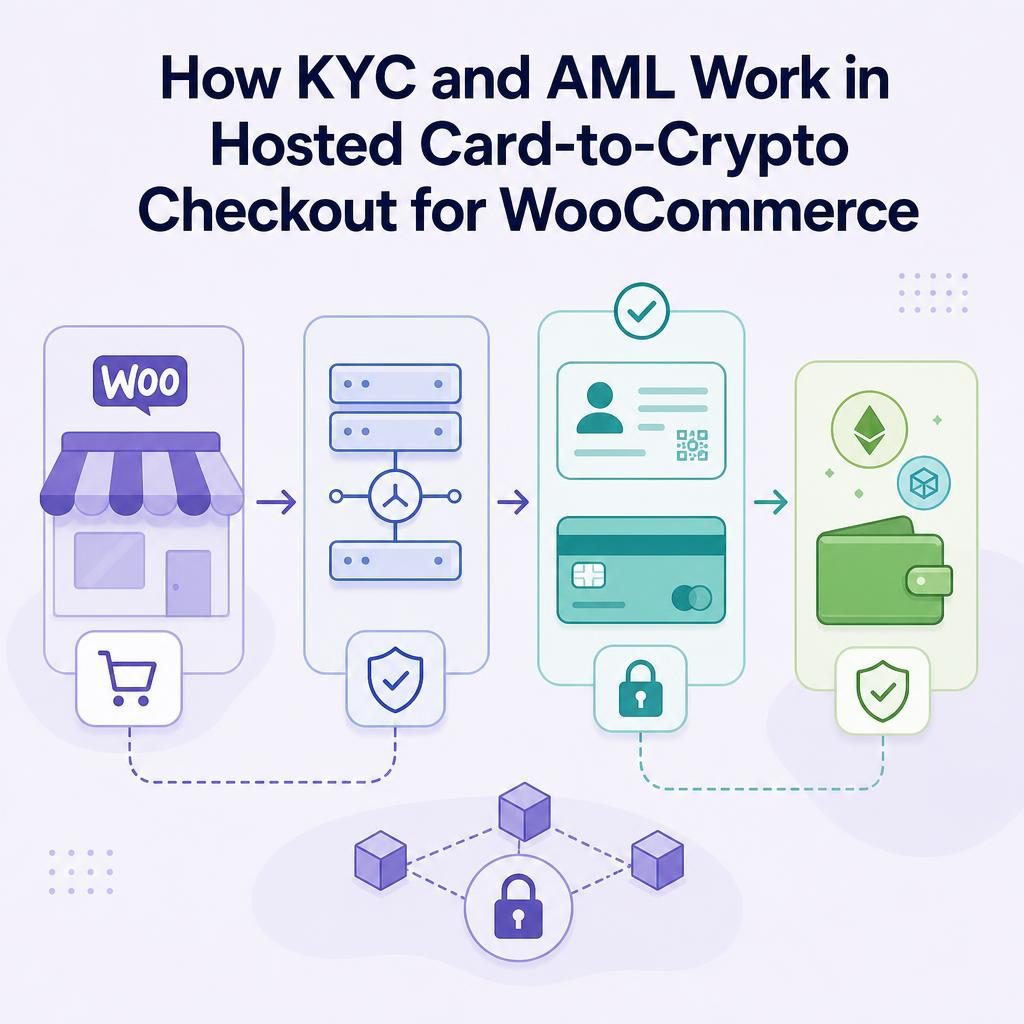
In hosted card-to-crypto checkout, the independent provider—not VERIFIED or your WooCommerce store—may verify the customer’s identity, apply its own financial-crime controls, process the card payment, convert the funds, and settle to your configured wallet. VERIFIED supplies the WooCommerce payment infrastructure and routes the customer to an independent hosted provider. It never handles card data or custodies funds.
For your customer, the path is straightforward: they select the option at checkout, move to a provider-hosted payment experience, complete any required first-use steps, and pay by card, Apple Pay, or Google Pay where offered. The provider executes the payment and conversion, then sends settlement directly to the wallet address you configured. Your job is to make that handoff clear, verify the wallet setup, and know which questions belong with your team and which belong with the provider.
KYC and AML crypto checkout: who does what?
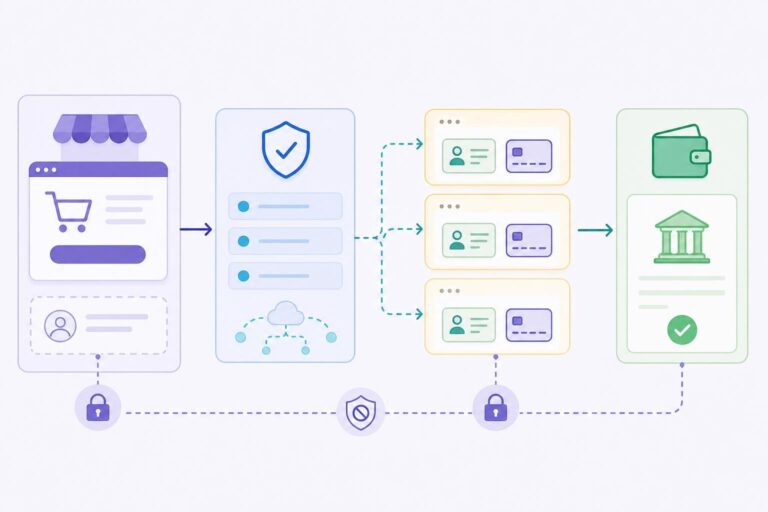
Start by separating the software connecting your store from the company conducting the payment. VERIFIED Crypto Checkout is payment infrastructure for WooCommerce. It is not a payment processor, custodian, bank, exchange, acquirer, or money transmitter.
| Party | Job in this payment model | What you should communicate |
|---|---|---|
| Your WooCommerce store | Creates the order, presents the payment option, fulfils the order, and supports store and order questions. | Tell customers that payment continues with a hosted provider and that identity verification may be required. |
| VERIFIED Crypto Checkout | Provides WooCommerce infrastructure and routes the customer to independent hosted providers. | Say, “We connect your order to a payment provider.” Avoid wording that implies VERIFIED approves the payment or checks ID. |
| Independent hosted provider | Conducts customer onboarding, performs KYC and its own AML-related controls, processes available payment methods, converts funds, and settles to the merchant wallet. | Send provider-specific identity, eligibility, and payment-attempt questions to the provider support path shown in the hosted flow. |
| Merchant wallet | Receives the provider’s settlement to the address and network you configured. | Use a wallet able to receive the possible assets and networks for the flow, then confirm the asset and network actually received in the crypto ledger. |
An acquirer is a financial institution that enables a business to accept card payments through card networks. In this model, you are not asking VERIFIED to become your acquirer. VERIFIED can route customers to more than 20 independent hosted card-to-crypto providers in single-provider or auto-routing mode, while those providers perform the payment work.
KYC, short for “Know Your Customer,” means identity verification: a provider checks information intended to establish who a customer is. AML, short for anti-money laundering, refers to the broader financial-crime controls a financial-services business uses to assess and manage risk under the rules that apply to it. The Financial Action Task Force describes a risk-based approach to anti-money-laundering and counter-terrorist-financing controls in its FATF Recommendations materials.
KYC is usually something the customer sees. AML mostly is not: it is the provider’s internal risk process, and it can vary by provider, customer, and country. No WooCommerce plugin can standardise that process or promise the same outcome for every payment attempt.
Your store can explain the handoff, but it should not promise the result of a provider’s identity or payment review.
What stays outside your checkout
With a hosted redirect, the customer leaves your checkout for the provider’s payment experience. Card entry and any provider identity steps happen there rather than in your WooCommerce payment form. VERIFIED never handles card data and does not custody funds.
This division is useful operationally. Your team can focus on the order, product, configured wallet address, and payment status returned to WooCommerce. The provider manages its own onboarding and payment-execution process. For the redirect mechanics, see how hosted checkout works.
The PCI Security Standards Council describes PCI DSS as a security standard for protecting payment account data. In this hosted flow, card entry occurs outside your WooCommerce payment form, but your broader security and compliance responsibilities still depend on your full implementation and business arrangements. Review the PCI DSS overview from the PCI Security Standards Council with the appropriate technical and compliance advisers.
What your customer experiences in WooCommerce
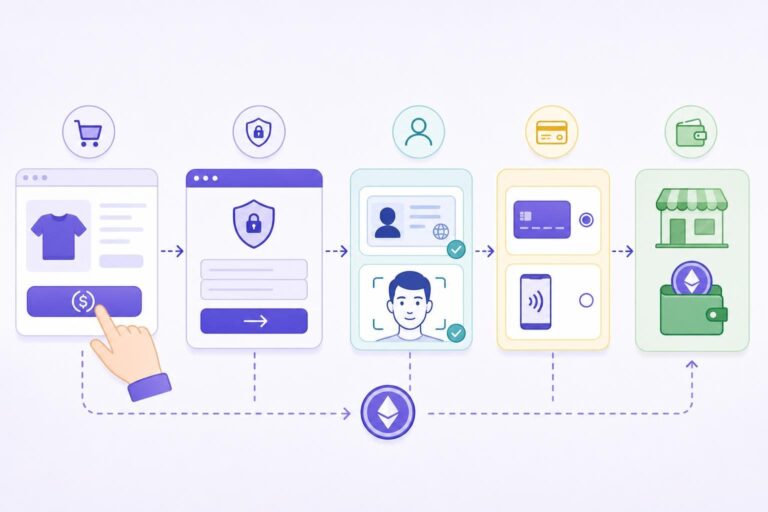
The easiest way to understand the model is to follow one order from checkout to settlement. The exact provider page can differ, but this is the operating sequence your store should be ready to support.
1. The customer chooses the card-to-crypto option
At your WooCommerce checkout, the customer selects the VERIFIED option and places the order. Before they continue, give them one plain sentence explaining what comes next. For example: “You will complete payment with a hosted provider. Identity verification may be required for first-time use.”
That wording does not predict eligibility. It simply prevents the customer from being surprised by a redirect or an identity request after they have decided to pay.
2. The customer enters a hosted provider experience
The payment flow redirects the customer to an independent provider. A hosted checkout is a payment page operated outside your own site, rather than a card form embedded in your WooCommerce checkout. The provider presents the payment and any onboarding steps required for that attempt.
3. First use may include identity and liveness steps
On first use with a provider, the customer may need to provide government ID and complete liveness KYC. A liveness check is a step intended to show that the person completing identity verification is present, rather than submitting a static image or copied document. A customer might photograph an identity document and follow an on-screen prompt using their phone camera.
Returning use with the same provider is usually faster because the customer may already have completed that provider’s first-use onboarding. “Usually” matters: do not describe returning use as guaranteed, and do not tell customers that no KYC will be required.
4. The provider accepts an available payment method and executes the conversion
Where offered by the provider, the customer pays by card, Apple Pay, or Google Pay. The provider processes that payment, converts the amount into the settlement asset supported by the active flow, and sends settlement directly to your configured wallet.
Settlement means the completion of the payment leg that delivers the agreed payout to its destination—in this case, the merchant wallet configured for the flow. A wallet address is the public destination identifier used to receive crypto assets on a particular network. It is not an email address, account nickname, or customer shipping address.
VERIFIED targets USDC on Polygon as the primary settlement asset. However, an independent provider may send a different asset or network depending on provider liquidity, including ETH, PYUSD, POL, BNB, or USDC on Ethereum. Configure a wallet that can receive those assets and networks, and confirm what actually arrived in the crypto ledger before treating a payment as reconciled. Do not promise a particular received asset, network, amount, or settlement time to a customer.
| What VERIFIED targets | What an independent provider may send | What you must configure and check |
|---|---|---|
| USDC on Polygon is VERIFIED’s primary settlement target. | Depending on provider liquidity, the provider may send a different supported asset or network, including ETH, PYUSD, POL, BNB, or USDC on Ethereum. | Use a wallet that can receive the applicable assets and networks. Review the crypto ledger to confirm the asset and network actually received. |
Do this next in staging
Before you send customers into the live flow, set the destination wallet address and network, add your pre-redirect checkout notice, and run one test order from WooCommerce through the hosted handoff. Use the current documentation to install the VERIFIED Crypto Checkout WooCommerce plugin and configure the flow. Those checks expose avoidable setup mistakes while you can still correct them without a customer waiting on an order.
The redirect is not a detour; it is where the independent provider performs the payment and onboarding work assigned to it.
Where friction happens—and how to manage it
Hosted card-to-crypto checkout removes card entry from your store’s payment form, but it does not remove customer decisions. Most friction happens at the handoff: a shopper expected a one-click card payment and instead sees a new provider page, a possible identity request, or an eligibility result your store cannot change.
First-use onboarding and regional variation
The first-time identity step is a likely abandonment point. Treat it as part of the customer experience, not as an unlikely exception. State it before redirecting and keep the wording factual. Avoid “no KYC,” “approved instantly,” and “available everywhere.” Your WooCommerce store cannot safely promise any of those things for independent providers.
Auto-routing can direct customers to independent hosted providers, but it does not make every provider’s eligibility policy identical. A payment method shown to a customer, provider availability, and review requirements may vary with the provider, customer circumstances, or location.
There is a practical support trade-off between routing modes. With a single-provider setup, you can prepare your support copy around one provider’s hosted onboarding experience. With auto-routing, the provider and identity experience a customer sees can differ between attempts, so keep your checkout copy provider-neutral and direct provider-specific questions to the support path displayed in the hosted experience.
Incomplete redirects, declined attempts, and recovery evidence
A customer can close the hosted page, stop during onboarding, or decide not to continue. Your support team should first establish where the customer stopped: did they reach a provider, submit a payment attempt, or return to the order-confirmation page?
A completed identity process does not mean a provider will accept a payment attempt. If a customer says the provider declined or did not complete the transaction, acknowledge the unpaid order, avoid diagnosing the provider’s decision, and direct them to the provider support option shown in that hosted flow. A useful plain reply is: “Your order remains unpaid because the hosted provider did not complete the payment. We cannot review or override the provider’s decision. Please use the support option shown on its payment page for questions about that attempt, or choose another available payment option in our store.”
For eligible first-time VERIFIED customers with a confirmed provider attempt, automated recovery is available. It uses a tokenized, no-login Pay Now link that remains available for seven days and can include a fixed, percentage, or shipping-credit incentive. A tokenized link contains a unique security value that lets the intended recipient reach the payment action without creating a new login session. Review the abandoned crypto checkout recovery overview before making recovery part of your support process.
Subscription renewals are a new customer action
Subscription renewals are customer-initiated from reminder-email links; there is no stored-card automatic rebilling. The renewal payment therefore runs through a hosted provider again. As an inference from that model, an identity step can recur when the provider handling that attempt is new to the customer, but the provider controls the actual onboarding requirement and outcome.
Hypothetical: a support reply that keeps the handoff clear
Imagine Maya selects the payment option for a $120 WooCommerce order. She reaches the provider page, sees an ID request, and closes the tab. Your team should not assess her identity documents or tell her whether she will be eligible.
A useful reply is: “Your order is awaiting payment through the hosted provider. The provider may request identity verification for first-time use. If you have a question about its verification screen, please use the provider support option shown there. If you completed an attempt and did not receive a result, send us your order number and the approximate time of the attempt so we can check the order record.”
If the order meets the stated recovery conditions, the applicable recovery flow may be available. Do not promise a recovery link before confirming the provider attempt and eligibility.
Merchant readiness checklist before you enable the flow
You do not need to become a KYC specialist to operate this checkout model. You do need a clean handoff between your store, the independent provider, and your wallet. If you have already completed the staging test above, start with item 2 below.
Pre-launch checklist
- Install and configure the plugin in staging. Install the VERIFIED Crypto Checkout WooCommerce plugin, then confirm the instructions that apply to your checkout type before changing live checkout copy.
- Write one accurate checkout notice. Tell customers they will complete payment with a hosted provider and that first-time identity verification may be required. Put the notice near the payment method, not only in a distant policy page.
- Verify the wallet address and receiving capability character by character. VERIFIED targets USDC on Polygon, but provider liquidity may result in ETH, PYUSD, POL, BNB, or USDC on Ethereum. Use a wallet that can receive those assets and networks, then confirm the asset and network actually received in the crypto ledger. A transfer sent to the wrong address or wrong network may be difficult or impossible to recover.
- Assign support ownership. Your team owns order questions and store configuration. The hosted provider owns questions about its ID screens, onboarding, card attempt, and provider-specific eligibility.
- Save useful order evidence. For an incomplete checkout, retain the WooCommerce order number, customer email, approximate attempt time, and any provider-attempt confirmation available to you. This helps determine whether an eligible recovery case can be reviewed.
- Test your order-status process. Make sure your team can identify a completed payment, an unpaid order, and an order that needs investigation.
- Train fulfilment staff. Do not ship solely because a customer says they paid. Follow your documented confirmation and fulfilment process.
The current WooCommerce plugin version 1.56.1 supports both Classic and Blocks checkout. If you are implementing a new storefront or updating an existing one, use the current documentation to confirm the configuration steps for your checkout type.
A note on fees and customer communication
VERIFIED charges a 4% infrastructure fee. Independent providers charge separate conversion fees. Do not combine those into an invented all-in percentage in customer-facing copy. If pricing affects product prices, margins, refunds, or incentives, review the current fee transparency guide and applicable provider terms before launch.
Reconcile orders without guessing
Reconciliation means matching the payment information you received with the WooCommerce order you need to fulfil. In a hosted card-to-crypto flow, your team needs a dependable way to distinguish a paid order from an abandoned redirect or a payment-status update that needs attention.
VERIFIED includes a crypto ledger and missed-webhook on-chain checks. A webhook is an automated message sent between systems when an event occurs, such as a payment-status update. A missed-webhook on-chain check is designed to check relevant on-chain payment state when an expected update needs attention. These tools support order review; they do not change a provider’s onboarding decision or replace your own fulfilment controls.
Here is a hypothetical example. Your store receives an order for $250. Your operations person sees that the buyer reached the hosted provider, but the WooCommerce order has not moved to the expected paid status. Rather than asking the customer to pay again immediately, the team checks the order record, reviews the crypto ledger, and uses the missed-webhook on-chain check where appropriate. If settlement is confirmed against the configured wallet and order details, the team follows its established fulfilment procedure. If it is not confirmed, the team keeps the order unpaid and communicates the next support step.
This avoids two common mistakes: shipping based on an unverified claim of payment and prompting a customer to retry while the first payment is still being investigated. For more on the payment-and-settlement sequence, read the card-to-crypto payments guide.
A clear order record and wallet check are more useful than trying to infer payment status from a customer’s description of a redirect.
Is this hosted model a fit for your store?
Hosted card-to-crypto checkout can be worth evaluating when you want customers to fund a crypto payment with familiar card methods while your store avoids placing card-entry fields in its own checkout. It can also suit development teams that prefer a hosted redirect rather than maintaining a direct card-collection experience in WooCommerce.
Evaluate it especially carefully if you sell in a regulated or operationally complex category. High-risk is an industry label often used for a business a payment provider considers to present elevated financial, regulatory, refund, or brand risk. It is not a universal legal category, and it does not tell you whether a particular provider will support your business.
Before you treat this model as a fit, review five things: your products, your marketing claims, your refund process, your fulfilment evidence, and the applicable provider terms. That gives you a useful operating picture without assuming that a provider will reach a particular decision. The VERIFIED risk information is a sensible starting point.
This model does not replace clear product policies or responsive customer service. It assigns distinct jobs to the right parties: your store sells and fulfils the order; VERIFIED supplies WooCommerce infrastructure and provider routing; and the hosted provider conducts its own customer onboarding, card-payment execution, conversion, and settlement.
If that separation fits how you want to run checkout, start with the architecture and setup instructions, then install the VERIFIED Crypto Checkout WooCommerce plugin in a staging environment before enabling it for customers.
About VERIFIED Crypto Checkout
VERIFIED Crypto Checkout is payment infrastructure for WooCommerce merchants using hosted card-to-crypto payment flows. It routes customers to independent hosted providers and supports WooCommerce checkout, payment links, invoices, order payment requests, a crypto ledger, and missed-webhook on-chain checks.
VERIFIED is not a payment processor, custodian, bank, exchange, acquirer, or money transmitter. It never handles card data or custodies funds. Independent hosted providers, not VERIFIED, perform KYC, card processing, conversion, and settlement directly to the merchant’s configured wallet.
To understand the company and overall model, visit About VERIFIED and What Is Crypto Checkout for WooCommerce?. For an implementation discussion or support contact details, use the VERIFIED contact page.
Further Reading
Frequently Asked Questions
Does VERIFIED perform KYC on my WooCommerce customers?
No. VERIFIED is payment infrastructure that routes customers to independent hosted providers. The providers, not VERIFIED, perform customer onboarding and may require government ID and liveness KYC on first use.
Can I advertise no-KYC crypto checkout?
No. You should not promise no-KYC checkout. A hosted provider may require identity verification, particularly on a customer’s first use with that provider, and provider requirements can vary.
What does AML mean in a hosted card-to-crypto payment flow?
AML means anti-money laundering. It refers broadly to financial-crime controls used by financial-services businesses. In this model, the independent hosted provider applies its own onboarding and payment-execution controls; VERIFIED does not conduct those checks.
What payment methods can customers use?
Customers can pay by card, Apple Pay, or Google Pay where the independent hosted provider offers those methods. Availability can vary by provider and customer circumstances.
Where does settlement go after a customer pays?
The independent provider converts the payment and sends settlement directly to the merchant wallet configured for the flow. VERIFIED targets USDC on Polygon, but provider liquidity may result in a different asset or network, including ETH, PYUSD, POL, BNB, or USDC on Ethereum. Use a wallet able to receive those assets and networks, and confirm the asset and network actually received in the crypto ledger.
What should I do if a customer abandons identity verification or is declined?
Explain that the hosted provider controls its own identity and eligibility process, direct provider-specific questions to the provider support path, and retain the order number and evidence of any confirmed provider attempt. Do not tell a customer you can override a provider decision. Eligible first-time VERIFIED customers with a confirmed provider attempt may qualify for automated recovery.
Are subscription renewals charged automatically to a stored card?
No. Subscription renewals are customer-initiated from reminder-email links, with no stored-card automatic rebilling. The renewal runs through a hosted provider again. An identity step can recur if the provider handling that attempt is new to the customer, but the provider controls the requirement.
Does hosted checkout mean my store never touches card data?
In the VERIFIED hosted flow, card entry occurs on the independent provider’s hosted experience rather than in your WooCommerce payment form, and VERIFIED never handles card data. Your wider security and compliance responsibilities depend on your full implementation and business arrangements.
How do I check an order when a payment update appears to be missing?
Use your WooCommerce order record together with the VERIFIED crypto ledger and missed-webhook on-chain checks. Confirm payment status under your store’s procedures before fulfilment rather than relying only on a customer’s statement that they paid.
About the Author: Brad Ungar
