
Written by Brad Ungar | Founder, VERIFIED Crypto Checkout
Brad Ungar builds payment infrastructure for WooCommerce merchants who need card-to-crypto checkout, hosted provider routing, payment links, and subscription flows that settle directly to a merchant wallet.
Product review: VERIFIED Crypto Checkout engineering
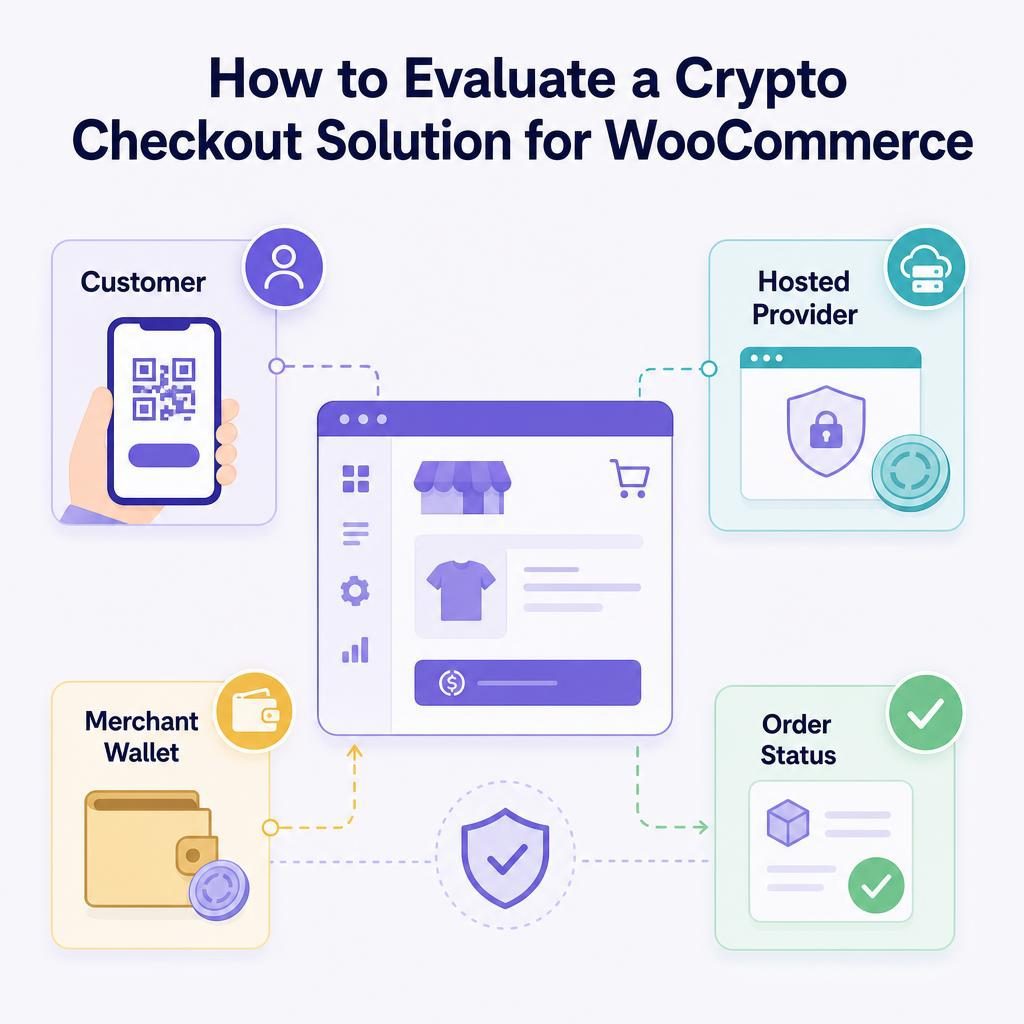
A crypto checkout solution for WooCommerce is more than a button that displays a wallet address. You need to know how your customer pays, who performs the financial steps, where settlement goes, and what proves an order is safe to fulfil. Two checkout buttons can look nearly identical while creating very different identity checks, support obligations, and order workflows.
Key Highlights
- Choose the customer payment path before comparing provider counts or coin lists.
- Confirm who owns KYC, card processing, conversion, settlement, refunds, and support.
- Test the actual settlement asset, network, and wallet before accepting live orders.
- Release fulfilment only after your selected verified-paid WooCommerce status appears.
- VERIFIED’s 4% infrastructure fee is separate from independent provider conversion fees.
- First use with a hosted provider may require government ID and a liveness check.
- VERIFIED subscription renewals begin from customer reminder links, not stored-card rebilling.
- Keep an order ID, provider, timestamp, and recorded payment state for every escalation.
What should a WooCommerce merchant compare before choosing a crypto checkout solution?
Compare the customer payment path, ownership of the financial tasks, settlement destination, WooCommerce confirmation process, and recovery and support model before comparing coin lists or headline fees. A checkout is a fit only when those working parts match how your customers buy and how your team can operate after the first order.
Here is the decision rule I generally recommend. Choose a wallet-payment path when your buyers already hold crypto and want to spend it. Evaluate hosted card-to-crypto checkout when buyers need to pay by card, Apple Pay, or Google Pay while you receive crypto in your wallet. These are separate customer journeys, not interchangeable labels.
If the second model is what you need, start with this explanation of the card-to-crypto payment flow. It makes the comparison work below easier to apply.
The checkout button is the visible part; responsibility for the money movement is the decision.
Start with the payment path your customers need
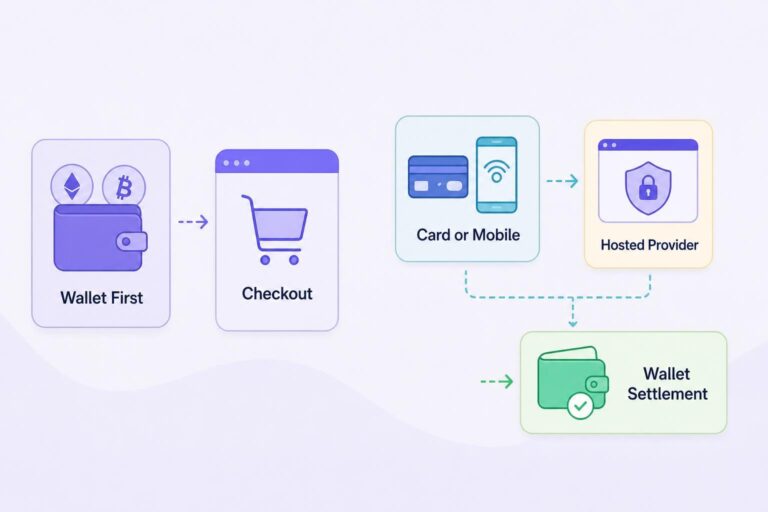
A wallet-first payment option asks a simple question: does your customer already have a crypto wallet and an asset they can send? If the answer is yes, checkout can show payment instructions or a QR code. The customer approves the transaction from their own wallet, and your order process waits for the required payment confirmation.
A hosted card-to-crypto path answers a different question: can someone without crypto pay with a familiar method while you receive crypto? The customer is routed to an independent hosted provider. That provider may collect KYC, meaning identity checks that can include government ID and a liveness check to confirm a real person is present. The provider performs card processing, converts the customer’s payment, and sends settlement to your wallet.
Settlement means delivery of the payment asset to the destination wallet. It is not the same as a screen saying that a customer finished checkout. Your store needs a dependable payment-confirmed signal before it treats an order as paid.
With VERIFIED Crypto Checkout, VERIFIED supplies WooCommerce checkout-routing infrastructure and payment operations. It routes customers to independent hosted providers; it does not handle card data or hold customer or merchant funds. The hosted providers perform KYC, card processing, conversion, and settlement.
| Choose this path | When it fits | What the customer does | Main tradeoff |
|---|---|---|---|
| Wallet-first payment | Your buyers already hold crypto and are comfortable sending it. | Approves a transaction from a personal wallet. | You are serving a narrower, crypto-ready audience. |
| Hosted card-to-crypto payment | Your buyers need card, Apple Pay, or Google Pay while you want crypto settlement. | Completes payment with an independent hosted provider. | First use may include provider eligibility checks and identity verification. |
There is one settlement point to test rather than assume. Current plugin documentation specifies USDC settlement on Polygon. However, the VERIFIED Crypto Checkout WordPress.org plugin listing says the routed provider chooses settlement at purchase time and may instead send another stablecoin, or a native coin such as ETH, POL, or BNB, on Polygon, Ethereum, or BNB Chain. A stablecoin is a crypto asset designed to track a reference value; Circle describes USDC as a dollar-backed stablecoin.
That difference matters operationally. Configure a wallet that can receive the possible assets on the named networks, then confirm the result with a controlled test order before you sell to customers. Do not treat USDC on Polygon as a universal result merely because it is the documented route. If your configured route, the provider’s live material, and the plugin documentation disagree about which asset arrives, ask plugin support and the routed provider to confirm before launch. Do not resolve that gap with an assumption.
A custodian holds funds or private keys for someone else. A payment processor processes card payments for a merchant. VERIFIED is neither in this model. It is payment infrastructure software that routes hosted checkout and records payment operations in WooCommerce.
Ask these two questions before comparing options
- Do my customers already hold crypto and want to spend it from their own wallets?
- Or do they need to pay with a card or mobile wallet while I receive crypto in my wallet?
If your answer is the second question, include provider eligibility and first-use KYC in your checkout plan. A practical product-page note might say: “Card and mobile-wallet payment is completed with an independent provider. First use may require an identity check.” Returning use with the same provider is usually faster, but that does not support a promise about any individual buyer’s result.
Map responsibility before you install anything
This corner of the industry still creates confusion, because the checkout interface and the financial service behind it are usually presented as one thing. They are not. Before you install anything, write down the responsible party for every job that matters when a payment succeeds, stalls, or needs a refund.
| Job that must happen | What you need to establish | Why it matters to your store |
|---|---|---|
| Customer payment entry | Does the customer enter card details with you or on an independent hosted page? | It changes the buyer journey and your direct exposure to card-data handling. |
| Identity and eligibility | Which provider performs KYC, and when can a customer be asked for it? | First-use identity checks can affect conversion and support volume. |
| Card processing and conversion | Which independent provider handles the card payment and conversion to crypto? | Provider terms and charges are separate from checkout software fees. |
| Settlement | Which asset and network arrive at which wallet address? | A correct asset sent to the wrong network or address is still an operational problem. |
| Order confirmation | What verified event changes a WooCommerce order to paid? | This is your control against shipping before payment is confirmed. |
| Refunds and disputes | What is the documented process, responsible party, and required information for a refund request? | You need a customer-facing policy before the first request arrives. |
| Customer support | Who handles eligibility, a failed provider attempt, an order issue, and a wallet question? | A clear handoff stops your team from promising answers it cannot give. |
A hosted checkout can reduce your direct handling of card information because card entry occurs with the hosted provider. It does not answer every security or compliance question for your business. The PCI Security Standards Council’s merchant guidance is a useful starting point for understanding why card-data handling and payment-page design matter. Confirm your own responsibilities with the relevant providers and advisers.
One traditional card-payments term is acquirer: the financial institution that enables a merchant to accept card payments. You do not need to become an acquirer expert to choose checkout software. You do need to know whether an independent provider, rather than your WooCommerce plugin, performs the card-payment role.
Put refunds into the map as well. A refund is not just an accounting line; it is a customer-support event that needs an owner, a record of the original order, and a clear explanation of what the customer should expect. The return path is not automatically symmetric: the buyer may have paid by card through a provider while you received crypto in your wallet. Settle the practical question with the provider before launch: who can return value, by which method, and what order evidence is required? Do not publish a refund timeline that you cannot support from the applicable provider terms.
If you cannot name the party that owns a payment failure, you do not yet have an operational payment plan.
Use the Checkout Responsibility Checklist
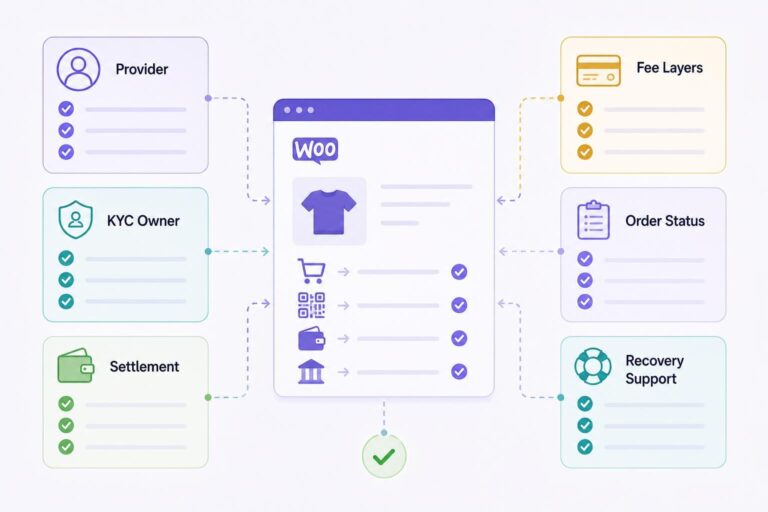
Use this named checklist during a demonstration, documentation review, or test-store setup. It is more useful than a ranking table because it asks what happens after the customer presses Pay.
- Payment source: Can the customer pay from an existing wallet, by card, by Apple Pay, or by Google Pay? Start with the options your actual buyers need, not the longest available list.
- Hosted or embedded design: Is the customer taken to a hosted provider page, or does payment occur inside your checkout? A hosted page makes the provider relationship visible. The main tradeoff is an extra page in the purchase path, and a possible first-use ID step, in exchange for clearer responsibility for identity checks and card processing.
- Provider and KYC ownership: Ask which party performs identity checks, what the customer sees, and where eligibility questions go. Set expectations plainly: “Your payment provider may request identity verification before completing your first purchase.”
- Settlement asset, chain, and wallet: Record all three. The documentation identifies USDC on Polygon, but the WordPress.org plugin listing says the routed provider chooses settlement at purchase time and may send another stablecoin or ETH, POL, or BNB on Polygon, Ethereum, or BNB Chain.
What to do: Configure a wallet able to receive the applicable assets on those networks, then verify the actual result in a test order. If route information and documentation conflict, ask plugin support and the routed provider to confirm which assets and networks your route can produce. - Fee layers: Separate checkout infrastructure fees from provider conversion fees. VERIFIED charges a 4% infrastructure fee; independent hosted providers charge separate conversion fees. Ask what each layer shows to you and to the customer before payment begins.
- WooCommerce order states: Identify how an order moves from pending payment or on-hold to processing or completed. Set one fulfilment trigger: only the verified paid status you selected as shippable should release goods.
- Missed payment messages: A webhook is an automated message from one system to another reporting an event, such as a payment update. Ask what records, on-chain checks, and exception process apply if that message is delayed or missed.
- Recovery: Establish whether an incomplete checkout can receive a new payment path and who qualifies. With VERIFIED, automated recovery is limited to eligible first-time VERIFIED customers with a confirmed provider attempt. Subscription renewals are excluded.
- Subscription model: Confirm whether renewal is automatic or customer-initiated. VERIFIED subscription renewals begin from reminder-email links; there is no stored-card automatic rebilling.
- Payment links and invoices: If you sell through email, support, or manual orders, check whether the system can create standalone payment links, invoices, and order-payment requests.
- Support and escalation: Put one support owner beside each likely failure: a KYC request, a declined provider attempt, an incorrect wallet, an order that has not updated, and a refund request. For every escalation, record the order ID, provider, timestamp, and recorded payment state before handing it off.
Test the three decisions that determine whether this route fits
If hosted card-to-crypto checkout fits your store, install the plugin on a test product. Set the wallet address and network, review how the 4% infrastructure fee is shown, and choose the verified order status that permits fulfilment. Then run a controlled order. Your test has a finish line when the order reaches that verified-paid status and you can match it to the ledger record and transaction hash where the ledger displays one.
You can also review how provider routing works in WooCommerce. VERIFIED supports single-provider and auto-routing modes across 20+ independent hosted crypto on-ramp providers. The useful question is not “how many providers?” by itself. It is whether your routing choice is visible, testable, and understandable when a customer does not complete the first attempt.
See how the decision works in a hypothetical order
Consider a hypothetical WooCommerce store selling a $100 product. The store wants mainstream customers to pay by card while the owner wants crypto settlement sent to a configured wallet.
The customer selects the crypto option and is routed to an independent hosted provider. On first use, that provider may request government ID and a liveness check. If the customer completes the provider flow, the provider performs card processing and conversion, then sends the selected settlement outcome to the store’s configured wallet. VERIFIED records payment operations and supports WooCommerce payment-state handling.
The fee calculation has two layers. VERIFIED’s stated infrastructure fee is 4% of the hypothetical $100 order, or $4. Independent provider conversion fees are separate. You should not present $4 as the complete cost of that payment. Review the provider-side display and terms for the route you plan to offer.
The main tradeoff is clear. Your customer can use a familiar card or mobile wallet without you taking card details or holding funds, but first provider use may involve identity verification and provider-specific eligibility. A store whose buyers are already crypto-native may choose a direct wallet-payment path instead of adding that step.
What happens when the order does not update
Hypothetical scenario: A customer says, “My payment is done,” but the WooCommerce order remains pending payment. Do not fulfil because the customer reached a return page or sent a screenshot. Check the checkout’s recorded payment status, the relevant on-chain confirmation or provider result, and the order notes. Release the order only when it reaches your defined verified-paid, shippable state.
There is an opposite failure as well: an order can remain held while payment state is unresolved. Give a named staff member an exception queue and a review path, so paid customers are not left waiting indefinitely. If you sell merchandise online, the FTC’s guidance on internet merchandise orders is relevant to how you communicate about shipping and delays. It does not replace payment controls, but it is a good reason to treat unresolved orders as an operating task rather than a forgotten status.
VERIFIED implements missed-webhook on-chain checks and a crypto ledger. In your exception record, look for the order reference, recorded payment state, relevant transaction hash where available, retry visibility, and a block-explorer link where available. Those tools can help reconcile a missed event; they do not remove the need for fulfilment controls and an assigned exception owner.
A customer redirect is a navigation event, not proof that your order is paid.
Test the operational edges before you go live
Set up a test product and walk through the parts that create support tickets. The aim is not to prove that a happy-path button works. The aim is to see who owns the next step when it does not.
1. Confirm the wallet destination
Copy the intended settlement address from a controlled wallet record. Confirm the network and asset beside it. A useful internal record shows the first and final characters of the address, network, asset, date checked, and the person who checked it. Do not take a wallet address from a pasted chat message or customer email. Because a routed provider may select an asset and network at purchase time, your wallet setup must cover the outcomes your route can produce.
2. Walk through the first-use customer experience
Review your product-page copy, checkout copy, and support response before launch. The provider may ask for identity documents on first use. A customer-facing explanation can be as simple as: “If identity verification appears, it is completed with the independent payment provider. For questions about your product or WooCommerce order, contact our store.” That tells the buyer what is happening without suggesting every checkout follows the same path.
3. Check confirmed-payment handling
Review what staff sees on the WooCommerce order screen after confirmation. Make the route from pending payment or on-hold to processing or completed explicit. Treat that verified-paid state as your settlement guard: it is the point at which your fulfilment team is permitted to release goods, not a customer redirect or an informal staff judgement. Document who can override it and what evidence they need for an exception. For the customer-facing side, see how WooCommerce payment confirmation pages should work.
4. Test an incomplete checkout and the recovery boundary
With VERIFIED, an eligible first-time customer with a confirmed provider attempt can receive a tokenized, no-login Pay Now link available for seven days. Tokenized means the link contains a unique access token so the customer does not need to sign in again. The link can include a fixed incentive, percentage incentive, or shipping credit. This is a recovery tool with a defined boundary, not a promise that every abandoned checkout receives a new link. Subscription renewals are not eligible.
What to do: Run an incomplete test checkout, then confirm whether the attempt meets the stated recovery conditions before writing customer messaging around it. Review the abandoned crypto checkout recovery explanation for the operating details.
5. Test payment links, invoices, and order-payment requests
If your team takes orders by email or creates custom orders in WooCommerce, send a controlled payment request. VERIFIED implements standalone payment links, invoices, and order-payment requests. Check that the recipient can identify what they are paying for and that your staff can match the payment to the correct order.
6. Test the subscription message accurately
Do not describe this as automatic card-on-file renewal. For VERIFIED, the customer receives a reminder email and initiates renewal from its link. That may suit products where an intentional customer payment is appropriate, but it does not replace conventional automatic recurring-card billing.
Choose based on the job you need done
Choose a wallet-first checkout model when you serve buyers who already use crypto and can reasonably pay from a wallet. Choose hosted card-to-crypto routing when buyers need card, Apple Pay, or Google Pay options and you want settlement sent directly to your configured crypto wallet.
Choose payment links and invoices when your sales process includes quotes, support-led orders, or payment-after-order requests. If you run a custom storefront rather than standard WooCommerce templates, involve your development team early and read the headless WooCommerce payments guide. Headless means the storefront front end is separate from WooCommerce’s usual theme pages, so checkout integration and order-state testing need deliberate engineering work.
For a standard WooCommerce store, plugin version 1.56.1 supports both Classic checkout and Blocks checkout. That is useful compatibility information, but it is not the whole selection decision. You still need to test your own theme, extensions, wallet destination, order workflow, and customer-facing wording.
Do not choose primarily on a long asset list, a low-looking starting fee, or a checkout screenshot. Those details can matter. They do not tell you who settles funds, who asks for ID, which asset reaches your wallet, or whether your warehouse might ship too soon.
The right option is the one your customers can complete and your team can explain after a payment does not go perfectly.
Run one controlled WooCommerce order before you launch
Install the plugin on a test product, then verify the provider path, wallet settlement, confirmed order status, and support handoff. Finish the evaluation only after the order reaches the verified-paid status you selected and the payment record can be matched in the ledger.
About VERIFIED Crypto Checkout
VERIFIED Crypto Checkout is WooCommerce payment infrastructure software for merchant-wallet settlement, hosted provider routing, payment links, invoices, and payment-state operations. It is not a payment processor, bank, money transmitter, exchange, acquirer, or custodian. VERIFIED does not handle card data or custody funds; independent hosted providers perform KYC, card processing, conversion, and settlement in the hosted card-to-crypto flow.
Learn more about VERIFIED Crypto Checkout, review what the product does, or contact the team through the contact page with your store setup questions.
Further Reading
About the Author: Brad Ungar
