
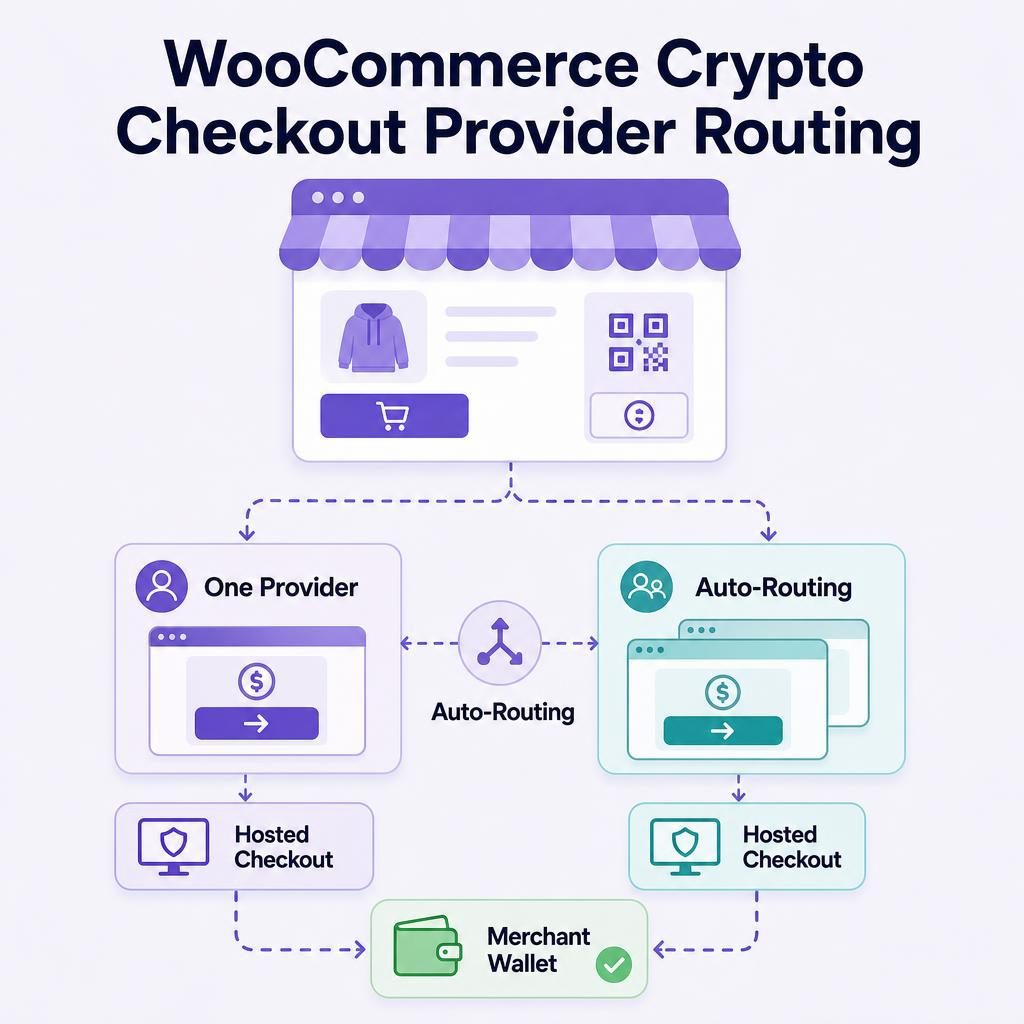
WooCommerce crypto provider routing decides which independent hosted provider your customer reaches after choosing VERIFIED at checkout. In my judgement, most stores should start with auto-routing, then test the hosted journey, WooCommerce order record, and wallet settlement as one process before normal fulfillment. This guide explains the choice, the limits around it, and the checks worth making before you rely on it.
Key Highlights
- Start with the route that fits your customer geography and support capacity.
- One provider favors a more familiar repeat-buyer journey.
- Auto-routing offers a choice among available hosted routes for each attempt.
- Independent providers decide KYC, card acceptance, conversion, and settlement.
- A returning customer may see a different provider on a later order.
- VERIFIED charges a 4% infrastructure fee; providers charge separate conversion fees.
- Fulfill only after your defined payment-confirmation checks are complete.
- Confirm the current settlement asset and network in product documentation before launch.
Should I use one hosted provider or auto-routing for WooCommerce crypto checkout provider routing?
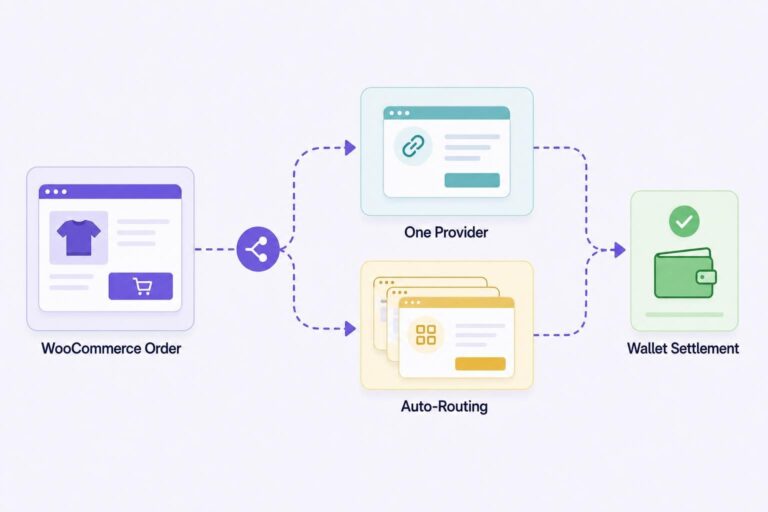
Use auto-routing for most WooCommerce stores; choose one hosted provider when repeat-provider familiarity matters more than having alternative hosted routes available.
VERIFIED Crypto Checkout version 1.56.1 supports WooCommerce Classic and Blocks checkout and routes customers to more than 20 independent hosted crypto on-ramp providers. An on-ramp provider is a business that accepts a conventional payment method, such as a card or mobile wallet, then handles conversion into a crypto settlement flow. In auto-routing mode, VERIFIED selects from provider routes that are available for that payment attempt.
The main tradeoff is continuity versus route choice. A single-provider setting can give returning buyers a familiar hosted journey. With auto-routing, that same buyer may see a different provider on a later purchase. In return, your checkout can draw on available provider routes at that moment rather than depending on one fixed provider integration.
That benefit has one clear boundary. Auto-routing cannot make a provider approve a buyer, accept a card, offer a particular payment method, complete KYC, or settle by a particular time. Each independent provider decides availability, identity checks, card acceptance, conversion, and settlement for its own transaction.
What provider routing actually controls
Provider routing is the rule that determines which independent hosted provider a customer reaches after selecting VERIFIED at checkout. It is narrower than card processing. Routing selects a possible hosted path; it does not decide whether a card works, whether a customer passes identity verification, whether Apple Pay or Google Pay appears, or whether settlement completes.
VERIFIED is payment infrastructure software for WooCommerce. It is not a payment processor, bank, money transmitter, exchange, acquirer, or custodian. An acquirer is a financial institution in the card-payment system that enables card acceptance. A custodian holds funds or private keys for someone else. VERIFIED does neither: it does not handle card data or custody funds.
The selected provider runs its own hosted payment and identity screens. It performs KYC, card processing, conversion, and settlement directly to your configured wallet. KYC, short for Know Your Customer, is identity verification. On a first use with a provider, a buyer may need government ID and a liveness check, an on-screen check intended to confirm a real person is present. In practical terms, that can mean photographing a driver’s licence and following a camera prompt. Returning use with that same provider is usually faster, but that is not a promise that identity checks will never reappear.
A hosted checkout keeps those steps in the provider’s environment rather than inside your WooCommerce site. That is the point of the model: the provider owns the card and identity process, while your store receives payment-state information for the order. The hosted checkout explainer covers that separation in more detail.
- Your customer creates a WooCommerce order. They choose VERIFIED instead of entering card details directly into your store checkout.
- The customer enters a hosted provider checkout. Your routing mode determines whether the customer is directed to one selected provider or an available route is selected automatically.
- The provider runs identity and payment steps. It may request KYC, assess the card, and present card, Apple Pay, or Google Pay options for that transaction.
- The provider converts and sends settlement. Settlement is the transfer of converted payment proceeds to your merchant wallet.
- Your store verifies payment before fulfillment. VERIFIED has a crypto ledger and missed-webhook on-chain checks. A webhook is an automated message that reports a payment-status event.
For the customer-side sequence, read how card-to-crypto payments work. Keep the division of responsibility clear for your staff: routing chooses a hosted path, and the provider controls the payment and identity decision inside that path.
Routing chooses a hosted path; it does not decide whether a provider accepts a particular customer, card, or transaction.
When auto-routing is the better starting point
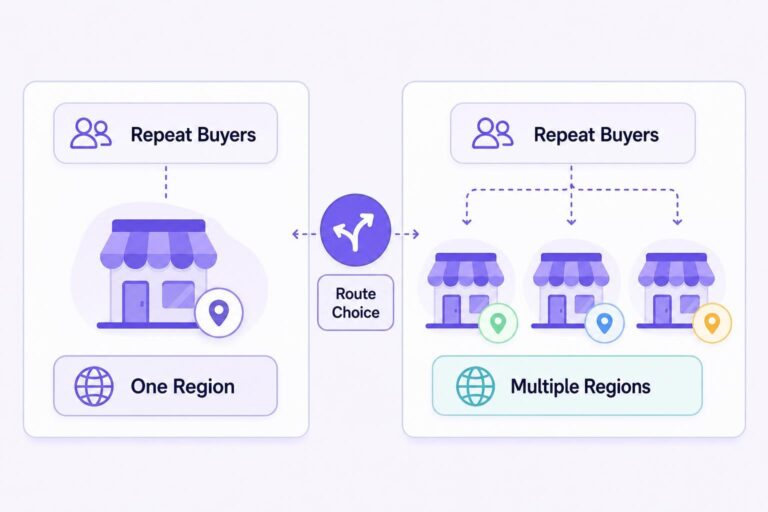
I generally recommend auto-routing if you sell across several regions, if you do not yet know where most buyers will come from, or if one provider journey is not central to your repeat-purchase strategy. It gives each new attempt access to the provider routes available at that time.
That does not mean a failed attempt is automatically retried through another provider. It also does not mean a buyer will see the same provider on a future order. Treat auto-routing as a way to select among available hosted paths, not as a promise of approval or a repair mechanism for an incomplete payment.
A single-provider route is worth considering when your buyers are concentrated, you have reviewed that provider’s hosted journey for your core market, and familiar screens have real value. A business with a steady group of returning customers may reasonably prefer that consistency over the broader route choice that auto-routing offers.
Confirm the settlement asset and network before choosing your launch wording
Current plugin documentation specifies USDC settlement on Polygon. USDC is a digital dollar token, and Polygon is the blockchain network named in that documentation. For general background, see Circle’s explanation of USDC.
Live pages may describe additional hosted-flow payout assets. Do not resolve that difference by assumption. Before publishing customer wording or accepting live orders, confirm which current documentation applies to your configuration and test the asset and network that actually arrive in your receiving wallet. The WooCommerce USDC settlement guide provides context for that review.
| Decision criterion | Choose one hosted provider when | Choose auto-routing when |
|---|---|---|
| Customer geography | Your buyers are concentrated in a market that fits the provider journey you have reviewed. | You sell across several regions and want each attempt to use an available route. |
| Repeat purchases | Seeing a familiar provider flow matters to returning buyers. | Serving varied buyer locations matters more than repeat-provider continuity. |
| KYC and acceptance friction | You have tested one provider journey with your intended customer segment. | You want more than one possible hosted path, while accepting separate provider checks. |
| Payment methods | You have tested the payment methods your core buyers are likely to use. | You need to test cards and mobile wallets across the markets you serve. |
| Support workflow | Your team needs one expected provider journey to explain. | Your team can explain why the provider shown may differ by buyer or transaction. |
| Test cadence | You can retest the selected route after a relevant change. | You can keep records of controlled tests across regions and payment methods. |
A hypothetical store decision
Imagine a hypothetical WooCommerce store selling digital training materials. Four out of five buyers are in one country, and many return for a second course. The owner has reviewed one hosted provider journey and considers familiar identity and payment screens useful for returning buyers. A single-provider configuration is reasonable to assess first, provided the owner has a support plan if the provider journey is unavailable to a particular buyer.
Now change the facts. The store receives orders from several regions, most purchases are one-time, and the owner cannot predict which provider route may fit a buyer’s location or payment method. Auto-routing is the stronger starting point. The owner should tell support staff that the hosted provider can differ between purchases.
Choose a routing mode your support team can explain without guessing why a provider accepted or declined an attempt.
In your first five minutes after installation, choose the routing mode you plan to test, confirm your receiving wallet details, and create a hidden test product. You can install the VERIFIED Crypto Checkout plugin from WordPress.org when you are ready to run that controlled test.
What your customer sees and where checkout can stop
Your customer sees two stages. First, they build a cart and choose VERIFIED in WooCommerce. Then they complete a card-to-crypto purchase in the hosted provider environment.
Most uncertainty sits in the second stage. First use with a provider may involve KYC and a liveness check. A buyer may also encounter regional eligibility limits, card eligibility, payment-method availability, or provider-specific conversion fees. Auto-routing does not remove those checks. It only means the checkout is not tied to one selected provider route.
Be clear about the two fee layers. VERIFIED charges a 4% infrastructure fee. Independent providers charge separate conversion fees. As simple hypothetical arithmetic, a 4% infrastructure fee on a $100 order is $4 before any provider conversion fee. Decide before launch whether your store absorbs that infrastructure fee or passes it on, then ensure the customer-facing price matches your configuration.
Do not tell customers that KYC never happens. A more accurate statement is: “Card-to-crypto checkout is completed with an independent hosted provider, which may ask for identity verification.” The KYC and AML crypto checkout guide explains the merchant-side boundary.
A first-time identity check is not a failed checkout; it is a provider verification step the buyer may need to complete.
Set up your support wording with the route
You control the WooCommerce configuration, routing mode, wallet details, order-status rules, and customer-facing wording. The hosted provider controls its KYC requests, service availability, card acceptance, conversion terms, and settlement decisions.
If a buyer cannot complete the hosted flow, do not guess at the reason or tell them another attempt will be accepted. Ask for the WooCommerce order number, the provider name shown, the approximate attempt time, and the customer’s country or region if they are willing to share it. Check whether the order records a confirmed attempt, then direct the buyer to the appropriate provider or your store support path.
A useful internal reply is: “The hosted provider makes card and identity decisions for that payment attempt. We can check your order status and confirm whether payment was received, but we cannot approve the attempt for the provider.”
Customer-facing wording you can adapt
“After you place your order, you will complete payment with an independent hosted card-to-crypto provider. The provider may ask for identity verification and will show available payment options and conversion terms before you complete the purchase. We process fulfillment after payment confirmation.”
Do not name a provider when you use auto-routing, because the buyer may see a different provider. Do not state a settlement time, because the provider determines that part of the transaction rather than your store.
If you sell subscriptions, set expectations before launch. Renewals are customer-initiated from reminder-email links; there is no stored-card automatic rebilling. The crypto subscription payments guide explains the customer-initiated renewal model.
Run a controlled provider-routing test before launch
Do not save a routing setting and assume the work is finished. A small, real controlled order lets you inspect the customer path, WooCommerce order state, and wallet record together.
1. Confirm the intended route and wallet instructions
Confirm the wallet address that should receive settlement. Then review the current VERIFIED product documentation for the applicable settlement asset and network. Your wallet should be able to receive the documented asset on the documented network. Sending an asset to the wrong network is a practical operational error, not a checkout feature that routing can correct.
2. Create a hidden, low-value test product and place an order
Create a hidden $10 test product before you begin live selling. That amount is a hypothetical example, not a required test value. The point is to use a real order that you can find quickly without mixing the test into normal fulfillment.
Record the routing mode, provider screen shown, payment status in WooCommerce, and settlement record in the destination wallet. If you serve several geographies, repeat the test where you can lawfully do so with representative payment methods. One successful test does not establish what every customer will see.
3. Confirm the order before fulfillment
Do not fulfill because a customer says they paid or sends a screenshot. Check the order’s payment state and the settlement evidence you chose as your launch rule. VERIFIED includes a crypto ledger and missed-webhook on-chain checks to help reconcile payment state.
Use a plain rule your staff can follow. For example: “Ship only when the order has reached the paid status our controlled test produced and the VERIFIED ledger shows a matching on-chain transaction for the full order total.” Adjust that model rule to suit your products, fraud controls, and delivery speed. A digital download delivered in seconds may need a different review process from a physical product that ships the next day.
WooCommerce’s order-management documentation shows where staff can review order status.
4. Check what an incomplete attempt looks like
Stop a controlled attempt before completion, then review what the customer and your support team can see. An abandoned provider attempt is not a settled payment. Find the order, confirm its actual status, and make sure nobody ships against it.
For eligible first-time VERIFIED customers with a confirmed provider attempt, automated recovery can send a seven-day tokenized no-login Pay Now link. It can include a fixed incentive, percentage incentive, or shipping credit. Subscription renewals are excluded. Read the limits in the abandoned crypto checkout recovery guide before making it part of your support process.
An abandoned provider attempt is not a settled payment, so it is never a reason to ship.
Review the routing choice after a material change
Review the setting when your sales pattern changes: you begin selling into new regions, returning buyers become more important, you change wallet configuration, or support repeatedly sees the same provider-path question. Run another controlled order and update your customer wording if the actual journey has changed.
The practical response to a route problem is simple: confirm the order’s actual payment state, do not fulfill an incomplete attempt, and ask the buyer to use the route your current checkout presents rather than promising a particular provider. Keep a short support reply ready, and keep records of the tests that established your fulfillment rule.
Do not rely on an automatic fallback from a single-provider route to auto-routing. The trigger conditions for any such behavior, and the WooCommerce administration location where you would review it, are not documented here. Until current product documentation confirms the exact conditions, treat your selected routing mode as something you must review and test after a material change, not as an automatic failover promise.
Set the route, then prove the workflow
Install the plugin, choose one hosted provider or auto-routing, and place a controlled test order. Review the hosted journey, WooCommerce order state, and direct wallet settlement before you use the flow for normal fulfillment. If you need setup references while testing, start in the VERIFIED documentation hub.
About VERIFIED Crypto Checkout
VERIFIED Crypto Checkout is WooCommerce payment infrastructure software. It routes customers to independent hosted providers for card-to-crypto checkout and supports payment instructions, payment-state verification, payment links, and order workflows. It is not a payment processor, bank, money transmitter, exchange, acquirer, or custodian. VERIFIED does not handle card data or custody merchant funds.
Independent providers perform their own KYC, card processing, conversion, and direct settlement decisions. For setup details, visit the documentation hub. Learn more on the About page or contact the team through the contact page.
Further Reading
- WordPress.org: VERIFIED Crypto Checkout plugin listing
- WooCommerce documentation: Managing Orders
- Circle: USDC information
Frequently Asked Questions
Will auto-routing retry a failed card-to-crypto checkout through another provider?
No automatic retry should be assumed. Auto-routing selects from hosted provider routes available for a payment attempt, but it does not promise that a failed or abandoned attempt will be sent to another provider. Check the actual order state and follow the checkout path presented to the customer.
Can I promise customers they will always see the same hosted provider?
No. A single-provider configuration is intended to create a more consistent provider journey, but provider availability and transaction decisions remain independent of VERIFIED. In auto-routing, a customer may see a different provider on a later order.
What should I do if a live page describes a settlement asset that differs from plugin documentation?
Do not publish a promise based on the conflicting page. Confirm the current documentation that applies to your configuration, then complete a controlled test and verify the asset and network received by your merchant wallet before you begin normal fulfillment.