
Written by Brad Ungar | Founder, VERIFIED Crypto Checkout
Brad Ungar builds payment infrastructure for WooCommerce merchants who need card-to-crypto checkout, hosted provider routing, payment links, and subscription flows that settle directly to a merchant wallet.
Product review: VERIFIED Crypto Checkout engineering
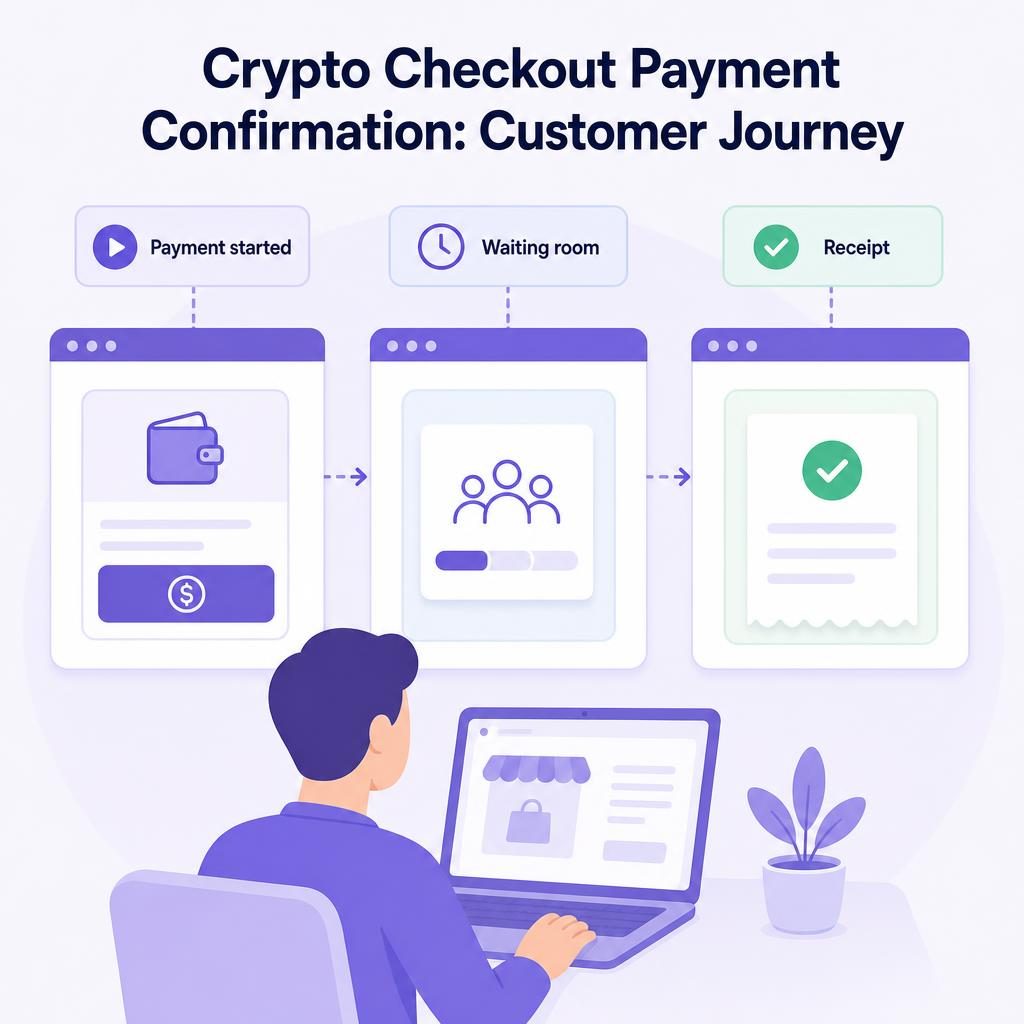
A crypto checkout payment confirmation is the part of the customer journey after a buyer completes a hosted payment attempt and before your WooCommerce store can show a confirmed order. This guide explains what the buyer sees during that interval, why the waiting screen matters, and how to test the path before you rely on it. Last Updated: August 2026
Key Highlights
- A clear waiting state tells customers that a payment result is still being checked rather than implying an order is complete too early.
- VERIFIED includes a branded hosted waiting room and thank-you/receipt experience that is enabled by default.
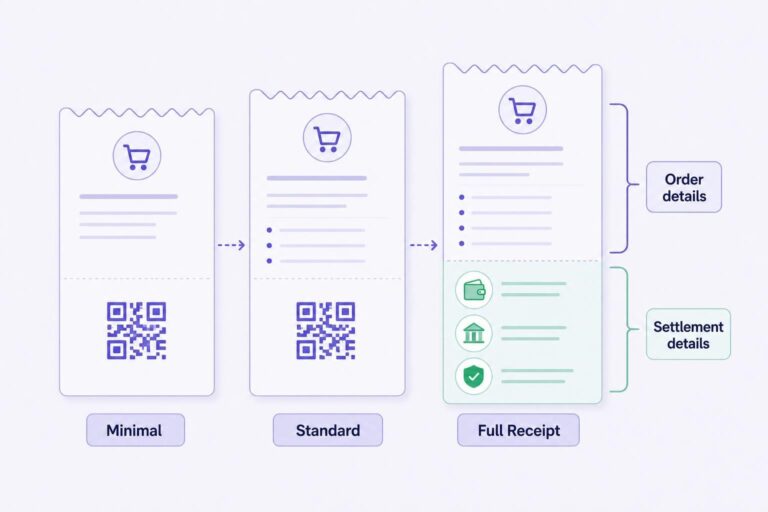
- Minimal, Standard, and Full Receipt views let you choose how much order information appears after payment is detected.
- The Full Receipt can show order items, totals, billing details, and verified crypto settlement details.
- Payment-state hardening hides payment and retry controls once payment is detected and stops a reload from briefly showing a Pay button again.
- When a customer says payment is stuck, check the WooCommerce order record and VERIFIED Ledger before suggesting another attempt.
- Independent hosted providers perform KYC, card processing, conversion, and settlement directly to your wallet; VERIFIED does not handle card data or custody funds.
Direct Answer: What happens after a crypto checkout payment?
After a customer starts a crypto checkout payment, they move from the hosted provider flow to a waiting screen while the result is checked, then to a receipt when payment has been detected. That sequence gives the customer one clear place to stay while the hosted payment flow and the WooCommerce order record come into line. It also removes payment controls once those controls no longer apply.
With VERIFIED, the customer-facing waiting room and thank-you/receipt experience are hosted and branded. The WooCommerce payment confirmation page is where you can review or enable the feature. Here, the focus is the practical question behind it: what your buyer experiences, what can create uncertainty, and what you should check before sending live customers through the flow.
Why the minutes after payment need their own screen
Most buyers know the normal card-checkout rhythm: submit payment, wait, and see an order confirmation. A card-to-crypto flow has an additional handoff. VERIFIED is payment infrastructure software, not a payment processor. It routes the buyer to an independent hosted provider. That provider handles card processing, card-to-crypto conversion, and settlement, meaning the transfer of the resulting payment directly to your merchant wallet.
This division matters because a buyer can finish the provider’s steps before your WooCommerce store has received and recorded the payment result. If the buyer is left on an old checkout page with an active Pay button, they have no useful way to tell whether they should wait, retry, or abandon the order.
A hosted waiting room gives that moment a proper home. It tells the buyer that the payment is being checked and gives them a next step that does not involve refreshing the original checkout or opening a second payment attempt.
A good confirmation screen replaces guesswork with a clear next step.
The waiting room is not proof that funds have settled. It is an honest customer message while the result is still being confirmed. For a wider explanation of the handoff, see how hosted checkout works. If you are still deciding how to describe the payment method to customers, the overview of card-to-crypto payments is a useful starting point.
What your customer sees in a crypto checkout payment confirmation
The exact screens inside a provider flow can vary because VERIFIED routes to independent hosted providers. The customer journey in your store should still follow a simple sequence. The table separates what the buyer sees from what your store is waiting to record. Use it when writing checkout copy and training the person who answers order questions.
| Stage | What the customer sees | What your store is doing | What you should tell the customer |
|---|---|---|---|
| Payment started | The buyer selects the card-to-crypto option and enters a hosted provider flow. | WooCommerce retains the order record while the buyer completes the hosted steps. | Complete the provider steps, then follow the confirmation screen rather than returning to checkout. |
| Provider attempt completed | The buyer reaches the branded hosted waiting room. | The payment result is being checked and reported back to the order flow. | Wait on this screen. Do not start a second payment attempt. |
| Payment detected | The buyer sees the thank-you/receipt view selected for your store. | The order has a reported payment result and the old payment controls no longer apply. | Use the receipt and WooCommerce order number if you need support. |
| Result not yet available | The buyer may still see the waiting room rather than a final receipt. | The plugin can perform missed-webhook on-chain checks for pending or recently cancelled orders; orders without sufficient settlement proof are held rather than made shippable. | Do not retry yet. Ask the store to check the existing order first. |
1. The customer chooses the payment method
At WooCommerce checkout, the customer selects the available card-to-crypto option and starts payment. They are then routed into a hosted provider flow. On first use with a provider, the buyer may need to complete KYC, short for “Know Your Customer,” an identity check that can include government-issued identification and a liveness check to establish that a real person is present.
Returning use with the same provider is usually faster, but do not tell buyers that identity checks never happen. A short checkout note is usually enough: “The payment provider may ask you to verify your identity.” For a fuller explanation, see KYC and AML in crypto checkout. AML means anti-money-laundering controls, the broader checks providers may use when assessing payment activity.
2. The customer completes the hosted provider steps
The provider, not VERIFIED, collects the information needed for its hosted flow. VERIFIED does not handle card data or custody funds. Custody means holding or controlling someone else’s money or crypto assets. The provider converts the payment and sends settlement directly to the wallet you configured.
Depending on the provider flow presented to the customer, they can pay by card, Apple Pay, or Google Pay. Avoid describing this as a card payment processed directly by your WooCommerce store. The buyer may see the hosted provider’s own screens or confirmation language, and your wording should prepare them for that handoff rather than make it look unexpected.
3. The buyer reaches the hosted waiting room
After the provider attempt, the buyer reaches the branded waiting room. This is the bridge between “I completed the payment steps” and “the store has a result it can use.” The useful instruction is simple: stay on this screen and do not reload the original checkout page or begin another payment attempt.
4. Payment is detected and the receipt is shown
When payment is detected, the experience moves to the thank-you/receipt view. VERIFIED includes payment-state hardening: it hides retry and payment controls after payment is detected. It also prevents a page reload from briefly re-exposing a Pay button after payment has already been reported.
That detail matters more than it sounds. A buyer who sees a Pay button again, even briefly, may reasonably assume the first payment failed. Removing controls that no longer apply helps the receipt feel like the end of one transaction, not an invitation to start another.
Choose the receipt detail that fits the order
The hosted receipt supports Minimal, Standard, and Full Receipt views. The practical question is not “Which view has the most information?” It is “What will help a buyer recognize this order and give your support team a useful shared reference?”
| Receipt view | What it is for | What to check before using it |
|---|---|---|
| Minimal | A short completion message for stores that want the receipt to stay focused. | Make sure your normal WooCommerce emails still give the buyer enough order-reference information. |
| Standard | A middle-ground confirmation where the buyer needs a clearer order reference without a full detail set. | Review it on desktop and mobile with a real test order. |
| Full Receipt | A fuller record that can show order items and totals, billing details, and verified crypto settlement details. | Confirm that the details match what your support team can actually use when answering an order question. |
“Verified crypto settlement details” means information shown after the flow has verified the payment state. Treat the receipt as an order reference, not a place to make promises the payment flow has not confirmed.
There is one product-documentation point to handle carefully. Current plugin documentation describes USDC on Polygon as the intended settlement route. Some live pages may describe additional payout assets in hosted flows. Do not resolve that contradiction by assumption or publish a broader asset claim because one page appears to say more. Check the current VERIFIED documentation or ask support before you put settlement-asset wording in customer-facing copy.
Hypothetical example: what a useful Full Receipt answers
Imagine that a customer buys a $45 product and a $10 accessory, with $5 shipping, for a $60 total. A useful receipt lets them recognize the items and total, see the billing details they entered, and view the available verified settlement details. If they contact you later, you and the buyer can refer to the same record: “Order 1842, total $60, two listed items.”
Keep fee explanations separate from the receipt. VERIFIED charges a 4% infrastructure fee, and independent providers charge separate conversion fees. The fee transparency guide explains that distinction in more detail.
Set expectations before the customer needs reassurance
The best confirmation experience begins before the buyer pays. You do not need a long technical explanation at checkout. You do need a sentence that tells the truth about the handoff.
A practical message might read: “You’ll complete payment in a hosted provider flow. The provider may ask you to verify your identity. Return to the confirmation screen while we confirm your order.” Adjust that language to fit your store voice, but do not promise that KYC will not be required or that settlement will occur at a particular time.
Tell customers what to do next, not what you cannot responsibly promise.
Prepare your support team for the first question
Most post-payment questions are straightforward: “Did it go through?”, “Why am I waiting?”, or “Where is my receipt?” Give your team a short internal script:
- Ask for the WooCommerce order number and the email used at checkout.
- Ask which screen the customer sees: provider flow, waiting room, or receipt.
- Ask whether the customer completed an identity request, if one appeared.
- Tell the customer not to start another payment while the existing attempt is being checked.
- Review the order record and available payment status before advising a retry.
Do not ask customers to send card details by email or chat. The PCI Security Standards Council’s merchant resources explain the importance of protecting payment account data. In this model, card handling occurs in the independent provider’s hosted flow, while your support process should stay focused on the order reference and payment state.
Keep confirmation separate from fulfilment
A payment receipt and a fulfilment notice solve different problems. The receipt tells the buyer what has been confirmed about the order and payment state. Your shipping, download, appointment, or service workflow tells them what happens next with the purchase. Keep those messages distinct, especially if some orders need manual review or stock confirmation.
WooCommerce’s official Managing Orders documentation is useful when reviewing how your store handles order statuses and fulfilment. Your own fulfilment process should determine when a confirmed order moves to the next operational step.
Test the customer journey before you promote it
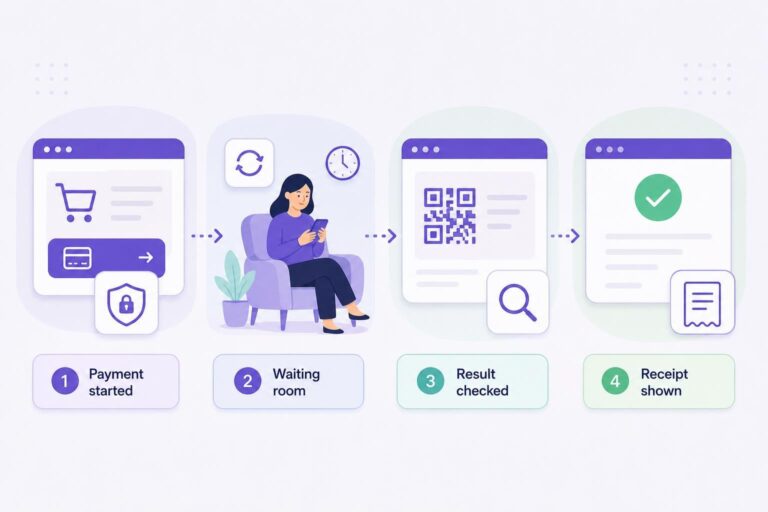
If you are still setting up the flow, install the plugin before you write customer-facing promises about it. Then run one controlled test order as if you were your least technical customer. Do not stop when you see a successful order in WordPress admin; look at the screens in the same order your buyer sees them.
- Start at your real checkout. Check the payment-method label, explanatory text, and order summary.
- Enter the hosted flow. Note where the customer leaves your site and what instruction tells them what happens next.
- Review the waiting room. Make sure its branding and wording make sense to someone who has never used card-to-crypto checkout.
- Review the selected receipt view. Check that items, totals, and billing details appear as you expect for that order type.
- Reload after payment is reported. Confirm that an obsolete Pay or retry control does not reappear.
- Check the WooCommerce order record, VERIFIED Ledger, and customer email. Make sure your staff can match the customer’s receipt and ledger entry to the order they will see in admin.
How to handle “I paid and nothing happened”
Start with the WooCommerce order record. It remains your store’s order record, so check the order and its available payment status before telling the buyer to retry. Then use the VERIFIED Ledger, the plugin’s crypto payment record, as a second check on the payment information available to your store. Payment timing is not guaranteed, and a waiting screen is not a reason to assume that an attempt failed.
For pending or recently cancelled orders, the plugin performs missed-webhook on-chain checks. A webhook is an automated message that tells one system about an event in another system; a missed webhook is simply a result that was not received through that normal message path. Orders without sufficient settlement proof are held rather than made shippable.
Check the existing order before you turn one uncertain payment into two payment attempts.
A simple troubleshooting sequence
- Ask the buyer for the WooCommerce order number and the email used at checkout.
- Ask which screen they see now and whether they completed any provider identity request.
- Check the WooCommerce order record, then the VERIFIED Ledger.
- For an eligible pending or recently cancelled order, allow the plugin’s missed-webhook on-chain check to inform the existing order review.
- Tell the buyer not to submit another payment while you check the existing attempt.
- If you need help, submit the order reference, your plugin version, relevant checkout details, and redacted screenshots through VERIFIED support tickets.
If you sell through more than one path, test each path separately. A storefront checkout, an order-payment request, and a standalone payment link can give the buyer different context. VERIFIED implements payment links, invoices, and order payment requests; the request a payment page explains how those collection tools fit into follow-up payment collection.
When to ask a question instead of making an assumption
The waiting room and receipt feature is enabled by default, but the right presentation still depends on your store. The available product record does not specify every limitation, exception, or interaction with every WooCommerce extension. If your checkout is heavily customized, headless, multilingual, or connected to a specialised fulfilment workflow, test it and ask before you promise a specific behaviour to customers.
Useful questions to send with a support request include:
- Which receipt view suits my order type?
- Which fields appear in my current configuration?
- How does the hosted experience behave with my checkout customization?
- Which settlement asset may I accurately describe in customer messaging?
- What details should I collect when a buyer remains on the waiting room?
When you are ready to review the feature itself, return to the WooCommerce payment confirmation page. It is the right next stop for enabling or reviewing the hosted waiting room and thank-you receipt experience.
Test the confirmation path your buyers will actually use
Install the plugin, run a controlled order through your own checkout, and compare the waiting room and receipt with the messages your customers receive. Use the documentation and support channel to resolve configuration questions before you promote the flow publicly.
About VERIFIED Crypto Checkout
VERIFIED Crypto Checkout is payment infrastructure software for WooCommerce. It routes customers to independent hosted providers for card-to-crypto payment flows. Those providers perform KYC, card processing, conversion, and settlement directly to the merchant wallet. VERIFIED does not handle card data and does not custody customer or merchant funds.
Learn more about VERIFIED Crypto Checkout and read what VERIFIED Crypto Checkout is. For product and account questions, use the contact page or submit a support ticket.
Further Reading
Frequently Asked Questions
What is a crypto checkout payment confirmation?
A crypto checkout payment confirmation is the customer-facing stage after a buyer starts a hosted payment flow and before or when the store can show the reported payment result. It helps the buyer understand whether they should wait, review a receipt, or contact support.
What is the hosted waiting room in VERIFIED Crypto Checkout?
The hosted waiting room is a branded customer screen shown while the payment result is being checked after a hosted provider attempt. It is designed to keep the customer from guessing whether to reload, retry, or leave checkout.
What should I do if a customer says they paid but nothing happened?
Check the WooCommerce order record and VERIFIED Ledger before advising a retry. For pending or recently cancelled orders, the plugin performs missed-webhook on-chain checks. Orders without sufficient settlement proof are held rather than made shippable, and payment timing is not guaranteed.
Can a customer accidentally pay twice after payment is detected?
VERIFIED includes payment-state hardening that hides retry and payment controls once payment is detected. It also prevents a reload from briefly re-exposing a Pay button after payment has already been reported. You should still tell customers not to begin a new attempt while an existing payment is being checked.
What can the Full Receipt show?
The Full Receipt can show order items and totals, billing details, and verified crypto settlement details. Review the configured view with a real test order before relying on it in customer communications.
Does VERIFIED process the customer’s card payment?
No. VERIFIED is payment infrastructure software that routes customers to independent hosted providers. Those providers handle card processing, conversion, KYC where required, and settlement directly to the merchant wallet. VERIFIED does not handle card data or custody funds.
Will every customer need identity verification?
No universal outcome should be assumed. First use at a provider may require government ID and liveness KYC, while returning use with the same provider is usually faster. Tell customers that a provider may request verification rather than promising that it will not.
Which settlement asset should I mention on my receipt or product page?
Use current product documentation rather than assumptions. Current plugin documentation describes USDC on Polygon as the intended settlement route. If another live page appears to describe additional hosted-flow payout assets, ask VERIFIED support to clarify the current supported configuration before publishing a broader claim.
About the Author: Brad Ungar
