
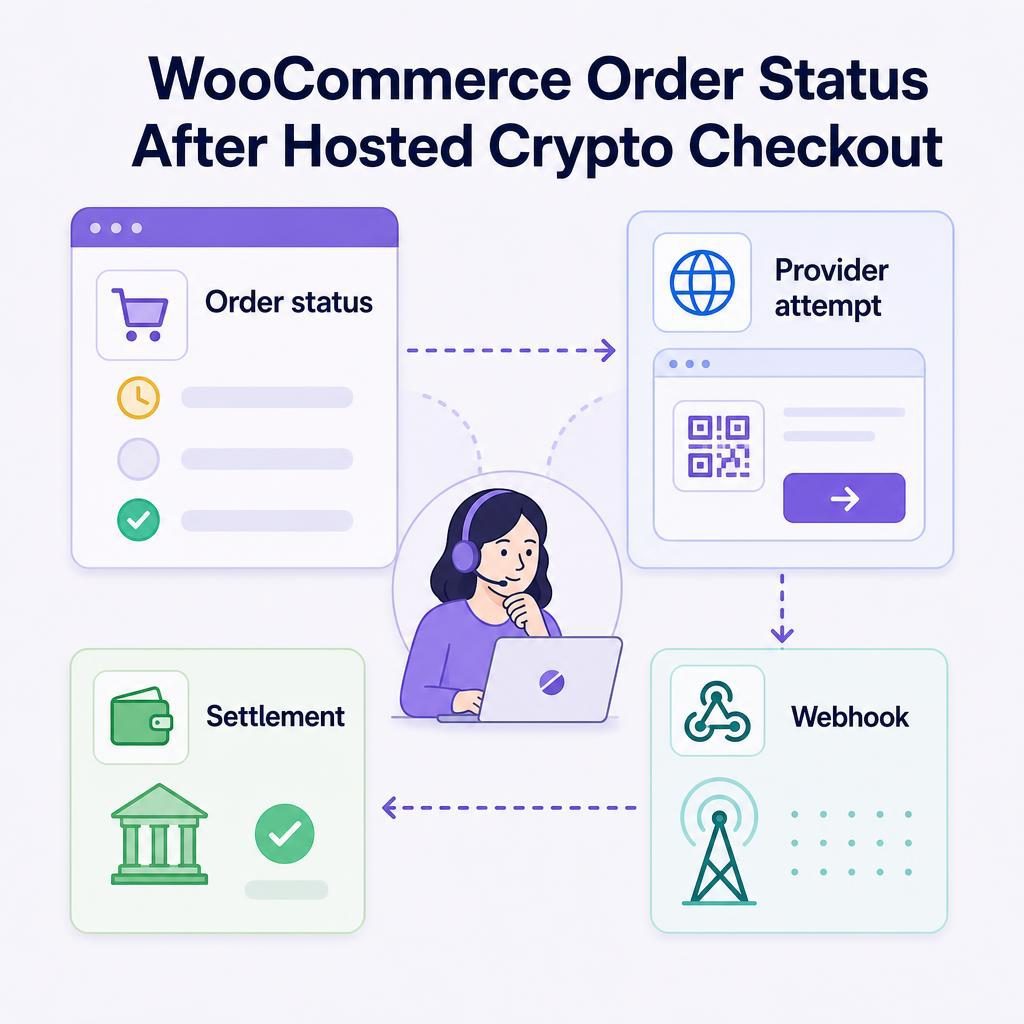
After a hosted card-to-crypto checkout, a WooCommerce order can show Pending payment or Failed even though the customer took a real payment step. My recommendation is simple: do not fulfill the order and do not ask the customer to pay again until you reconcile the payment trail. This guide shows your support, operations, and development teams what to check, in what order, and how to record the decision.
Written by Brad Ungar | Founder, VERIFIED Crypto Checkout
Brad Ungar builds payment infrastructure for WooCommerce merchants who need card-to-crypto checkout, hosted provider routing, payment links, and subscription flows that settle directly to a merchant wallet.
Product review: VERIFIED Crypto Checkout engineering
Key Highlights
- A WooCommerce status is evidence, not the complete payment record for a hosted payment.
- Check the original provider attempt before fulfillment, cancellation, or a new payment request.
- A return-page message or bank-notification screenshot does not by itself confirm settlement for an order.
- A provider-declared failure and a missing confirmation need different next steps.
- Use a missed-webhook on-chain check only after matching the original order and provider attempt.
- Compare expected value, wallet details, asset, and network before releasing fulfillment.
- Automated recovery is separate from confirming whether an earlier payment completed.
How should you read WooCommerce order status after hosted checkout?
Verify the provider attempt, the WooCommerce order record, and the available settlement evidence before you fulfill an order or ask the customer to pay again. A Failed or Pending payment label starts the review; it does not settle the question on its own.
VERIFIED is WooCommerce payment infrastructure. It routes a buyer to an independent hosted provider. A hosted checkout is a payment page operated outside your store, rather than a card form embedded in WooCommerce. The provider handles card payment, any required KYC, conversion, and settlement directly to your merchant wallet.
KYC means identity verification. On a customer’s first use with a provider, it can involve a government ID and a liveness check, which confirms that a real person is present. Returning use with the same provider is usually faster. VERIFIED does not handle card data or custody funds.
Your fulfillment rule should be equally clear: release an order only when the evidence ties back to that original order. If WooCommerce, the provider outcome, and settlement evidence disagree, hold fulfillment while your team establishes what happened.
A failed status is a reason to inspect the record, not proof that no payment action occurred.
Read the order as a payment timeline
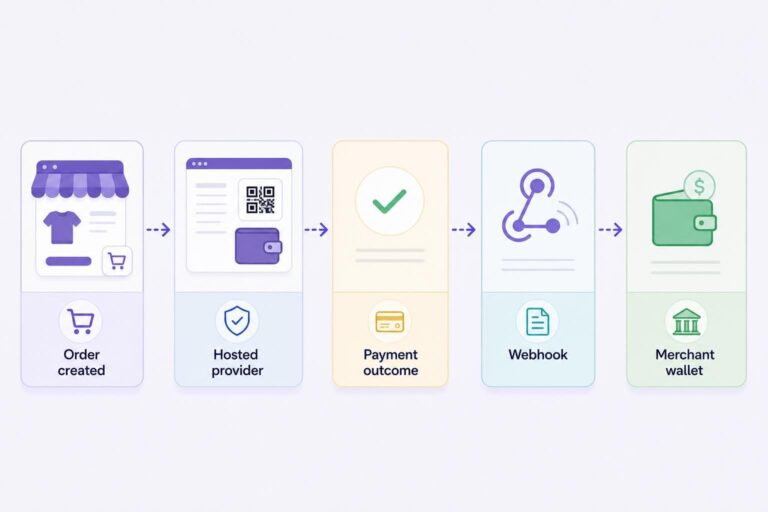
Payment reconciliation means confirming the authoritative payment outcome before fulfillment when the WooCommerce order state, return-page message, provider attempt, or webhook does not agree. A webhook is an automated server-to-server message that reports an event back to WooCommerce. This is an operating decision, not just a customer-service reply.
In a hosted checkout, WooCommerce creates the order and sends the buyer to the independent provider’s payment flow. The buyer may pay by card, Apple Pay, or Google Pay. The provider records the payment and KYC outcome, converts funds where applicable, and sends settlement to the wallet configured for that flow.
Settlement means the completed transfer of the agreed payout asset to your merchant wallet. Current plugin documentation specifies USDC settlement on Polygon. If a live page describes other hosted-flow payout assets, do not assume those descriptions are interchangeable. Check the current VERIFIED documentation and the relevant provider’s terms for the flow you have configured.
The handoffs explain why one label can mislead you. WooCommerce creates the order, the customer reaches a provider, and the provider records a payment or KYC outcome. Confirmation then has to reach WooCommerce before the order can reflect that outcome.
A customer can close a browser before returning to your store. A provider outcome can be recorded after that browser session ends. Confirmation delivery can also be delayed or missed. None of those events gives staff permission to guess.
| What you see | What it may mean | What to check next |
|---|---|---|
| Pending payment | WooCommerce has the order but has not recorded payment completion. | Check whether a hosted provider attempt exists and whether confirmation remains outstanding. |
| Failed | The attempt may have failed, or WooCommerce may not have received the evidence needed to complete the update. | Read order notes and inspect the provider attempt before telling the customer that nothing happened. |
| Review hold | This is your operating hold for an uncertain outcome, not a standard WooCommerce status name. | Do not fulfill or force an update. Review the provider outcome, references, expected value, and any relevant on-chain result. |
| Processing or completed | WooCommerce has applied payment-completion evidence under your configured flow. | Check the item, delivery details, and your separate fraud or fulfillment controls. |
| Customer says, “I paid” | The provider outcome, browser return, confirmation delivery, and order record may not yet agree. | Follow the reconciliation sequence. Do not issue a duplicate payment request first. |
WooCommerce’s Managing Orders documentation explains the platform’s order-status framework. In a hosted flow, the practical point is narrower: status helps you organize work, while payment evidence can arrive through more than one handoff.
Review hold is a behaviour rather than a WooCommerce status name. It means keeping an order out of fulfillment while the evidence is incomplete. Your available labels and screens can differ by plugin version and configuration, so confirm the label your team uses in your own WooCommerce Orders screen.
Where to look before making a fulfillment decision
Start with the original order, then read evidence in time order. You are trying to answer five questions: which order is this, did the buyer reach a provider, what did the provider record, did WooCommerce receive confirmation, and does the settlement evidence match the order?
- WooCommerce order: Review the order number, customer email, amount, creation time, status, order notes, and any nearby duplicate orders.
- Configured provider attempt: Establish whether the customer reached the hosted provider and whether the attempt is incomplete, failed, awaiting a provider decision, or confirmed.
- VERIFIED payment records: The plugin includes a crypto ledger, meaning a record of payment-related activity, and implements missed-webhook on-chain checks for reconciliation cases.
- Provider evidence: The provider’s result remains central because that provider performs card processing, KYC, conversion, and settlement in this hosted model.
- Wallet evidence: Where an on-chain check is applicable, compare the result to the original order and provider attempt rather than looking for a similar amount in isolation.
Record facts before you interpret them. Preserve the references that connect the customer, order, hosted-provider attempt, confirmation event, and settlement evidence. A busy support queue is exactly where loose notes create expensive confusion later.
This is where a rushed team creates a second problem while solving the first. Manually marking an uncertain order paid may clear the queue fastest, but the tradeoff is a broken audit trail, premature fulfillment, or a second payment request sent to a customer whose first attempt still needs confirmation.
A hypothetical order that needs reconciliation
Suppose Maya orders a $120 item. She reaches a hosted provider, completes the requested steps, and closes her phone browser before returning to the store. Two hours later, her WooCommerce order still says Pending payment. She sends support a screenshot of a bank notification and asks why the order has not moved.
The screenshot is useful context. It is not enough to fulfill. Your team should locate Maya’s original order, check whether another order was created under the same email in the same time window, read the order notes, and establish the provider outcome.
If the provider outcome is confirmed but WooCommerce lacks the completion event, move to the missed-webhook review path. If there is no confirmed provider attempt, tell Maya that payment is not yet confirmed and provide one clear next step. Do not immediately create another $120 order. The amount alone cannot identify the correct payment.
Use this seven-step reconciliation sequence before fulfillment
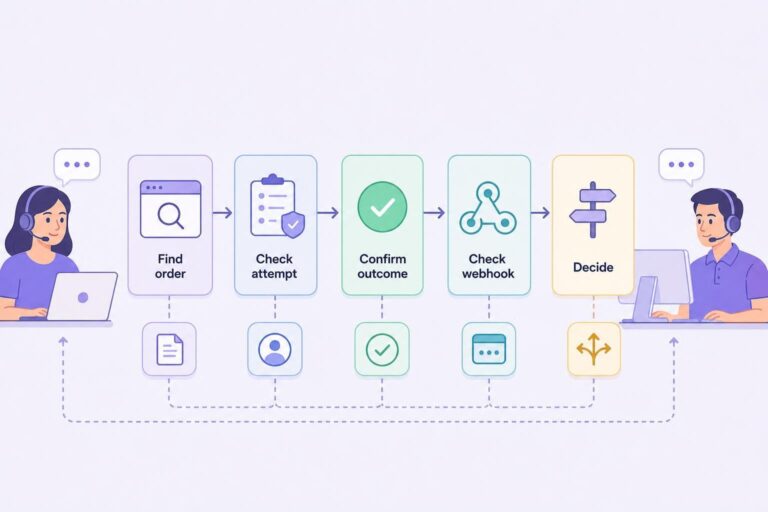
I generally recommend that support and operations staff follow the same sequence every time. A consistent sequence reduces duplicate fulfillment and prevents an unnecessary retry from becoming the team’s default answer.
- Find the original WooCommerce order. Search by order number, customer email, amount, and creation time. Check for more than one order in the same period. Do not assume the newest order is connected to the payment attempt.
- Read the status, notes, and timestamps. Record the current status, when the order was created, whether a hosted session started, and any received payment event. Keep observed facts separate from your conclusion.
- Review the provider attempt and payment record. Identify whether the customer reached a provider and whether the attempt is incomplete, failed, awaiting a provider decision, or confirmed.
- Establish the provider outcome. A provider-confirmed failure and missing confirmation are different cases. A confirmed failure does not support fulfillment. If the outcome is unclear, place the order into your identified review hold rather than forcing a core WooCommerce status.
- Check whether confirmation reached WooCommerce. If the provider outcome is confirmed but the order did not update, inspect the event trail for the order and associated attempt. A late or missing webhook is relevant at this point. WooCommerce’s Payment Gateway API documentation describes payment gateways that redirect customers to an offsite flow; that handoff is why order state and payment activity need careful reconciliation.
- Use the missed-webhook on-chain check as a fallback. VERIFIED implements on-chain checks for missed-webhook reconciliation. Use this only after tying the review to the original order and provider attempt. Apply it to an applicable pending or recently cancelled order where the provider outcome is confirmed but the expected WooCommerce update is missing. Do not find a similar wallet amount and call it payment confirmation.
- Decide and document. Fulfill only when confirmed evidence supports the original order. If payment remains unconfirmed, keep it in review, cancel it under your own policy, or use the appropriate retry or recovery route. Add an internal note explaining what you checked and why you made the decision.
| Evidence found | Practical meaning | Next action |
|---|---|---|
| Provider declares the attempt failed | The provider record does not support payment completion for that attempt. | Do not fulfill. Follow your store policy for cancellation or a new customer-initiated payment path. |
| Provider confirms the attempt, but WooCommerce has no completion update | The order record and confirmation delivery do not agree. | Keep the order in review, inspect the event trail, and use the applicable missed-webhook on-chain check. |
| No provider attempt can be confirmed | You do not have evidence that the buyer reached or completed the hosted payment flow. | Do not fulfill. Give the customer one clear next step under your store policy. |
Record this evidence before escalating an on-chain check
- The WooCommerce order number and creation timestamp.
- The provider-attempt or hosted-session reference available in your records.
- The expected wallet, asset, network, and value for the configured flow.
- The provider outcome and any confirmation-delivery evidence.
- The transaction hash, if your review produces one, plus the time it was observed.
This record gives the next reviewer a defined case to inspect. It is far better than a note saying only “customer says paid.”
For current setup details and technical records available in your version, use the VERIFIED documentation hub before escalating a case. It gives your support and development teams a shared reference point without treating a customer-facing screen as the payment record.
A matching wallet amount is not payment confirmation unless it connects to the original order and provider attempt.
If you run a custom storefront, retain the order ID, hosted-session reference, and webhook handling through each handoff. The headless WooCommerce integration guide covers implementation context. This guide covers the operating decision after an order already exists.
Match expected value before you release the order
Order matching involves more than finding an amount that looks close. Your team needs to know what value it expected from the configured flow and why that figure may differ from the merchandise subtotal or customer-facing total.
VERIFIED charges a 4% infrastructure fee. You can structure that fee as merchant-absorbed or customer-paid. Independent hosted providers charge separate conversion fees. Those charges vary by provider and transaction. The main tradeoff is that a simple order-total comparison is easy to operate, but it may not reflect the value your team expects to reconcile.
Hypothetical expected-value calculation
Assume a $100 merchandise order and a 4% VERIFIED infrastructure fee. If you absorb the fee, your internal starting calculation is $96: $100 minus $4.00. A separate provider conversion fee may also affect the value you expect to receive, depending on the provider’s terms and your configured flow.
If you pass the 4% infrastructure fee to the customer, the customer-facing checkout amount in this hypothetical is $104: $100 plus $4.00. The provider’s separate conversion fee still varies, so do not invent a net settlement figure. Check the provider record and your current configuration.
These are hypothetical arithmetic examples, not provider pricing or a promise of settlement value. A mismatch is a reason to hold and reconcile, not a reason to force an order status.
For the fee model, see the VERIFIED fee transparency guide. Before you build an automated release rule, make sure it compares the correct expected value for the fee arrangement you selected.
Do not let a failed order create a second problem
A Failed order can reflect a provider-declared failure. If the provider evidence says that is the outcome, there is no payment confirmation to fulfill against. It can also be an order that has not received the evidence needed for WooCommerce to record completion. These are different situations and need different customer messages.
Do not do these things
- Do not treat Failed as proof that no card-related activity occurred.
- Do not fulfill because a buyer provides a browser screenshot, return-page message, or bank-notification screenshot.
- Do not ask the buyer to pay again before checking the original provider attempt.
- Do not change an order to Processing merely to clear a support queue.
Duplicate handling deserves a firm rule. A buyer can leave the hosted page, return to your store, and start checkout again. You may then have one order with a confirmed provider outcome and another that never reached a provider. If staff review only the newer record, they can send an unnecessary payment request or fulfill the wrong order.
Do not resolve an uncertain payment by creating a second uncertain payment.
If you need to request payment after you have closed the earlier case, use a payment path that points to the correct outstanding order. The WooCommerce payment links guide explains the payment-link use case. It is a follow-up tool, not evidence that the first attempt failed.
Keep payment confirmation separate from recovery
Payment confirmation asks, “Did this particular attempt complete?” Recovery asks, “Should we invite the customer to continue after an eligible checkout did not produce a completed order?” They are related, but they are different decisions.
VERIFIED’s automated recovery is limited to eligible first-time VERIFIED customers with a confirmed provider attempt. Subscription renewals are excluded. Where recovery is available, it uses a tokenized, no-login Pay Now link valid for seven days. The recovery offer can use a fixed incentive, percentage incentive, or shipping-credit incentive.
That limit matters because a recovery link is not evidence that an earlier payment succeeded. Complete reconciliation first. Then decide whether the case meets the recovery rules. The abandoned crypto checkout recovery guide explains that follow-up flow.
Subscriptions need their own procedure. Renewal payments are customer-initiated from reminder-email links; there is no stored-card automatic rebilling. Do not classify a missed subscription renewal as a webhook problem or as an eligible automated-recovery case. See the crypto subscription payments guide for the reminder-link model.
Turn reconciliation into a fulfillment rule
Your fulfillment rule can fit on one page: do not ship a physical item, release a download, provision an account, or schedule a service until confirmed evidence matches the original WooCommerce order. Give staff an escalation path for any case where the provider outcome and WooCommerce history disagree.
Your internal record should include the order number, customer email, creation time, WooCommerce status, provider-attempt reference, provider outcome, confirmation-delivery evidence, expected-value calculation, any on-chain-check result, and final disposition. If you cancel, refund, issue a payment request, or send a recovery link, record why. The next person should not have to reconstruct the decision from an email thread.
For the buyer-facing side, make the confirmation experience say that payment is being confirmed rather than implying that a browser return proves success. The WooCommerce payment confirmation page guide covers that design choice.
Test the workflow with low-risk internal orders before you depend on it in a busy queue. Confirm who receives confirmation-related alerts, who can inspect a provider attempt, and who can release a review hold. I cannot promise that every provider event or customer path will look the same. Your team needs an exception path, not an assumption.
Fulfillment follows confirmed evidence, not the customer’s browser path.
Set an order-review rule your team can follow
If the plugin is already installed, use the VERIFIED Ledger, order records, and documentation hub to align support and development on the missed-webhook review path. If you are evaluating the flow, install the plugin and decide who owns provider-attempt review before fulfillment begins.
About VERIFIED Crypto Checkout
VERIFIED Crypto Checkout is WooCommerce payment infrastructure for hosted card-to-crypto checkout, payment links, invoices, and related payment flows. It routes customers to independent hosted providers; those providers perform KYC, card processing, conversion, and settlement directly to your merchant wallet.
VERIFIED is not a payment processor, bank, money transmitter, exchange, acquirer, or custodian. It does not handle card data or custody your funds. Learn more about VERIFIED Crypto Checkout, read the product explainer, or contact the team with your WooCommerce workflow questions.
Further Reading
About the Author: Brad Ungar
