
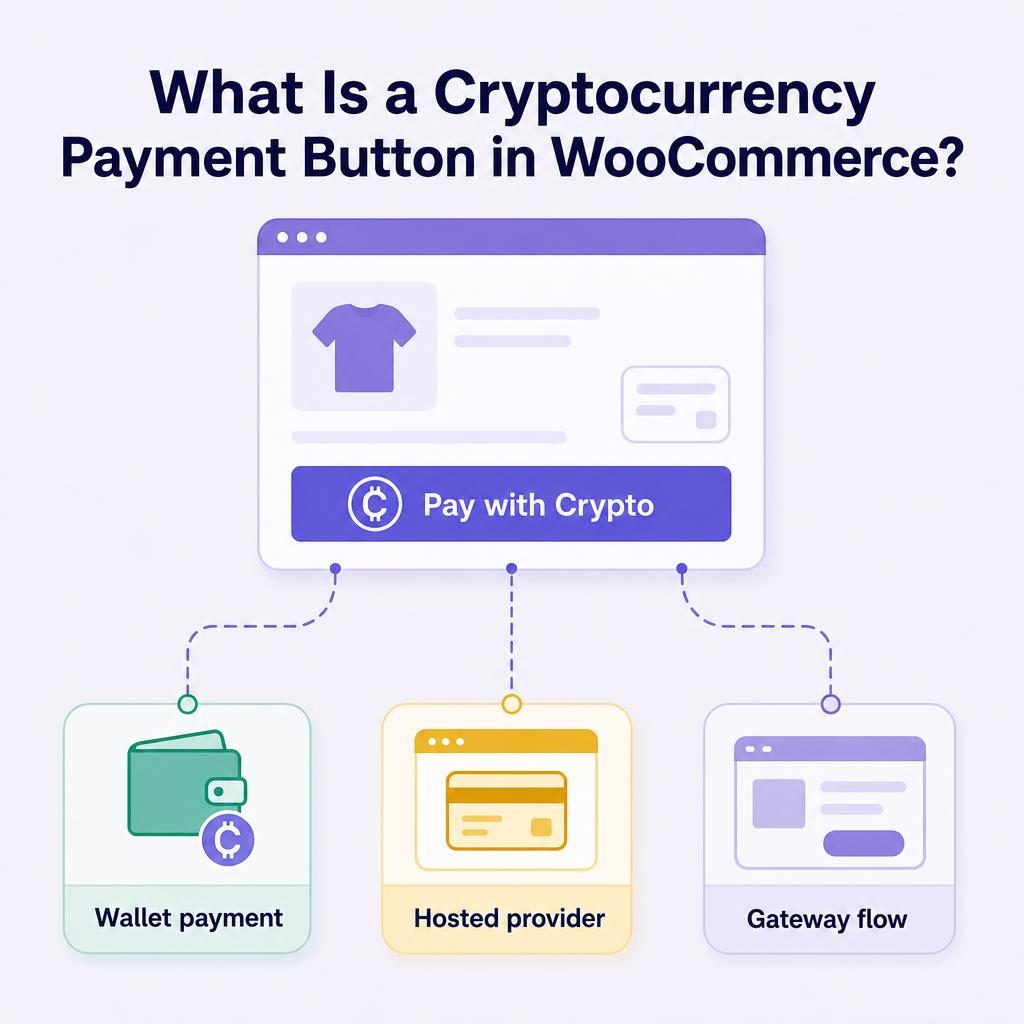
You are trying to add another way to pay without putting a misleading choice in front of customers at checkout. A cryptocurrency payment button can start a wallet payment, a hosted card-to-crypto flow, or another gateway process entirely. This guide will help you identify which one you have, explain what the customer sees next, and label it honestly before launch.
What does a cryptocurrency payment button do in WooCommerce?
A cryptocurrency payment button starts a crypto-related payment workflow, but its label alone does not tell you whether the customer pays from their own wallet or uses a hosted card-to-crypto provider.
That distinction changes the customer journey, the party making payment decisions, and what you need to explain before a customer clicks. A button saying “Pay with Crypto” is an invitation to begin a process. It is not, by itself, a description of how the customer will pay.
I generally recommend choosing the payment model first, then writing the button label around that model. If someone expects to connect a wallet but reaches a card-payment page instead, they may leave checkout even though the flow is working as configured.
Written by Brad Ungar | Founder, VERIFIED Crypto Checkout
Brad Ungar builds payment infrastructure for WooCommerce merchants who need card-to-crypto checkout, hosted provider routing, payment links, and subscription flows that settle directly to a merchant wallet.
Product review: VERIFIED Crypto Checkout engineering
Key Highlights
- A checkout label does not define the payment model.
- Wallet buttons use crypto the customer already holds.
- Hosted buttons can redirect customers to an independent provider.
- First use with a provider may include identity verification.
- A created WooCommerce order is not necessarily a paid order.
- Confirm the settlement wallet, asset, and network before launch.
- Match button copy to the next screen customers will see.
Three payment models can sit behind one checkout label
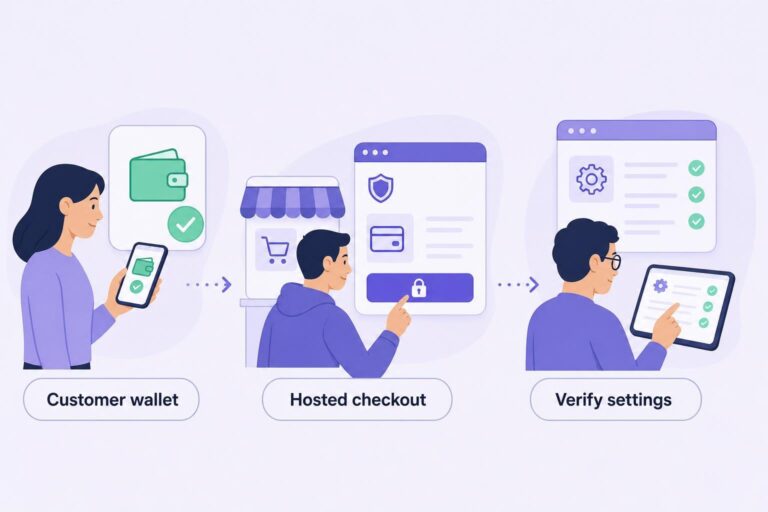
The useful question is not whether a button contains the word “crypto.” Ask what the customer does after selecting it and who actually carries out the payment.
1. A native wallet-payment button
A native wallet-payment button is for a customer who already has cryptocurrency in a compatible wallet. They select the option, connect or open their wallet, review the amount and network, then approve an on-chain transaction.
An on-chain transaction is a payment recorded on the relevant blockchain network. The customer sends crypto they already control. No card purchase takes place within that wallet-payment step.
This can suit a store whose customers already understand wallets, networks, and transaction approvals. The main tradeoff is reach: someone with only a credit card and no crypto wallet cannot complete that particular flow without making separate arrangements first.
2. A hosted card-to-crypto button
A hosted card-to-crypto button begins differently. WooCommerce creates the order, then routes the customer to an independent hosted provider. On that provider’s page, the customer may be offered card, Apple Pay, or Google Pay. If the transaction completes, the provider performs conversion and sends settlement directly to the merchant wallet.
VERIFIED Crypto Checkout is payment-infrastructure software for this hosted model. It routes customers to more than 20 independent hosted crypto on-ramp providers in single-provider or auto-routing modes. VERIFIED does not handle card data, hold customer or merchant funds, perform KYC, approve cards, convert funds, or execute settlement. Those actions belong to the independent provider selected for the hosted session.
For the wider architecture, read the card-to-crypto payments explainer. The question here is narrower: whether the button accurately describes the customer’s next step.
3. A generic crypto gateway button
A generic crypto gateway button tells you the least. It might open a wallet-payment screen, redirect to a hosted page, show a QR code, create an invoice, or offer several routes. The label describes a category rather than an operational arrangement.
Before enabling one, inspect its settings rather than guessing from a plugin listing, provider logo, or checkout label. Look for a redirect or hosted-session URL; that points to an off-site payment page. Look separately for a wallet-connect requirement, which indicates that the customer needs a compatible wallet. Then check whether the settings include a merchant settlement-wallet address field and what asset or network it expects.
If the gateway does not document a test mode, run one low-value live order through a route currently enabled for your store. Record the customer’s next screen, the payment-status change in WooCommerce, and the settlement destination. That gives you a practical basis for your checkout copy and support instructions.
The useful question is not “Does this accept crypto?” It is “Who takes the payment, and what must my customer do next?”
How do wallet and hosted card-to-crypto buttons differ?
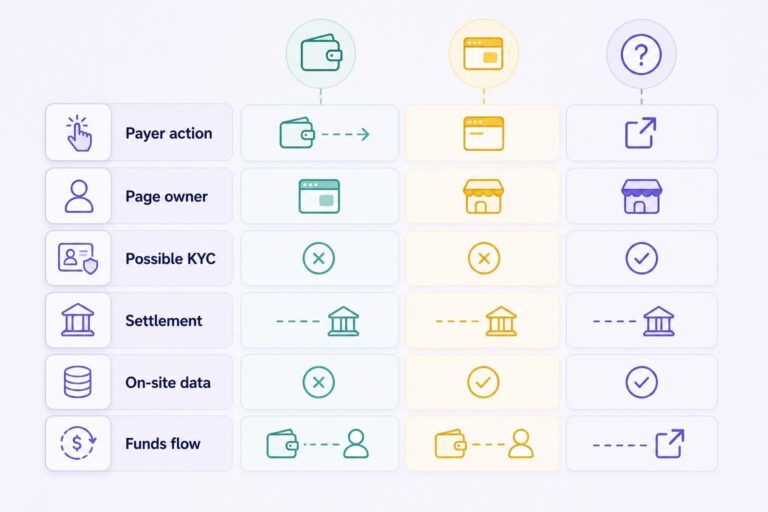
The table gives you a decision rule you can use before choosing a label. Treat the generic-gateway column as a list of questions to verify for the specific configuration, not a promise about every gateway or customer.
| Decision criterion | Native wallet-payment button | Hosted card-to-crypto button | Generic gateway button |
|---|---|---|---|
| Payer action | Customer uses crypto already held in a compatible wallet. | Customer continues to a hosted provider and may pay by card, Apple Pay, or Google Pay. | Depends on the configured gateway and the screen shown. |
| Payment page owner | The wallet-payment integration or service controls the wallet-payment interface. | An independent hosted provider controls its payment page. | Verify this in the gateway settings and live flow. |
| Card-data exposure | No card entry is part of the wallet-payment step. | Card entry happens on the provider’s hosted page; VERIFIED does not handle card data. | Depends on whether and where the gateway collects card details. |
| Possible KYC | Sending from a customer-held wallet does not itself create a card-to-crypto identity step; separate wallet-service rules may still apply. | First use with a provider may require KYC, including government ID and a liveness check. | Depends on the provider and payment route. |
| Order confirmation dependency | Do not fulfil merely because a customer signed or sent a wallet transaction. Wait for the gateway’s configured payment-confirmation signal and the WooCommerce state your fulfilment process requires. | Your store depends on the hosted provider’s payment result being reported through the configured flow. | Verify the gateway’s confirmation method before fulfilment. |
| Merchant settlement destination | Usually the wallet address configured for that wallet-payment method. | The provider sends settlement directly to the merchant wallet. Current VERIFIED plugin documentation specifies USDC settlement on Polygon. | Depends on the gateway’s settlement terms and setup. |
Settlement is the point at which payment value reaches the destination you have configured. It is different from a customer clicking a button or submitting a card. In a hosted flow, the provider controls the card decision, any required identity checks, conversion, and settlement execution.
Current VERIFIED plugin documentation specifies USDC settlement on Polygon. Some live pages may describe additional hosted-flow payout assets. You should treat that as a documentation conflict to resolve before launch: check the current documentation and product review, then state only the asset and network confirmed for your configuration. Do not write checkout copy around an assumed payout option.
Choose a native wallet button when the customer is expected to hold compatible crypto already. Choose a hosted card-to-crypto button when you want a customer to begin with a card, Apple Pay, or Google Pay and accept that an independent provider controls the next stage. Use a generic gateway button only after you can explain the customer journey in one sentence.
What happens after a customer selects a hosted button?
Here is the normal sequence in a hosted card-to-crypto flow. Knowing the handoffs helps you prepare support staff and write one honest sentence at checkout.
- WooCommerce creates the order. The customer selects the payment option and submits your store checkout. They have started the order process, but payment is not yet complete.
- The customer is routed to a hosted provider. With VERIFIED, the customer leaves the WooCommerce payment page for an independent provider’s hosted session. That provider controls this portion of the experience.
- The provider checks the available route. The customer may see card, Apple Pay, or Google Pay according to the provider, location, payment method, and provider rules. A WooCommerce button cannot guarantee availability.
- The provider may request identity verification. KYC, short for “know your customer,” is an identity-check process. On first use with a provider, the customer may be asked for government-issued ID and a liveness check, which is intended to confirm that a real person is present. Returning use with the same provider is usually faster, though it remains subject to that provider’s process.
- The provider handles payment and conversion. If the provider accepts the transaction, it handles card processing, conversion, and settlement execution. Card-processing relationships sit with the provider, not VERIFIED.
- Your store receives the configured result. VERIFIED implements payment-state handling, including on-chain checks when a webhook is missed. A webhook is an automated message one system sends to another when an event occurs. Your operational rule should remain simple: fulfil only when the WooCommerce order shows the payment state your process requires; see WooCommerce’s order-management documentation for the order states your team will manage.
For a broader explanation of the setup, see what crypto checkout means in WooCommerce. This page stays focused on the button itself, so you can describe it without suggesting that every customer follows the same path.
Hypothetical checkout example
Imagine a customer buying a $75 order of supplements from a WooCommerce store. They select a button labelled “Continue to hosted crypto checkout.” WooCommerce creates the order and routes them to an independent hosted provider. The customer sees that provider’s payment page, chooses an available method, and may be asked to complete identity verification on their first use with that provider.
If the provider cannot offer a route for that customer, the order is not paid. Your support team should tell the customer: “This payment route was not available. Please return to checkout and choose another payment option.” In wp-admin, the team should check the WooCommerce order’s payment status and the relevant payment record before taking any fulfilment action. Do not ask the customer to send funds manually to an address as a workaround.
If the flow succeeds, settlement is sent directly to the merchant wallet under the provider’s process. VERIFIED charges a 4% infrastructure fee. Independent providers charge separate conversion fees. How costs appear to the customer or merchant depends on configuration and provider terms, so review the live checkout and current documentation before publishing fee language.
An order can exist in WooCommerce while the payment that would support fulfilment is still incomplete.
What can go wrong, and what should you do?
Most problems occur at a handoff: between your store and the hosted provider, between the provider and the customer’s bank, or between payment confirmation and the settlement destination. Clear labels and a short support plan do more good than a vague promise that checkout will be easy.
The customer expected a wallet but sees a card flow
This is a label problem. Change the checkout copy before launch. “Pay with Crypto” can suggest a customer-held wallet to many buyers. If your option begins a hosted card-to-crypto process, say so beside the button. For example: “Continue to a hosted provider to pay by card or supported wallet method.”
The customer is asked for ID
Do not tell customers that crypto checkout has “no KYC.” In the hosted model, first use with a provider may require KYC and liveness verification. Point customers to the KYC and AML crypto-checkout guide before they need help. AML means anti-money laundering: controls intended to detect and prevent illicit movement of funds.
A card is declined or no route is available
A declined card or unavailable route is a provider-side decision. The provider applies its own eligibility, payment-method availability, and risk rules.
Tell the customer plainly: “This payment route was not available. Please return to checkout and choose another available method.” Then check wp-admin for the order’s payment status and the related payment record. Keep order creation separate from payment completion, and do not make approval promises in checkout copy.
The wallet or network is wrong
Compatibility matters for wallet payments and settlement. A valid-looking wallet address does not establish that it is intended for the asset and network your flow uses. Check the configured settlement destination, currently documented asset, and network before launch. Keep that record with your store’s payment settings.
What should you verify before enabling the button?
You do not need to become a payments specialist. You do need clear answers to the questions customers ask at the worst possible moment: while they are trying to pay.
Pre-launch review
- Name the model: Is this customer-wallet payment, hosted card-to-crypto checkout, or another gateway flow?
- Read the next screen: Check where the button sends the customer and who controls that page.
- Inspect the settings: Look for a hosted-session or redirect URL, a wallet-connect requirement, and a merchant settlement-wallet address field.
- Find the settlement-wallet setting: In wp-admin, open WooCommerce → Settings → Payments, select the relevant payment method, and confirm the merchant wallet address before enabling the route. Check the current plugin documentation if the installed version presents its settings differently.
- Describe identity checks honestly: State that the provider may request KYC on first use.
- Confirm the payment-complete rule: Decide which WooCommerce order state your team requires before fulfilment.
- Confirm settlement details: Verify your merchant wallet address and the currently documented asset and network.
- Check fee language: VERIFIED charges a 4% infrastructure fee, while providers charge separate conversion fees. Do not combine them into an invented all-in rate.
- Give support a fallback: Write one short response for redirects, KYC requests, declines, and payment-status questions.
If a customer leaves before payment is completed, recovery is not a blanket promise. VERIFIED’s automated recovery is limited to eligible first-time VERIFIED customers with a confirmed provider attempt. It uses seven-day tokenized, no-login Pay Now links and can include a fixed incentive, percentage incentive, or shipping credit. Subscription renewals are excluded. See how abandoned crypto-checkout recovery works before building this into a campaign.
Recurring payments work differently here. Subscription renewals are customer-initiated from reminder-email links; there is no stored-card automatic rebilling. Read the subscription-payment guide before presenting a hosted checkout button as a recurring billing method.
Which button model should you choose?
Choose a native wallet-payment button when your customers already use compatible wallets and you want them to pay with crypto they hold. Make the asset and network requirements visible before they approve the transaction.
Choose a hosted card-to-crypto button when you want a route for customers who may start with a card, Apple Pay, or Google Pay rather than an existing crypto balance. The main tradeoff is that the customer leaves WooCommerce for an independent provider and may encounter provider availability checks or KYC.
Choose a generic gateway only after you know which customer journey it presents. If you cannot explain the next screen in one sentence, you are not ready to label the button.
VERIFIED’s core WooCommerce plugin supports Classic and Blocks checkout. Check the current WordPress.org plugin listing and VERIFIED documentation for current release availability and any version-specific add-on requirements. Old product notes are not a current-release declaration.
Install the plugin and test the hosted route before you launch
If a hosted card-to-crypto route fits your store, install the plugin, confirm your settlement setup, and test the customer journey you plan to describe. For setup details and current requirements, start with the VERIFIED documentation hub.
About VERIFIED Crypto Checkout
VERIFIED Crypto Checkout is payment-infrastructure software for WooCommerce. It routes customers to independent hosted providers for card-to-crypto payment flows. VERIFIED is not a payment processor, bank, money transmitter, exchange, acquirer, or custodian. A custodian is a party that holds funds on another party’s behalf; VERIFIED does not handle card data or hold customer or merchant funds.
Independent hosted providers perform KYC where required, card processing, conversion, and settlement execution. Merchant eligibility, customer availability, and provider terms remain subject to the provider involved.
Learn more about VERIFIED Crypto Checkout, read how crypto checkout works in WooCommerce, or contact the team with a checkout question.
Further Reading
About the Author: Brad Ungar
