
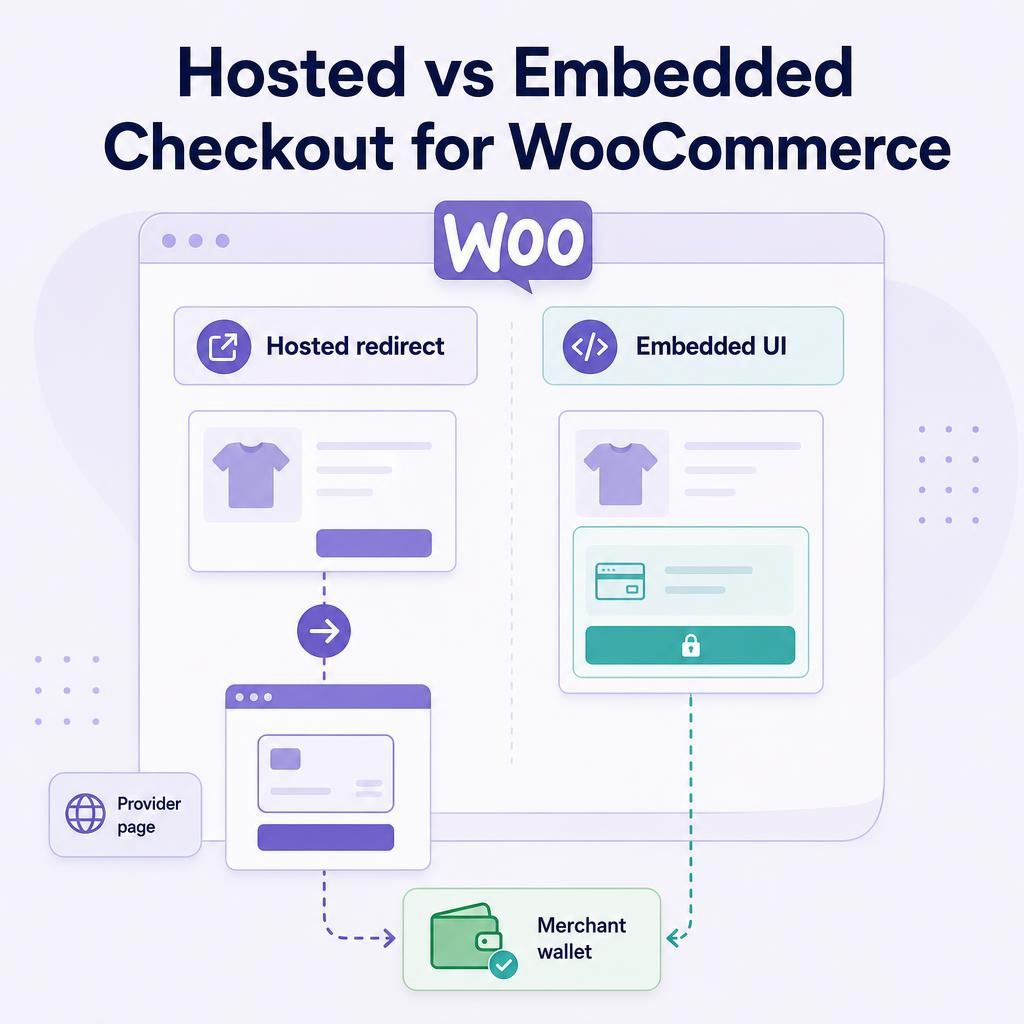
Written by Brad Ungar | Founder, VERIFIED Crypto Checkout
Brad Ungar builds payment infrastructure for WooCommerce merchants who need card-to-crypto checkout, hosted provider routing, payment links, and subscription flows that settle directly to a merchant wallet.
Product review: VERIFIED Crypto Checkout engineering
Choosing hosted checkout WooCommerce changes what your buyer sees, who operates the card-payment step, and where your team starts when an order needs support. For a card-to-crypto flow, the practical choice is between sending a buyer to an independent provider’s payment page or building more payment UI into your own storefront. This guide helps you choose the model, understand the handoff, and test the parts that can go wrong before you accept live orders.
Key Highlights
- Hosted checkout redirects a WooCommerce buyer to a payment page operated by an independent provider.
- Embedded checkout keeps payment UI inside your storefront, but neither label settles every compliance responsibility.
- VERIFIED routes payment sessions; independent providers perform card processing, KYC, conversion, and settlement.
- First use with a provider may require government ID and liveness KYC, a check that the person is physically present.
- Current plugin documentation specifies USDC settlement on Polygon to your configured merchant wallet.
- A hosted redirect reduces direct card-entry handling in your store without removing responsibility for your site or customer relationship.
- WooCommerce plugin version 1.56.1 supports both Classic and Blocks checkout.
- Test the redirect, provider handoff, mobile return path, order status, and wallet details as one customer journey.
Should my WooCommerce store use hosted or embedded checkout for card-to-crypto payments?
Choose a hosted redirect when you want an independent provider to operate card payment and any required identity checks; use embedded payment UI only when its added control justifies the added integration and security responsibilities. In the VERIFIED WooCommerce flow described here, a buyer can pay by card, Apple Pay, or Google Pay through an independent hosted provider. That provider runs its own payment and conversion flow, then sends settlement directly to your configured wallet.
You still own the sale. You need accurate product pages, clear payment expectations, working order records, a tested return path, and a practical way for customers to reach you about a purchase. A hosted redirect can reduce the card-entry work inside your store. It does not remove responsibility for your store, the order, or the customer relationship.
Hosted checkout WooCommerce: how does it differ from embedded checkout?
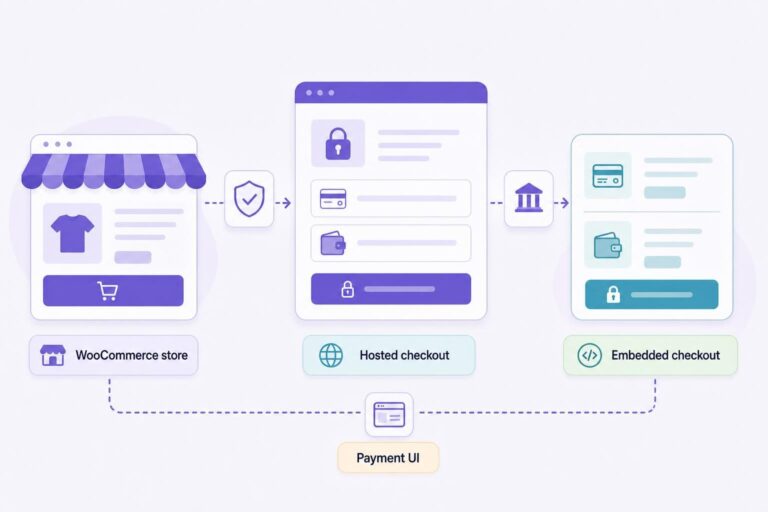
Hosted checkout means your buyer leaves your WooCommerce checkout and is redirected to a payment page operated by another company. In this card-to-crypto model, an independent hosted provider operates that page. Your store creates the order and later receives a payment result, while the provider operates the payment interface.
Embedded checkout means the payment interface appears inside your merchant experience. It may be an on-page form, a modal window, or a component in a headless storefront. “Embedded” describes where the buyer sees the interface. It does not automatically mean your store handles card data. In the same way, “hosted” does not mean every other merchant duty disappears.
If you need the foundational definition, read the hosted checkout explainer. This guide addresses the decision that follows: which operating model fits the way your store needs to work?
The useful decision is not which screen looks better; it is which party should operate payment and identity checks.
Card-to-crypto checkout has two connected events. First, the buyer pays with a familiar payment method. Then the provider converts that payment and sends crypto settlement to your wallet. A redirect makes that handoff visible. It also gives the provider a defined place to run its own payment, fraud, and identity processes.
VERIFIED is payment infrastructure and routing software. It is not a payment processor, bank, money transmitter, exchange, acquirer, or custodian. An acquirer is the financial institution or licensed entity that enables a business to accept card payments. In this model, independent hosted providers perform card processing, any required KYC, conversion, and settlement. VERIFIED does not handle card data or custody funds.
What happens in a hosted card-to-crypto checkout?
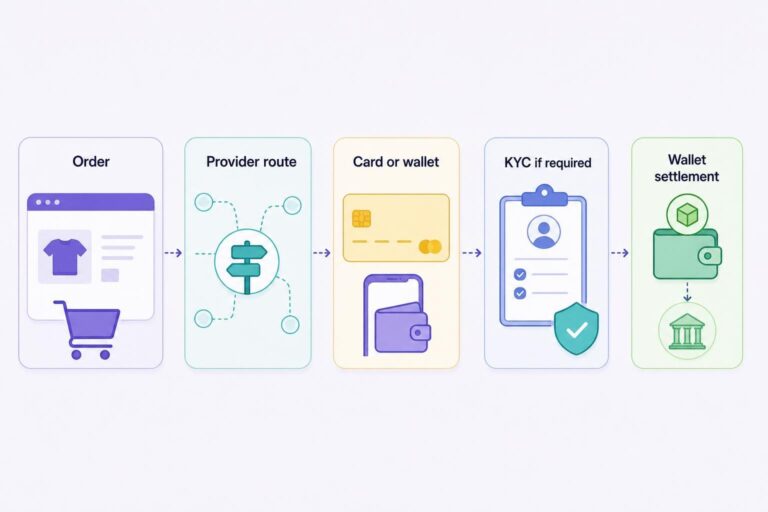
Here is the sequence your buyer and support team should expect. Provider screens, availability, and requirements can vary, so test the route you configure before opening it to customers.
- The buyer creates an order in WooCommerce. Your store calculates products, shipping, tax, and the total. In a hypothetical $85 order, WooCommerce remains where the buyer sees the items, delivery choice, and order reference.
- VERIFIED starts the routed payment step. WooCommerce plugin version 1.56.1 supports single-provider mode and auto-routing across 20+ independent hosted crypto on-ramp providers. Routing does not mean a particular provider will accept a particular buyer.
- The buyer is redirected to the selected provider. The provider page can offer card, Apple Pay, or Google Pay. This is where redirect anxiety can arise: a buyer sees another interface and may wonder whether they are still completing the same order.
- The provider performs any required first-use checks. A buyer’s first use with a provider may require government ID and liveness KYC. KYC means know-your-customer verification. Liveness means the provider checks that the person presenting the ID is physically present rather than using a copied image or document. Returning use with the same provider is usually faster, though that is not a promise for every buyer or route.
- The provider processes payment and conversion. The provider runs the buyer’s card or wallet-payment process and conversion under its own flow and terms. Its conversion fee is separate from VERIFIED’s infrastructure fee.
- Settlement goes to your configured wallet. Settlement means delivery of payment to the destination account or wallet. Current plugin documentation specifies USDC on Polygon. Check the complete wallet address, asset, and network before accepting live orders.
- WooCommerce receives payment status. VERIFIED includes on-chain checks for missed webhooks, which are fallback checks when a payment-status notification does not arrive as expected. You should still test your own order-status updates and customer emails.
The plugin supports both Classic and Blocks checkout. Classic checkout is WooCommerce’s older checkout structure. Blocks checkout uses WooCommerce’s block-based checkout interface. Classic and Blocks checkout can render payment methods differently, so test the exact checkout type your store actually publishes rather than assuming a Classic-checkout test covers Blocks. Test on a phone as well, where redirects and browser returns are easiest to miss.
Set expectations before the redirect
Put one short sentence near the payment action. For example: “You’ll complete card payment with a payment partner, then return to this store.” This is hypothetical storefront wording, not required provider language. It explains the next screen without predicting approval, verification, or settlement timing.
Who owns each part of the payment flow?
Generic hosted-versus-embedded comparisons often stop at card-security scope and user experience. That leaves out the operational question that matters after launch: when a buyer needs help, who owns the next action? This matrix shows where the work sits in a provider-routed card-to-crypto flow.
| Party | Responsibility in this flow | What you should verify before launch |
|---|---|---|
| Merchant and WooCommerce store | Products, prices, shipping, customer communication, order records, storefront disclosures, and support for the purchase. | Test order totals, mobile checkout, the return path, confirmation emails, and visible support contact details. |
| VERIFIED Crypto Checkout | WooCommerce payment infrastructure, provider routing, payment links and requests, crypto ledger functions, and payment-state checks. | Confirm plugin setup, routing mode, checkout type, and the infrastructure fee. |
| Independent hosted provider | Hosted payment page, card-payment handling, Apple Pay or Google Pay where offered, provider KYC, conversion, and settlement process. | Read terms displayed in the provider flow and test the first-use experience where testing is available. |
| Merchant-configured wallet | Receives settlement sent by the provider. You control the destination and its access arrangements. | Confirm the complete wallet address, USDC support, Polygon network support, and who can access the wallet. |
When something goes wrong: who owns the first action
The first investigation should follow the point where the problem appears. That keeps your support team from asking the buyer to solve an issue controlled by the provider, or from sending a store-order problem away too early.
| What your team sees | Who owns the first investigation | First action |
|---|---|---|
| A customer cannot find an order or confirmation. | Your WooCommerce store | Locate the WooCommerce order using the customer details and order reference, then confirm the contact email and order status. |
| A buyer stops at a government-ID or liveness prompt. | Independent hosted provider | Explain that the provider controls its own identity-verification decision. Do not ask the buyer to send ID documents to your store unless your own documented process requires it. |
| An order appears complete but funds are not visible in the wallet. | Your wallet setup and payment record | Check the full configured wallet address, USDC, and Polygon first. Do not fulfill solely because a screen appears successful; retain the order and payment details while you confirm settlement. |
For the settlement side of setup, use the WooCommerce USDC settlement guide. It is the right place to confirm the documented wallet route before you publish a payment method.
A provider can operate the payment screen without taking responsibility for your products, customer promises, or wallet setup.
Hosted checkout reduces card handling, not all merchant responsibility
A hosted redirect can reduce card-entry handling in your storefront because the buyer enters payment details on the provider’s page rather than into a card form you operate. That can narrow the technical work associated with the payment form itself.
It does not erase every payment-related obligation. Using a third-party provider does not automatically remove your own PCI DSS obligations. PCI DSS stands for Payment Card Industry Data Security Standard. It applies to any business that touches cardholder data, or that can affect how securely someone else handles it. PCI DSS includes requirements for managing third-party service providers, and merchants can retain responsibilities of their own. Review the PCI Security Standards Council’s guidance on third-party service providers, then confirm your specific scope with your acquirer or a Qualified Security Assessor, called a QSA, who is a PCI-recognized security assessor.
In practical terms, keep WordPress, WooCommerce, themes, and extensions maintained. Restrict administrator access. Do not put sensitive payment details in order notes. Review the providers you use, and make sure your privacy notice and support process explain what happens after a buyer clicks pay.
Embedded checkout deserves a higher bar because it creates more integration points to secure, test, and explain. That control may be worthwhile in a deliberately designed headless storefront. If that is your case, review these headless WooCommerce payment considerations before deciding where payment UI belongs.
Choose hosted or embedded based on your operating model
Choose a hosted redirect if you want independent providers to operate the card-payment and identity-check steps, you do not need to collect card data in your checkout interface, and direct wallet settlement is central to your process. This can be a clear operating model for a regulated or higher-risk store. High-risk means a category or operating pattern that a payment business considers more likely to create losses, disputes, or compliance work; it is not a judgment on product quality.
Choose an embedded experience only when a specific benefit justifies the work. For example, a headless storefront may have a deliberately built single-page application flow where a redirect would interrupt the customer journey you designed. Then budget for the work: component integration, security review, accessibility, error states, mobile behavior, return behavior, and support for the payment screen itself.
| Choose this model | Choose it when | Plan for |
|---|---|---|
| Hosted redirect | You want the provider to operate card payment and possible KYC, prefer not to build a card-entry UI, and need a clear route to a configured wallet. | Explaining the redirect, testing first-use provider steps, and confirming a mobile return path. |
| Embedded payment experience | You have a specific reason to control the payment UI and the technical resources to own the extra integration, testing, and security work. | Payment-component behavior, accessibility, security review, error states, and support for more storefront-side payment UI. |
One clarification before you decide: VERIFIED has no embedded card form to install. The documented VERIFIED WooCommerce model routes buyers to independent hosted provider pages. Embedded checkout is included here as an architecture comparison, so you can choose the customer journey before you build around a payment flow.
If the hosted route fits your operating model, you can install the VERIFIED Crypto Checkout WooCommerce plugin in a testable store environment. Then run one complete test order on a phone, from the storefront handoff through wallet confirmation. Installing the plugin does not decide whether an individual provider accepts a buyer, so keep wallet and checkout testing on your launch plan.
What happens if the buyer leaves on the provider page?
A redirect creates one additional point where a buyer may stop. For eligible first-time VERIFIED customers with a confirmed provider attempt, automated recovery can send a seven-day tokenized, no-login Pay Now link. The recovery message can include a fixed incentive, a percentage incentive, or shipping credit. It is not available for every abandoned attempt, and it does not apply to subscription renewals. Subscription renewals are customer-initiated from reminder-email links; they are not stored-card automatic rebilling. Treat recovery as a follow-up tool, not a reason to leave the redirect unexplained or wallet setup untested. See the abandoned crypto checkout recovery guide for the operational context.
Put the payment step where the responsible party can explain it, operate it, and support it clearly.
Pre-launch checklist for a hosted WooCommerce flow
Run this checklist in staging or through a controlled test process where available. A desktop-only click-through will not show you how the payment handoff behaves for actual mobile shoppers.
Before you turn the payment method on
- Check your checkout type: Confirm whether your live store uses WooCommerce Classic or Blocks checkout, then test the version customers will see.
- Explain the handoff: Add plain storefront wording so buyers know payment continues with a payment partner.
- Walk the mobile route: Test the redirect, provider page, browser return, and WooCommerce confirmation page on a phone.
- Prepare for first-use KYC: Tell support staff that some customers may see a government-ID and liveness request from the provider. Do not tell buyers identity verification will never be required.
- Verify settlement details character by character: Wallet address, USDC, Polygon. If another page lists a different asset or network, do not assume it applies to your configuration; check the VERIFIED documentation hub or ask before going live.
- Plan for unavailable routing: If no provider route is available for a buyer’s country or circumstance, do not promise an alternative at checkout. Give the buyer a clear support contact or offer another payment method your store can genuinely support.
- Separate fees in your margin model: VERIFIED charges a 4% infrastructure fee. On the hypothetical $85 order above, that is $3.40 ($85 × 0.04), plus a separate provider conversion fee that you should read in the provider’s own disclosure. Review the fee transparency guide before setting prices or internal margin expectations.
- Write an escalation note: Keep the WooCommerce order number, payment-attempt details, destination wallet, and customer contact information together if you need help.
A hypothetical support note might read: “Order #1048 was placed on Tuesday. The buyer reached the provider page, completed the provider prompt, and our WooCommerce order remains pending. Our configured settlement wallet is [address].” That is more useful than “payment failed” because it identifies where the investigation should begin.
Make the redirect an explained step, not a surprise
Your buyer does not need a lecture about payment architecture. They need to know what happens next. Explain the redirect beside checkout, make your order confirmation easy to recognize, and give support staff a clear way to separate an order question from a provider identity-check question.
During setup, confirm the destination wallet before you enable the payment method. Check the complete address, USDC support, and Polygon network against the current plugin documentation. The checkout screen starts the transaction, but the configured wallet is the destination for provider settlement.
A well-explained redirect is easier to trust than a familiar-looking payment handoff with no clear owner.
Install the plugin and test your hosted payment route
Install VERIFIED Crypto Checkout in a testable WooCommerce environment. Your first two setup decisions are whether to use single-provider or auto-routing mode, and whether the configured wallet asset and network match the documented USDC-on-Polygon route. Use the documentation hub to work through those choices, then run a complete mobile order path through wallet confirmation.
About VERIFIED Crypto Checkout
VERIFIED Crypto Checkout is WooCommerce payment infrastructure and routing software for card-to-crypto checkout, hosted provider routing, payment links, and related payment-state tools. It is not a payment processor, bank, money transmitter, exchange, acquirer, or custodian. Independent hosted providers perform KYC, card processing, conversion, and settlement; VERIFIED does not handle card data or custody funds.
Learn more about VERIFIED Crypto Checkout, read the hosted checkout explainer, review the documentation hub, or contact the team through the contact page.
Further Reading
Frequently Asked Questions
Can a headless WooCommerce storefront use a hosted redirect?
A headless storefront can use a hosted redirect if its frontend preserves the order reference, opens the provider handoff cleanly, and returns the buyer to a recognizable confirmation state. Headless architecture does not by itself require embedded payment UI. The key implementation question is whether your frontend can reliably manage the redirect and return journey.
Should I use single-provider mode or auto-routing?
Choose the routing mode you can clearly test and support. Single-provider mode gives you one provider flow to document. Auto-routing can route across independent hosted providers, so your launch testing should cover the provider handoff, customer communications, and the order records your support team will use. Routing does not promise that a given provider will accept every buyer.
What details should I keep if I need help with a card-to-crypto order?
Keep the WooCommerce order number, customer contact details, payment-attempt details, the configured destination wallet, and the asset and network you expected. Do not collect a buyer’s card details in your own support notes. Those records let you separate a store-order issue from a provider-flow issue or a wallet-confirmation issue.
About the Author: Brad Ungar
