
Written by Brad Ungar | Founder, VERIFIED Crypto Checkout
Brad Ungar builds payment infrastructure for WooCommerce merchants who need card-to-crypto checkout, hosted provider routing, payment links, and subscription flows that settle directly to a merchant wallet.
Product review: VERIFIED Crypto Checkout engineering
A WooCommerce USDC payment gateway lets your customer pay on an independent provider’s hosted page while you receive USDC, a digital dollar, on the Polygon network in a wallet you control. VERIFIED supplies the WooCommerce software and routing; independent hosted providers carry out applicable verification, card processing, conversion, and settlement. This guide explains the handoff, the wallet setup you need, and the checks to complete before fulfillment. Last Updated: September 2026
Key Highlights
- VERIFIED routes WooCommerce buyers to independent hosted providers; it does not process cards or custody funds.
- Current plugin documentation identifies USDC on Polygon as the documented merchant settlement route.
- Supported provider flows can present card, Apple Pay, or Google Pay, depending on the provider and transaction.
- First use with a provider can require government ID and a liveness check.
- Plugin version 1.56.1 supports WooCommerce Classic Checkout and Blocks Checkout.
- Single-provider and auto-routing modes are available across 20+ independent hosted providers.
- VERIFIED charges a 4% infrastructure fee, separate from provider conversion fees.
- Reconcile the order, provider reference, payment state, and wallet evidence before routine fulfillment.
Direct Answer: What Is a WooCommerce USDC Payment Gateway?
A WooCommerce USDC payment gateway routes a buyer from your store to an independent hosted provider, while that provider performs applicable verification, buyer payment processing, conversion, and settlement directly to your merchant wallet.
VERIFIED provides the WooCommerce plugin and routing layer. It does not handle card data, hold your funds, or control your wallet keys. The selected provider runs the buyer-facing payment session and applies its own rules to the buyer, payment method, and transaction.
Your buyer may start with a card, Apple Pay, or Google Pay where the provider supports that option. You prepare your receiving wallet for the documented settlement route: USDC on Polygon. Circle describes USDC as a digital dollar designed to be redeemable 1:1 for US dollars, subject to Circle’s applicable terms. The way a buyer pays and the asset you receive are separate parts of one checkout design.
If this is new territory, begin with the plain-language explanation of what crypto checkout means in WooCommerce.
Your customer’s payment method and your settlement destination are two separate decisions.
Start With the Settlement Architecture
Installing a gateway plugin does not turn that plugin into your payment company. Someone else still approves the buyer payment and moves the money. In this model, that is the independent hosted provider.
VERIFIED is payment infrastructure software. It connects your WooCommerce checkout to independent hosted providers in either single-provider mode or auto-routing mode. In single-provider mode, you select the provider route. In auto-routing mode, VERIFIED can route across 20+ independent hosted providers available through the system.
The provider manages the buyer’s hosted flow. It may ask the buyer to complete KYC, short for “Know Your Customer.” KYC means identity checks carried out under the provider’s own rules and applicable obligations.
On a buyer’s first use with a provider, the provider can request government-issued ID and a liveness check. A liveness check is a camera-based step intended to show that a real person is presenting the identity document. Returning use with the same provider is usually faster, but the provider decides what checks apply to each transaction.
The Documented Settlement Route: USDC on Polygon
Editorial note for wallet setup
This page is the controlled settlement-architecture source for the VERIFIED WooCommerce gateway as of September 2026. Current plugin documentation identifies USDC on Polygon as the documented merchant settlement route.
Some older or live hosted-flow pages may describe other payout assets or networks. That language conflicts with the current documented route. Do not treat it as the same configuration instruction, and do not configure a wallet destination from older sales copy.
Before launch, confirm the current provider instructions and the VERIFIED documentation. If settlement does not match your expected asset, network, or value, hold the order for review rather than treating it as routine fulfillment.
Polygon is a blockchain network. The same token name can exist on more than one blockchain, so “a USDC wallet” is not a complete instruction. Your wallet must be ready to receive USDC on Polygon specifically. The Polygon documentation is useful background for a team learning the network terminology.
Responsibility matrix
| Part of the flow | Who is responsible | What you should verify |
|---|---|---|
| Cart, products, tax, shipping, and fulfillment rules | You and your WooCommerce store | Totals, product settings, customer emails, and fulfillment holds. |
| Checkout routing from WooCommerce | VERIFIED Crypto Checkout | Plugin version, routing mode, and the return path to your store. |
| Hosted buyer checkout | Independent hosted provider | Buyer payment methods, country availability, transaction rules, and buyer-facing steps. |
| KYC, card processing, conversion, and transaction decision | Independent hosted provider | The provider’s requirements and the transaction outcome. |
| Settlement to your merchant wallet | Independent hosted provider | Wallet address, Polygon network, documented asset, and current instructions. |
| Order records and reconciliation | You, using WooCommerce and VERIFIED records | Whether the order state, provider reference, fee record, and wallet activity agree. |
A custodian is a business that holds assets or private keys for someone else. VERIFIED is not a custodian. A private key is the credential that controls a wallet. Keep it under your control and out of WooCommerce notes, email, and support tickets.
For a closer explanation of why a buyer leaves your store for another screen, see how hosted checkout works.
What the Buyer and Merchant See, Step by Step
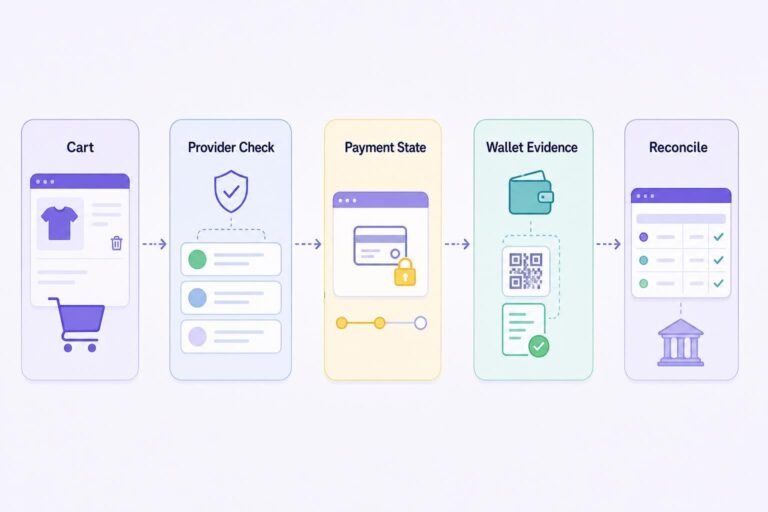
Provider screens differ. Use this sequence to understand the handoff, not as a promise that every buyer will see the same options or verification steps.
Hosted-flow sequence
WooCommerce cart → VERIFIED routing choice → independent hosted provider → provider checks and buyer payment method → provider conversion and settlement → WooCommerce payment-state record → merchant reconciliation
- The buyer begins in your WooCommerce checkout. They select the VERIFIED option and leave your store for a hosted provider session.
- VERIFIED applies your routing choice. Single-provider mode sends the buyer to the provider you selected. Auto-routing can select from independent providers available through the route.
- The provider shows available buyer options. Supported flows can include card, Apple Pay, or Google Pay. The provider and the transaction determine what appears.
- The provider applies its checks. The buyer may encounter KYC, payment authentication, or another provider-required review.
- If the provider approves the payment, it converts the funds and sends settlement toward the wallet address you configured. The provider controls this process, and VERIFIED does not set a universal settlement timetable. Before fulfillment, confirm the provider record and wallet evidence for that order.
- WooCommerce receives payment-state information. A provider confirmation message can arrive late or fail to arrive. The VERIFIED crypto ledger records the payment session, and missed-webhook on-chain checks can help you investigate whether payment evidence exists.
- You reconcile before routine fulfillment. Match the WooCommerce order, provider reference, fee records, and wallet activity.
Hypothetical order example
Suppose a buyer places a hypothetical $100 digital-product order. They select the VERIFIED option and enter a provider-hosted flow. If the provider requires a first-use identity review, the buyer may see an ID and liveness step before continuing.
Your reconciliation record should let you tie together WooCommerce order #1048, the provider transaction reference, the VERIFIED ledger entry, and the wallet transaction.
Example only: The amount and order number are invented. They do not state provider terms, fees, approval rules, or settlement timing.
Reconcile before you fulfill.
For customer-facing language that explains the conversion step without jargon, see how card-to-crypto payments work.
How to Read Settlement Outcome States
“Paid” is not the only question. Your team needs to know whether the expected asset and value can be verified before an order moves into normal fulfillment. This matters most for physical goods, custom work, or anything that cannot be recovered after shipment.
| Settlement outcome | What it means operationally | Merchant action |
|---|---|---|
| Expected value and on-chain proof confirmed | The order can be matched to the expected settlement evidence. | Follow your normal order-status and fulfillment policy. Keep the ledger entry and transaction reference with the order record. |
| On-chain proof is late or missing | The payment evidence cannot yet be confirmed. | Keep the order under review. Check the VERIFIED Ledger, provider reference, wallet history, and missed-webhook on-chain checks before deciding whether to fulfill. |
| Unexpected asset, network, or value | The evidence does not match the expected configuration. An upstream variation may need review; it is not automatically proof of failure. | Pause routine fulfillment. Review the provider record and current instructions, then record how the exception was resolved for your accounting file. |
The point is simple: a wallet-settlement route needs an exception process. Decide who reviews a held order, where they record the decision, and what your support team tells a customer while the order is under review.
Fees: Keep the Two Charges Separate
There are two cost layers to examine. VERIFIED charges a 4% infrastructure fee. Independent hosted providers charge separate conversion fees. These charges come from different parties for different parts of the flow.
The 4% figure is not an all-in payment rate. You need the selected provider’s current terms before you can understand the total cost of a particular order. Provider costs can vary with the provider’s payment method and conversion flow.
Here is the arithmetic using a hypothetical $100 order. The 4% VERIFIED infrastructure fee equals $4. The provider conversion fee is separate, and this guide does not assign it a rate. Your finance record should distinguish the customer order total, the VERIFIED fee, the provider’s disclosed fee where available, and the wallet settlement record.
| Cost or record | What it represents | Where to check it |
|---|---|---|
| VERIFIED infrastructure fee | The 4% charge for VERIFIED checkout infrastructure. | Your VERIFIED fee record and current product information. |
| Provider conversion fee | A separate charge from the independent provider for its conversion flow. | The selected provider’s current disclosure or account terms. |
| WooCommerce order total | The amount the buyer agreed to pay for configured products, shipping, and tax. | WooCommerce order screen and customer order email. |
| Wallet settlement record | The incoming blockchain transaction used in reconciliation. | Your merchant-controlled wallet and related provider records. |
For the wider cost framework, read the VERIFIED fee transparency guide.
Refunds need a defined process
An on-chain USDC transfer to your wallet is not reversed in the same way as a card refund. VERIFIED holds no funds to refund from. If you need to refund an order, use your own process to match the original WooCommerce order to its settlement record, then check the provider’s current handling where it applies.
Before you promise a customer a specific refund result or timing, check the provider route used for that order. The answer can differ by provider, and you are the one making the promise to your customer.
WooCommerce Compatibility and Wallet Readiness
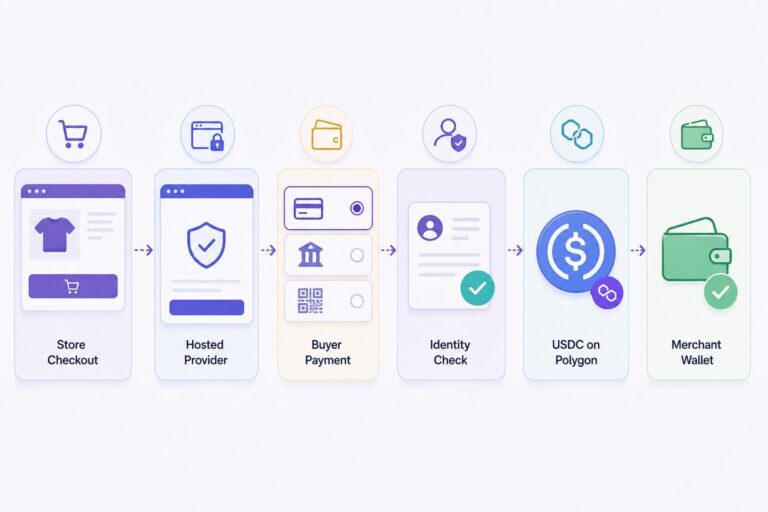
VERIFIED Crypto Checkout plugin version 1.56.1 supports WooCommerce Classic Checkout and Blocks Checkout. Test the checkout layout your customers actually use. A payment option can appear correctly in one layout and still need end-to-end testing in the other.
You need a merchant-controlled wallet and a careful network check. A wallet address is the public destination used to receive a blockchain transfer. Current plugin documentation names Polygon for settlement, which is why “a USDC wallet” is not yet a complete setup instruction.
Wallet and network readiness checklist
- Confirm that you control the wallet address and have a secure process for accessing it.
- Confirm that the wallet is prepared for USDC on Polygon, rather than USDC on another network.
- Copy the address from a controlled source and have a second person check it where practical.
- Document who may change the configured wallet destination and how that change is approved.
- Test checkout selection, provider redirect, customer return, order status, and reconciliation before routine fulfillment.
- Keep private keys out of WooCommerce, email, and support communications.
The plugin is available through the official VERIFIED Crypto Checkout listing on WordPress.org. Installing it does not replace provider onboarding, provider transaction rules, or the provider’s current settlement instructions.
Use the VERIFIED documentation hub for setup guidance. Whoever reconciles orders at month end should be able to open one WooCommerce order and find the provider reference and wallet transaction without asking you. If they cannot, fix that before you go live.
Hosted Wallet Settlement Versus a Conventional Merchant Account
A conventional merchant account can be a sensible fit if your business needs a familiar card checkout and bank-account payouts. A MID, or merchant identification number, is the identifier tied to your merchant account in a card-acceptance arrangement. An acquirer is the financial institution or organization that enables a merchant to accept card payments through that arrangement.
That model normally involves underwriting, which is a review of your business, products, expected sales, and risk. It can also involve a rolling reserve, meaning that a stated portion of proceeds is held for a period to cover potential losses. Those are conventional card-payment terms, not services VERIFIED supplies.
| Question | Conventional merchant-account flow | Hosted provider flow with wallet settlement |
|---|---|---|
| What does the buyer usually see? | A card checkout tied to the merchant’s card-acceptance arrangement. | A redirect into an independent hosted provider flow. |
| Who processes the card? | The merchant’s acquiring and processing arrangement. | The independent hosted provider, if it supports that buyer payment flow. |
| Who may perform identity checks? | The card flow generally focuses on card authentication and fraud controls. | The provider may require KYC, including first-use ID and liveness steps. |
| Where does settlement go? | Usually a merchant bank account. | A merchant wallet according to the provider flow and documented configuration. |
| What must you reconcile? | Orders, processor reports, deposits, refunds, and disputes. | Orders, provider records, VERIFIED payment state, fees, and wallet activity. |
If this wallet-settlement design fits your store, install the VERIFIED Crypto Checkout WooCommerce plugin, then complete the wallet and checkout test described below before offering it to customers.
A chargeback ratio is the share of card transactions that become cardholder disputes over a stated period. It matters in conventional card acceptance because disputes can affect account terms or standing. Keep clear product descriptions, support records, delivery evidence, and a usable refund procedure whichever checkout route you add.
If you are comparing options after an application problem, see payment options after a merchant-account denial. An alternative checkout route does not remove compliance requirements.
Wallet settlement can change where you receive value; it does not remove the need to run a careful payment operation.
Where Conversion Friction Usually Appears
The first friction point is surprise. A buyer expecting a standard card form may pause at a redirect or identity request. Put a short notice next to the payment option: “You will complete payment with an independent hosted provider. First-time use may require identity verification.”
The second is overpromising. Do not tell buyers that every payment method is available to every person, that every buyer skips KYC, or that settlement follows one timetable. The provider controls availability and its own checks. Buyer location, payment method, provider history, and transaction details can affect what the buyer sees.
The third is unclear support ownership. Your team should know whether the buyer is still on your WooCommerce store or has entered the hosted provider flow, and which order reference to request. If a provider asks the buyer for identity documents, direct the buyer back to that provider’s hosted screen or support path. Do not ask them to send documents to your store unless you have a separate, appropriate process.
The detailed KYC and AML guide for crypto checkout can help you prepare customer-facing language. AML means anti-money laundering: controls organizations use to identify and address certain financial-crime risks. In this model, provider identity and compliance workflows remain the provider’s responsibility.
Launch in a Controlled Order
Start with the version of the flow you can explain, test, and reconcile. Adding every option at once makes exceptions harder to spot.
- Install and enable the VERIFIED Crypto Checkout WooCommerce plugin. Confirm whether your store uses Classic Checkout or Blocks Checkout, then test the layout in use.
- Choose routing deliberately. Use single-provider mode when you have a reason to select one provider. Consider auto-routing after you understand how your support process will handle different hosted flows.
- Verify the wallet destination. Follow current documentation and provider instructions rather than relying on older sales copy.
- Run one controlled test order. Check the redirect, return page, WooCommerce status, customer email, ledger entry, transaction reference, and reconciliation path.
- Write two short support replies. One should explain the hosted redirect. The other should explain possible first-time provider identity verification.
- Review orders daily at launch. Compare completed orders against provider records and wallet activity before volume makes exceptions difficult to isolate.
VERIFIED also supports standalone payment links, invoices, and order-payment requests. These can suit a custom transaction outside a standard cart, but they need the same wallet and reconciliation discipline. For recurring sales, subscription renewals are customer-initiated from reminder-email links; there is no stored-card automatic rebilling.
Start with one route you can explain and reconcile before you add more moving parts.
Install the plugin and complete one controlled test order
Install the plugin, confirm your Polygon wallet destination, and run one small test order from checkout through reconciliation. If you need to assign wallet or review ownership first, use the documentation hub to make that plan before you enable the option for customers.
About VERIFIED Crypto Checkout
VERIFIED Crypto Checkout is WooCommerce payment infrastructure. It routes customers to independent hosted providers and helps connect WooCommerce order activity, payment state, and merchant wallet settlement records.
VERIFIED is not a payment processor, bank, money transmitter, exchange, acquirer, or custodian. It does not handle card data or take custody of merchant funds. Independent hosted providers perform their own applicable KYC, card processing, conversion, and settlement activities.
Learn more about VERIFIED Crypto Checkout, read the plain-language product explainer, or contact the team through Contact Us.
Further Reading
- Circle: USDC overview and redemption information
- Polygon documentation
- WooCommerce official documentation
- WordPress.org: VERIFIED Crypto Checkout plugin listing
Frequently Asked Questions
What is a WooCommerce USDC payment gateway?
A WooCommerce USDC payment gateway routes a buyer from a WooCommerce store to an independent hosted provider flow while the merchant prepares for the documented settlement route, USDC on Polygon. VERIFIED provides the WooCommerce infrastructure and routing; the provider performs its own applicable KYC, payment-method processing, conversion, and settlement.
Does VERIFIED Crypto Checkout process cards or hold merchant funds?
No. VERIFIED is payment infrastructure software. It does not handle card data or custody merchant funds. Independent hosted providers manage their own applicable card processing, KYC, conversion, and direct settlement to the merchant wallet.
Can buyers use cards, Apple Pay, or Google Pay?
Supported hosted-provider flows can offer card, Apple Pay, or Google Pay. The options shown depend on the independent provider and the particular transaction. Test the buyer journey for the provider route you plan to use so your support team can explain what buyers will see.
Will every customer need to complete KYC?
Not necessarily. A buyer’s first use with a provider can require government ID and a liveness check. Returning use with the same provider is usually faster, but the provider decides what verification is required for each flow.
What network should receive settlement?
Current VERIFIED plugin documentation identifies USDC on Polygon as the documented settlement route. Do not configure a wallet from older sales copy that describes other assets or networks. Confirm current provider instructions before accepting live orders.
What happens if settlement proof or the expected value cannot be verified?
Keep the order under review rather than treating it as routine fulfillment. Use the VERIFIED Ledger, provider reference, wallet activity, and missed-webhook on-chain checks to investigate the record before deciding what to do next.
What does VERIFIED charge for the WooCommerce gateway?
VERIFIED charges a 4% infrastructure fee. Independent hosted providers charge separate conversion fees. Review both layers rather than treating 4% as an all-in transaction rate.
What happens if I need to refund an order?
An on-chain USDC transfer to your wallet is not reversed in the same way as a card refund, and VERIFIED holds no funds to refund from. Maintain a merchant refund process that matches the original order to its settlement record, then check the provider’s current handling where it applies before making a commitment to a buyer.
Does the plugin work with WooCommerce Blocks Checkout?
Plugin version 1.56.1 supports WooCommerce Classic Checkout and Blocks Checkout. Test payment selection, redirect, order return, and payment-state updates in the checkout layout your store uses.
About the Author: Brad Ungar
