
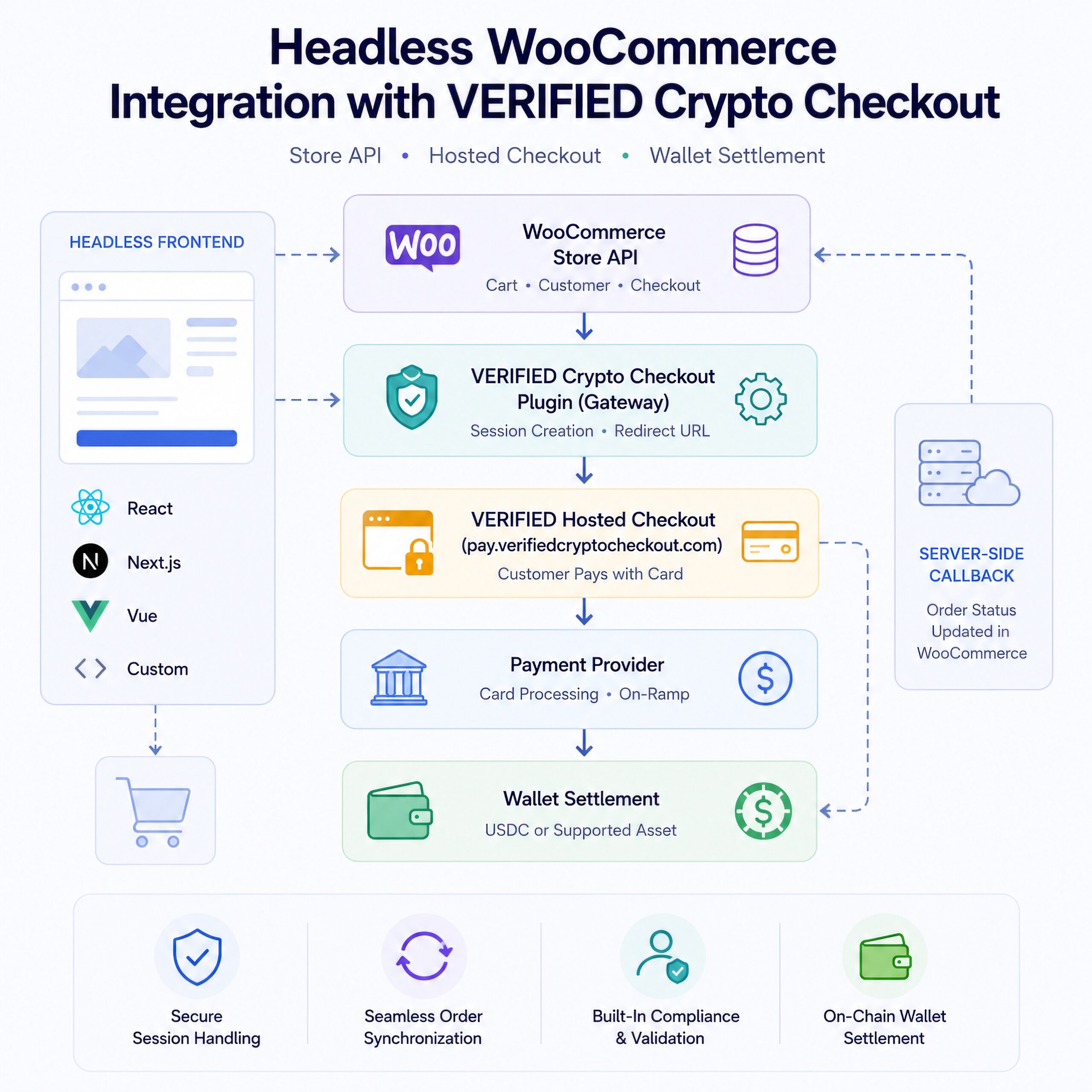
VERIFIED Crypto Checkout can be integrated with a headless WooCommerce storefront by using the WooCommerce Store API for cart and checkout operations, then submitting verified_crypto_checkout as the payment method and redirecting the customer to the returned hosted checkout URL.
By Brad Ungar | VERIFIED Crypto Checkout
This guide is the implementation companion to Headless WooCommerce Payments. That article explains the architecture and payment infrastructure logic behind headless WooCommerce checkout. This page focuses only on the developer integration path for connecting a decoupled storefront to VERIFIED Crypto Checkout.
This page is intentionally implementation-focused. For the broader strategy, architecture, and payment infrastructure model behind headless WooCommerce payments, read Headless WooCommerce Payments.
In this model, your React, Next.js, Vue, Nuxt, or custom frontend uses the WooCommerce Store API to manage the cart, customer data, and checkout request. VERIFIED Crypto Checkout runs inside WooCommerce as the payment gateway layer. When the checkout request reaches WooCommerce with the correct payment method identifier, the plugin creates the hosted checkout session, returns a redirect URL, routes the customer to the hosted checkout environment, and handles settlement and callback behavior server-side.
Your frontend does not need to build payment provider logic, initialize provider SDKs, manage crypto wallets, or handle blockchain settlement. The developer responsibility is narrower: preserve the WooCommerce cart session, submit the Store API checkout request correctly, and redirect the customer to the URL returned by WooCommerce.
This page is the live implementation guide. If your development team needs an offline copy, you can also download the Headless WooCommerce Developer Integration Guide PDF. Can view all the VERIFIED Crypto Checkout documentation here.
Key Highlights
- Use the WooCommerce Store API: The headless frontend should use Store API endpoints for cart creation, cart updates, customer data, and checkout submission.
- Use the exact payment method identifier: The checkout request must submit
verified_crypto_checkoutas thepayment_method. - Preserve WooCommerce session cookies: The
wp_woocommerce_session_*cookie must persist across Store API calls or the cart will reset. - Redirect immediately: The returned
redirect_urlshould be used exactly as returned and opened as a full-page redirect. - Do not iframe the checkout: The hosted checkout and provider payment flow must open in the full browser window.
- Do not rely on frontend payment confirmation: WooCommerce order status updates through server-side callbacks, not through the customer returning to the storefront.
Direct Answer
To integrate VERIFIED Crypto Checkout with a headless WooCommerce store, build the cart through the WooCommerce Store API, update the customer record, submit POST /wc/store/v1/checkout with payment_method set to verified_crypto_checkout, then redirect the customer to the payment_result.redirect_url returned by WooCommerce.
The VERIFIED plugin handles gateway registration, checkout session creation, hosted checkout routing, payment provider selection, settlement logic, and WooCommerce order callbacks. The headless frontend remains responsible for the cart session, Store API request sequence, and browser redirect.
Integration Architecture
A headless WooCommerce integration separates the storefront from the WooCommerce backend. VERIFIED Crypto Checkout remains installed in WooCommerce and behaves like a standard WooCommerce payment gateway. The frontend does not communicate directly with payment providers or settlement infrastructure.
| Layer | Responsibility |
|---|---|
| Headless Frontend | React, Next.js, Vue, Nuxt, or custom storefront that manages the shopping experience and calls the WooCommerce Store API. |
| WooCommerce Store API | Handles cart state, customer data, checkout validation, order creation, shipping, taxes, and checkout submission. |
| VERIFIED Plugin | Registers as a WooCommerce payment gateway, creates the checkout session, and returns the hosted checkout redirect URL. |
| Hosted Checkout | Customer-facing checkout environment at pay.verifiedcryptocheckout.com where the customer completes the payment flow. |
| Provider | Third-party payment provider that handles payment execution, provider-side requirements, and supported payment flow availability. |
| Merchant Wallet | Merchant-controlled wallet configured in the plugin for provider-supported wallet settlement, commonly USDC depending on configuration. |
| Callback | Server-side callback that updates WooCommerce order status after payment and settlement events. |
Prerequisites
Before building the headless checkout flow, confirm the WooCommerce backend, VERIFIED plugin, and frontend environment are configured correctly.
- WooCommerce is installed, activated, and configured with products and store settings.
- VERIFIED Crypto Checkout is installed and activated.
- The merchant wallet address is configured in WooCommerce payment settings.
- The WooCommerce Store API is enabled and accessible.
- The Store API is publicly reachable without requiring an interactive WordPress login.
- Both the frontend and WooCommerce backend are served over HTTPS.
- WooCommerce session cookies are preserved between Store API requests.
pay.verifiedcryptocheckout.comis accessible from the customer browser.- Inbound callbacks to WooCommerce are not blocked by a firewall, WAF, security plugin, or reverse proxy.
The standard plugin works for classic WooCommerce checkout, WooCommerce Blocks, and headless storefronts. A separate headless build is not required. Developers should first confirm that VERIFIED Crypto Checkout works in standard WooCommerce checkout before debugging a headless implementation.
Payment Method Identifier
The VERIFIED Crypto Checkout payment method identifier is:
verified_crypto_checkoutThis value must be passed as the payment_method field in the checkout request:
POST /wc/store/v1/checkoutThe identifier must match exactly. It should be lowercase, use underscores, and should not be modified. If the value is misspelled or the gateway is disabled, WooCommerce may return a payment method unavailable error or fail to return the expected payment redirect.
Step-By-Step Checkout Flow
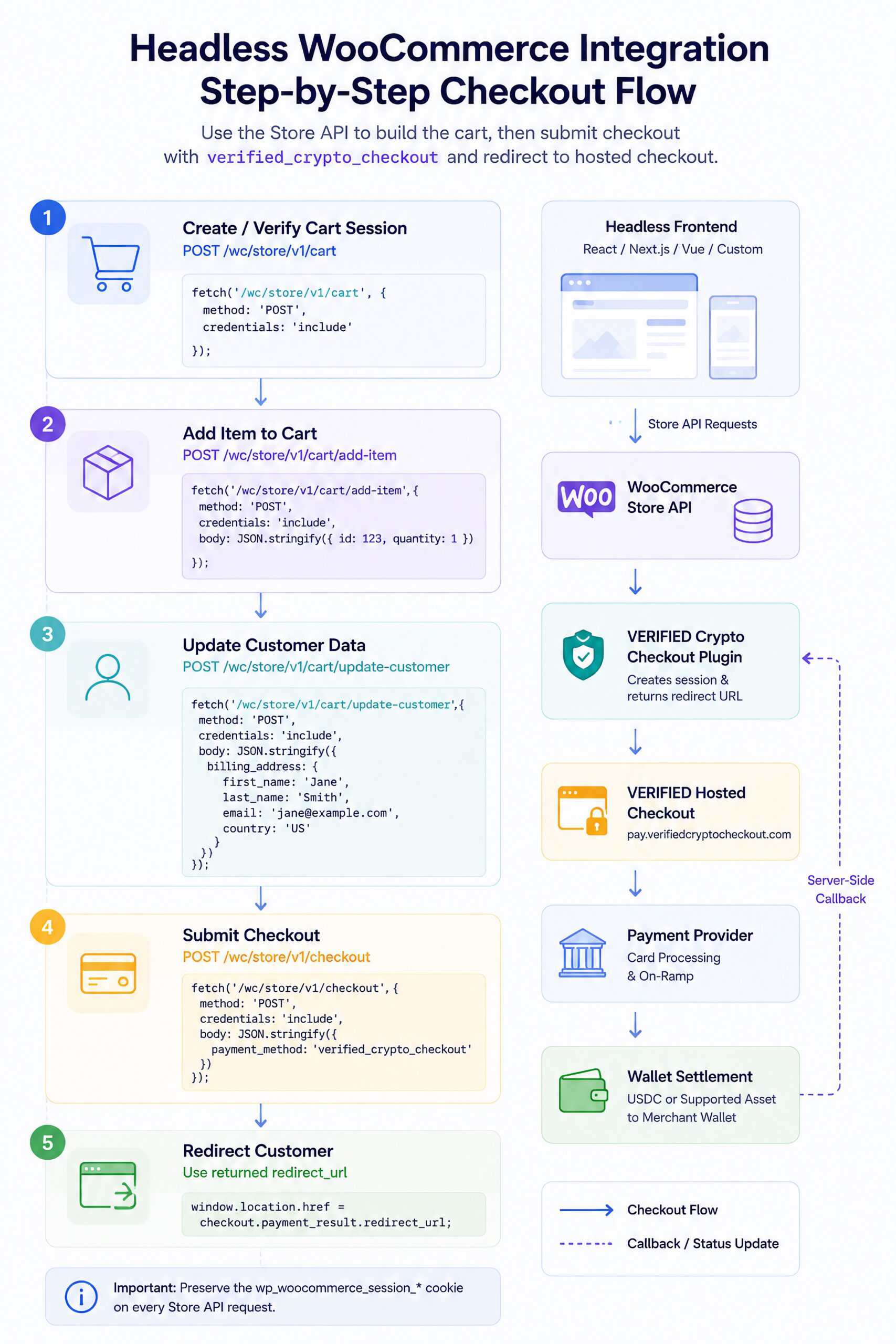
This is the core Store API flow for a headless storefront using VERIFIED Crypto Checkout.
1. Create Or Verify The Cart Session
Before adding products, initialize or verify the WooCommerce cart session.
POST /wc/store/v1/cartExample request:
fetch('https://yourstore.com/wp-json/wc/store/v1/cart', {
  method: 'POST',
  credentials: 'include',
  headers: {
    'Content-Type': 'application/json'
  }
});
The response should set or preserve a WooCommerce session cookie named like wp_woocommerce_session_*. This cookie must be sent with every subsequent Store API request in the same checkout flow.
2. Add Item To Cart
Add the selected WooCommerce product to the cart.
POST /wc/store/v1/cart/add-itemExample request body:
{
  "id": 123,
  "quantity": 1
}
Browser example:
fetch('https://yourstore.com/wp-json/wc/store/v1/cart/add-item', {
  method: 'POST',
  credentials: 'include',
  headers: {
    'Content-Type': 'application/json'
  },
  body: JSON.stringify({
    id: 123,
    quantity: 1
  })
});
The id must be the WooCommerce product ID. For variable products, use the variation ID required by WooCommerce.
3. Update Customer Data
WooCommerce requires customer billing data before checkout can be submitted. For digital-only products, the minimum fields are typically first name, last name, email, and country.
POST /wc/store/v1/cart/update-customerMinimum request body:
{
  "billing_address": {
    "first_name": "Jane",
    "last_name": "Smith",
    "email": "[email protected]",
    "country": "US"
  }
}
Browser example:
fetch('https://yourstore.com/wp-json/wc/store/v1/cart/update-customer', {
  method: 'POST',
  credentials: 'include',
  headers: {
    'Content-Type': 'application/json'
  },
  body: JSON.stringify({
    billing_address: {
      first_name: 'Jane',
      last_name: 'Smith',
      email: '[email protected]',
      country: 'US'
    }
  })
});
If the store sells physical products, WooCommerce may also require a shipping address and selected shipping rate before checkout will succeed. In that case, set the shipping address, retrieve available shipping rates from the cart response, and select a shipping rate before submitting checkout.
4. Submit Checkout
This is the step that triggers VERIFIED Crypto Checkout. Submitting the checkout request with payment_method set to verified_crypto_checkout causes WooCommerce to route the order through the VERIFIED gateway.
POST /wc/store/v1/checkoutRequest body:
{
  "payment_method": "verified_crypto_checkout"
}
Browser example:
const response = await fetch('https://yourstore.com/wp-json/wc/store/v1/checkout', {
  method: 'POST',
  credentials: 'include',
  headers: {
    'Content-Type': 'application/json'
  },
  body: JSON.stringify({
    payment_method: 'verified_crypto_checkout'
  })
});

const checkout = await response.json();
A successful response should include an order ID and a payment redirect URL.
{
  "order_id": 1234,
  "status": "pending",
  "payment_result": {
    "redirect_url": "https://pay.verifiedcryptocheckout.com/session/sess_..."
  }
}
5. Redirect Customer To Hosted Checkout
Once the redirect URL is returned, redirect the customer immediately.
window.location.href = checkout.payment_result.redirect_url;For a server-side flow in Next.js or a similar framework, use a server-side redirect:
res.redirect(302, checkout.payment_result.redirect_url);In a Next.js App Router flow:
redirect(checkout.payment_result.redirect_url);Use the URL exactly as returned. Do not cache it, store it for later, modify query parameters, wrap it in an iframe, or attempt to fetch it through JavaScript. The hosted checkout URL contains session information and should be treated as time-sensitive.
Session Management And Cookie Persistence
Session handling is the most common source of headless WooCommerce checkout failures. WooCommerce uses a server-side cart session identified by a cookie named like:
wp_woocommerce_session_*If this cookie is not preserved across Store API calls, WooCommerce may treat each request as a new anonymous session. The cart may appear empty, customer data may disappear, checkout may return a 400 error, or the payment method may not reach the VERIFIED gateway flow correctly.
Browser-Based Frontends
When the browser calls the Store API directly, use credentials: "include" on every Store API request.
fetch('https://yourstore.com/wp-json/wc/store/v1/cart/add-item', {
  method: 'POST',
  credentials: 'include',
  headers: {
    'Content-Type': 'application/json'
  },
  body: JSON.stringify({
    id: 123,
    quantity: 1
  })
});
The same credential behavior should be applied to cart initialization, add-item, update-customer, select-shipping-rate, and checkout requests.
Server-Side Or SSR Frontends
If Store API calls are made through a Next.js API route, server action, Nuxt server route, middleware layer, or backend proxy, the WooCommerce session cookie must be manually forwarded between the browser, your server, and WooCommerce.
// Receive the cookie from the browser request
const cookie = req.headers.cookie;

// Forward it to WooCommerce
const wcResponse = await fetch('https://yourstore.com/wp-json/wc/store/v1/checkout', {
  method: 'POST',
  headers: {
    'Content-Type': 'application/json',
    'Cookie': cookie
  },
  body: JSON.stringify({
    payment_method: 'verified_crypto_checkout'
  })
});

// Forward Set-Cookie back to the browser if WooCommerce updates it
const setCookie = wcResponse.headers.get('set-cookie');

if (setCookie) {
  res.setHeader('Set-Cookie', setCookie);
}
CORS And SameSite Considerations
If the frontend and WooCommerce backend are on different domains or subdomains, cross-origin cookie behavior must be configured carefully. Common requirements include:
- Allowing the frontend origin in WooCommerce or server CORS configuration.
- Sending credentials with Store API requests.
- Allowing the browser to receive and send WooCommerce session cookies.
- Using HTTPS for both frontend and backend.
- Configuring cookies with
SameSite=None; Securewhen cross-site cookie transmission is required.
When carts disappear between requests, cookie persistence should be the first area reviewed. In most headless checkout failures, the VERIFIED plugin is not the failure point; the checkout request is reaching WooCommerce without the correct cart session.
Order Lifecycle
After checkout is submitted, WooCommerce creates the order and VERIFIED Crypto Checkout returns the hosted checkout URL. The customer completes payment outside the storefront, and the WooCommerce order updates through server-side callback behavior.
| Status | What It Means |
|---|---|
| Pending | The checkout request was submitted and the WooCommerce order was created. The customer has been redirected to the payment page but has not completed payment yet. |
| On Hold | Payment may have been initiated, but settlement or confirmation has not fully completed. Some flows may use this as an intermediate status. |
| Processing | Payment has been confirmed and the order is ready for fulfillment. This is the main success status for most WooCommerce merchants. |
| Completed | The order has been fulfilled. This may be set manually by the merchant or automatically by fulfillment logic. |
| Failed | The payment was not completed, was declined, expired, or abandoned. A new checkout session may be required for a retry. |
| Cancelled | The order was cancelled by the merchant, customer, or system process. |
The frontend should not assume the customer will return to the storefront after payment. Some provider flows may not redirect the customer back automatically. Design the post-checkout experience around server-side order updates rather than customer return behavior.
For more context on why hosted checkout is used in this architecture, read Hosted Checkout Explained.
Standard Plugin Installation
The same VERIFIED Crypto Checkout plugin works for classic WooCommerce checkout, WooCommerce Blocks, and headless WooCommerce storefronts. No special headless plugin build is required.
- Install the plugin from an official source.
- Activate the plugin in WordPress.
- Configure the merchant wallet address in WooCommerce payment settings.
- Enable the VERIFIED Crypto Checkout gateway.
- Run a test transaction through standard WooCommerce checkout first.
- After standard checkout works, begin the headless Store API integration.
The plugin is available through the WordPress Plugin Repository. Developer documentation and related implementation resources are available through the VERIFIED Crypto Checkout Documentation Hub.
Troubleshooting
| Symptom | Likely Cause | Fix |
|---|---|---|
| Cart returns empty | WooCommerce session cookie is not being persisted between requests. | Use credentials: "include" for browser requests or manually forward the wp_woocommerce_session_* cookie for server-side requests. |
| 400 checkout error | Cart is empty, customer data is missing, or required shipping data is incomplete. | Confirm the add-item response returns a cart, customer data is set, shipping is selected when required, and the session cookie is present. |
| Missing redirect_url | VERIFIED plugin is inactive, gateway is disabled, or wallet configuration is incomplete. | Check WordPress plugins, WooCommerce payment settings, gateway status, and wallet configuration. |
| Session expired at checkout page | Redirect URL was cached, reused, delayed, or modified. | Redirect immediately using the URL exactly as returned by WooCommerce. |
| Order stuck pending | Server-side callback is blocked by hosting, WAF, firewall rules, or security plugins. | Check WAF rules, WordPress security plugins, server logs, and inbound POST access to WooCommerce callback paths. |
| CORS error | Cross-origin Store API requests are not configured correctly. | Allow the frontend origin, enable credentialed requests, or proxy Store API calls through the frontend server. |
| SameSite warning | WooCommerce session cookie is not configured for cross-origin transmission. | Use HTTPS and configure cookies with SameSite=None; Secure when the frontend and backend require cross-site cookie behavior. |
Go-Live Checklist
Use this checklist before pushing a headless WooCommerce integration live.
- VERIFIED Crypto Checkout plugin installed.
- Plugin activated in WordPress.
- Merchant wallet address configured.
- VERIFIED Crypto Checkout gateway enabled in WooCommerce payments.
- WooCommerce Store API accessible at
/wp-json/wc/store/v1/cart. - Store API reachable without interactive WordPress login.
- HTTPS enabled on both WooCommerce backend and headless frontend.
- WooCommerce session cookie
wp_woocommerce_session_*persisted on all Store API calls. - Cart initialization tested.
- Add-item request tested.
- Customer update request tested.
- Shipping rate selection tested for physical products.
- Checkout request tested end-to-end.
verified_crypto_checkoutsubmitted exactly as the payment method.- Returned
redirect_urlused immediately. - Full-page redirect used instead of iframe.
pay.verifiedcryptocheckout.comaccessible from the customer browser.- Content Security Policy does not block hosted checkout navigation.
- Callbacks to WooCommerce are not blocked by WAF or security plugins.
- Test order moves from Pending to Processing after payment confirmation.
- Post-checkout UX does not depend on the customer returning to the storefront.
- Order confirmation email reviewed for accurate wording.
Quick Reference
| Item | Value |
|---|---|
| Payment method identifier | verified_crypto_checkout |
| Hosted checkout domain | pay.verifiedcryptocheckout.com |
| Session cookie | wp_woocommerce_session_* |
| Cart endpoint | POST /wc/store/v1/cart |
| Add item endpoint | POST /wc/store/v1/cart/add-item |
| Customer endpoint | POST /wc/store/v1/cart/update-customer |
| Checkout endpoint | POST /wc/store/v1/checkout |
| Works with | Classic checkout, WooCommerce Blocks, and headless storefronts |
System Positioning
VERIFIED Crypto Checkout is a WooCommerce checkout infrastructure layer for merchants who need hosted checkout routing and wallet-based settlement support inside a WooCommerce order flow. In a headless implementation, WooCommerce still owns the cart, customer data, taxes, shipping logic, order creation, and fulfillment record. VERIFIED Crypto Checkout owns the gateway session, hosted checkout routing, payment provider handoff, settlement configuration, and callback behavior.
This separation is important. A headless frontend should not become the payment system. The storefront should submit a valid WooCommerce checkout request and redirect the customer to the hosted checkout session returned by the gateway. That keeps payment routing and settlement logic out of the frontend application.
For the broader product definition, read What Is VERIFIED Crypto Checkout?. For architecture context, read Headless WooCommerce Payments. For fee structure and settlement economics, read the VERIFIED Crypto Checkout Fees Transparency Guide.
When This Integration Makes Sense
A headless VERIFIED Crypto Checkout integration makes sense when a merchant wants WooCommerce to remain the ecommerce backend while a separate frontend controls the customer experience. It is especially relevant for teams using modern JavaScript storefronts, custom checkout interfaces, multi-brand frontend experiences, or frontend frameworks that sit outside the WordPress theme layer.
It also makes sense when the merchant wants the same WooCommerce payment infrastructure to support multiple checkout environments: classic checkout, WooCommerce Blocks, payment links, invoices, QR payments, and headless Store API flows.
When It Does Not Make Sense
This integration does not make sense if the developer cannot preserve WooCommerce session cookies, cannot expose the Store API, cannot allow HTTPS redirects to the hosted checkout domain, or cannot receive server-side callbacks. It also does not make sense if the merchant expects the frontend to directly control provider approval decisions, payment provider availability, customer verification, or settlement timing.
VERIFIED Crypto Checkout provides the WooCommerce gateway and hosted checkout infrastructure. It does not replace WooCommerce cart logic, eliminate provider requirements, guarantee customer approval, or turn the headless frontend into a payment processor.
Implementation CTA
Install VERIFIED Crypto Checkout, configure the merchant wallet, confirm the gateway works in standard WooCommerce checkout, and then connect your headless storefront through the WooCommerce Store API. The same plugin supports classic checkout, Blocks, and headless implementations without requiring a separate build.
You can install the plugin from the official WordPress Plugin Repository or review the Documentation Hub before implementation.
Documentation Hub Update Recommendation
Section: Headless WooCommerce Integration
Anchor text: Headless WooCommerce Integration Guide
Description: Add this page as the primary HTML implementation resource for developers integrating VERIFIED Crypto Checkout with a decoupled WooCommerce storefront using the WooCommerce Store API.
Add now? Yes. This page should replace the PDF as the primary linked implementation resource, with the PDF used only as a downloadable secondary asset.
Frequently Asked Questions
How do I integrate VERIFIED Crypto Checkout with a headless WooCommerce store?
Use the WooCommerce Store API to create the cart, add items, update customer data, and submit checkout. In the checkout request, pass verified_crypto_checkout as the payment_method. WooCommerce returns a payment_result.redirect_url, and the frontend should redirect the customer to that URL immediately.
What payment method identifier should I use for VERIFIED Crypto Checkout?
The payment method identifier is verified_crypto_checkout. It must be passed exactly as the payment_method value in POST /wc/store/v1/checkout.
Does a headless WooCommerce store need a special VERIFIED plugin build?
No. The standard VERIFIED Crypto Checkout plugin works for classic WooCommerce checkout, WooCommerce Blocks, and headless storefronts that use the WooCommerce Store API.
Why does my headless WooCommerce cart return empty during checkout?
The most common cause is missing WooCommerce session cookie persistence. The frontend must preserve and resend the wp_woocommerce_session_* cookie on every Store API request. Browser requests should use credentials: include, and server-side requests must manually forward cookies.
Can I iframe the VERIFIED hosted checkout page?
No. The hosted checkout page should open as a full-page browser redirect. Iframing can break provider security requirements, cookie behavior, and checkout session handling.
How does WooCommerce know the payment was completed?
WooCommerce order status is updated through a server-side callback from VERIFIED infrastructure. The frontend should not assume the customer will return to the storefront after payment.
Why is my order stuck in Pending after payment?
An order may remain Pending if the server-side callback from VERIFIED infrastructure is blocked by hosting, a WAF, firewall rules, security plugins, or callback endpoint restrictions. Check server logs, WAF rules, and inbound POST handling for WooCommerce callback paths.
What is the hosted checkout domain for VERIFIED Crypto Checkout?
The hosted checkout domain is pay.verifiedcryptocheckout.com. The customer should be redirected to the payment_result.redirect_url returned by WooCommerce, and the URL should not be modified, cached, iframed, or reused.